
Published on May 12, 2026


Field service management app solutions are no longer optional for companies running field operations, but the difference between controlled execution and constant firefighting.
In most cases, the issue is not visibility alone. It is the absence of a structured system that connects information. Scheduling may happen in one place, job updates in another, and inventory tracking somewhere else. This fragmentation slows execution and makes coordination dependent on manual communication.
A field service management app introduces structure by turning jobs, assets, customers, and tasks into connected records. Instead of isolated tasks, it structures jobs, resources, and data into a single workflow.
Then, teams gain a consistent way to plan, assign, execute, and track work, with information updated in real time across the operation.
What Is A Field Service Management App?
A field service management app is a system used to organize and execute field operations in a structured way. It handles how jobs are created, assigned, tracked, and completed across teams that operate outside the office.
At its core, the system connects three elements:
- Work orders
- People
- Execution
Scheduling defines what needs to be done, dispatching assigns the right technician, and job tracking ensures each task moves from request to completion with clear status and accountability.
The value goes beyond digitizing tasks. It comes from having a consistent operational model. Office teams and field technicians work on the same data, updated in real time, which reduces dependency on manual coordination and improves how decisions are made during execution.
Key Features To Look For In A Field Service Management App
The key features of a field service management app include scheduling, dispatching, mobile access, inventory tracking, and reporting. Together, they structure operations, improve coordination, and ensure real-time visibility across field teams.
Scheduling & Dispatching
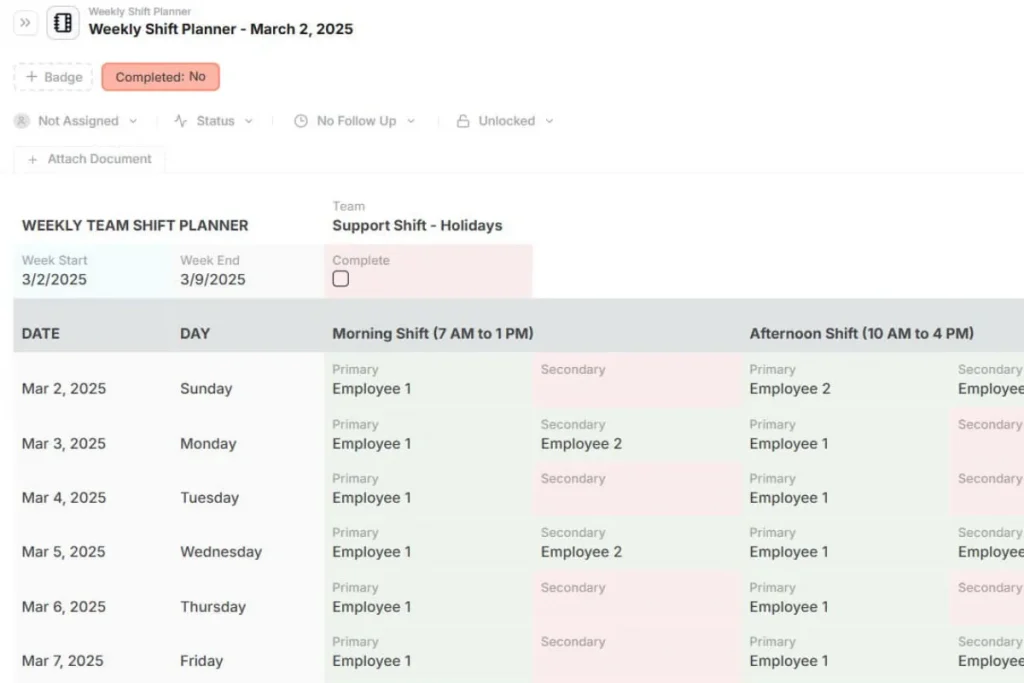
Scheduling and dispatching define how work flows through your operation. A reliable system should allow managers to assign jobs quickly, adjust priorities, and manage technician availability without friction.
The key is not just visual scheduling. It is the ability to organize job assignments based on location, skill set, and workload. Route optimization and structured dispatch management reduce idle time and improve how teams respond in the field.
Mobile Functionality
Field execution depends on what technicians can access on-site. A strong mobile experience gives them full visibility into job details, customer information, and required tasks without relying on calls or messages.
Updates should happen directly in the system. Technicians need to log progress, upload photos, complete digital forms, and capture signatures in real time. This keeps the entire operation aligned without manual follow-ups.
Inventory & Asset Management
Field operations often break down when parts or equipment are not available at the right time. Inventory and asset management ensure that every job is backed by accurate data on what is available and where it is located.
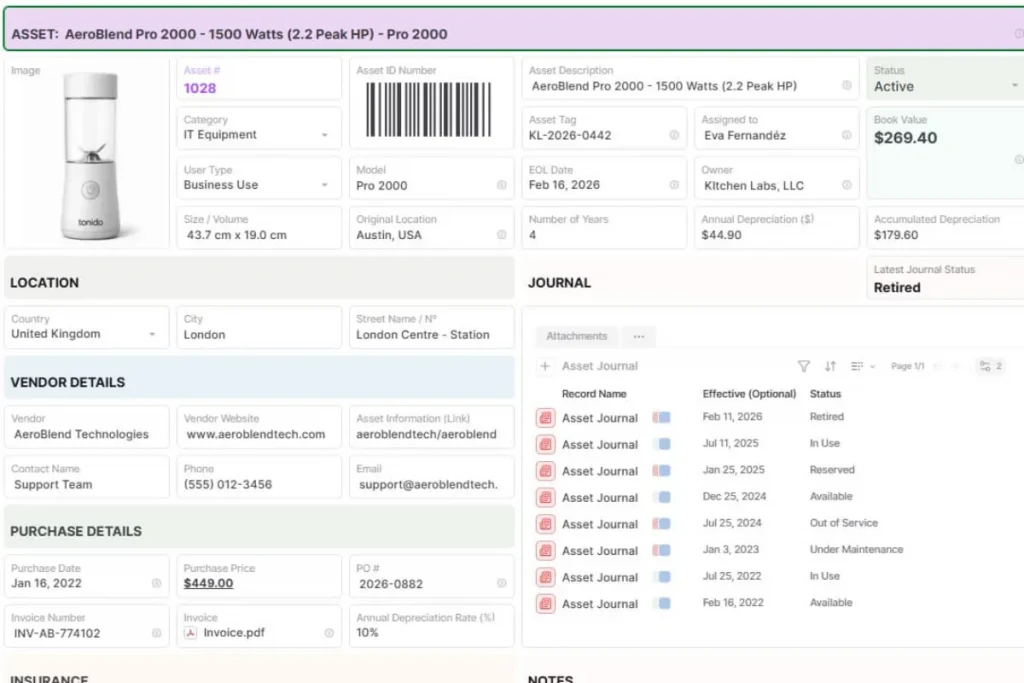
Tracking parts, tools, and assets as part of the workflow improves planning and reduces repeat visits. It also connects field activity with stock control, which is critical for maintaining service quality at scale.
Reporting & Analytics
Operations generate a large amount of data, but it only becomes useful when it is structured and accessible. Reporting tools should provide clear visibility into job performance, technician output, and service efficiency.
Tracking KPIs such as completion times, response rates, and productivity allows managers to identify bottlenecks and improve processes over time. The goal is to support decisions with consistent, reliable data.
Top Field Service Management Apps
The field service management market offers a wide range of tools, each designed for a specific level of operational complexity. Most solutions solve part of the problem well, but few handle the full operational workflow in a flexible way.
- Odoo Field Service is often used by teams that need scheduling combined with billing. It works well when operations follow a structured, ERP-like model, but changes in workflows can require additional configuration;
- SAP Field Service Management is built for large organizations with complex processes and integration requirements. It provides strong data capabilities, but implementation and ongoing adjustments tend to be resource-intensive;
- Jobber and Housecall Pro focus on simplicity. Smaller service businesses usually adopt them because they need an easy way to manage scheduling and customer jobs. As operations grow, limitations around customization and data structure can become more visible;
- FieldPulse is commonly used by service teams that need tighter control over inventory and pricing. It supports operational tracking, but still operates within predefined workflows;
- Freshdesk brings strong communication and ticketing capabilities, especially for teams that handle service requests across multiple channels. Its strength is in support management rather than full operational control.
Across these tools, a common pattern appears: most platforms are designed around fixed workflows.
They handle scheduling, dispatching, or ticketing. However, they struggle when operations require custom data structures, cross-team coordination, or non-standard processes.
This is where the gap becomes clear. As field operations evolve, companies need more than features. They need a system that can adapt to how their business actually runs, not the other way around.
How to Choose The Right Field Service Management App
Start by assessing how your operation actually runs: how teams create jobs, assign technicians, track data, and collaborate throughout workflows. The goal is to find a system that supports this flow without forcing major adjustments.
Evaluate:
- Workflow Flexibility
Your processes will evolve. A system should allow you to adjust workflows, job structures, and task flows without needing complex reconfiguration or external support.
- Integration Capabilities
Field operations rarely exist in isolation. The system should connect with other tools such as CRM, inventory, or finance. More importantly, it should allow data to flow consistently across these areas without duplication.
- Customization Options
Each business tracks different data. The ability to define your own fields, job structures, and records is critical. Systems that limit customization often create workarounds outside the platform.
- Real-Time Visibility
Managers need a clear view of operations as they happen. This includes job status, technician activity, and resource availability.
- Cost Vs. Operational Value
Pricing should be evaluated in the context of operational impact. A lower-cost tool that creates inefficiencies can become more expensive over time. Consider the long-term value in terms of time saved, errors reduced, and scalability.
Remember: choosing a field service management app is less about features and more about how well the system fits your operations. The same tool can work well for one company and create friction for another, depending on how work is structured.
Use Your Field Service Management App as a Strategic Operational Tool
AnyDB approaches this differently. Instead of fitting your operations into a fixed system, it allows you to structure your own data model using connected business records.
Your business can define jobs, technicians, assets, and workflows based on how operations actually run.
This flexibility, combined with real-time data, customization, and integration across operations, allows AnyDB to meet all the criteria above without the limitations typically found in traditional FSM tools.
For businesses dealing with complex operations, adopting a flexible platform that adapts to real workflows, rather than forcing rigid processes, is critical.
Explore how a unified system can centralize your field operations, connect your data, and scale your business efficiently.
Frequently Asked Questions About Field Service Management App
Here are the answers:
What is the purpose of a field service management app?
It helps businesses manage field operations, including scheduling, dispatching, and job tracking, while improving communication between teams.
What industries use field service management apps?
Industries such as HVAC, construction, maintenance, utilities, and home services commonly use FSM apps.
What is the difference between FSM software and ERP?
FSM focuses on field operations, while ERP systems manage broader business processes. Some advanced FSM tools integrate with ERP systems for full operational visibility.

The End-to-End Operations System that Finally Fits Your Reality.
No more scattered spreadsheets or rigid, disconnected tools.
AnyDB is a modern, customizable platform for managing business records and operations across teams, clients, and partners.
Learn More


Phone: (512)-761-7979
© 2024 Humanly Inc. All rights reserved.
What is AnyDB?
AnyDB is a unified, customizable data store designed to streamline and empower your entire organization. Effortlessly store, organize, and share custom business data to drive both internal and external operations across teams. Think of it as spreadsheets on steroids.Perfect for Sales, Marketing, Operations, HR, and beyond. Discover AnyDB