
Published on January 19, 2026


A vendor list is one of the most useful tools for procurement, operations, finance, events, and administrative teams. It helps keep supplier information organized in a structured and accessible format.
For growing companies, relying on spreadsheets often leads to errors, conflicting versions, and difficulties tracking contracts, invoices, and deadlines. That’s why many teams look for modern ways to manage supplier data.
In this guide, you’ll learn what a vendor list is, how it works, and how to build one that stays organized as your business scales.
What Is a Vendor List?
A vendor list is an organized directory of all suppliers a business works with. Its main purpose is to keep purchasing and vendor management consistent.
It centralizes information such as contacts, service categories, compliance status, pricing history, and performance records. With this structure in place, teams avoid inconsistent entries, reduce rework, and gain a clear view of their supplier ecosystem.
It’s also helpful to separate three related concepts:
- Vendor list: A general list of suppliers used across multiple teams.
- Vendor database: A more complete dataset with documents, details, and connections to other records.
- Approved vendor list: A restricted list of pre-evaluated and approved suppliers.
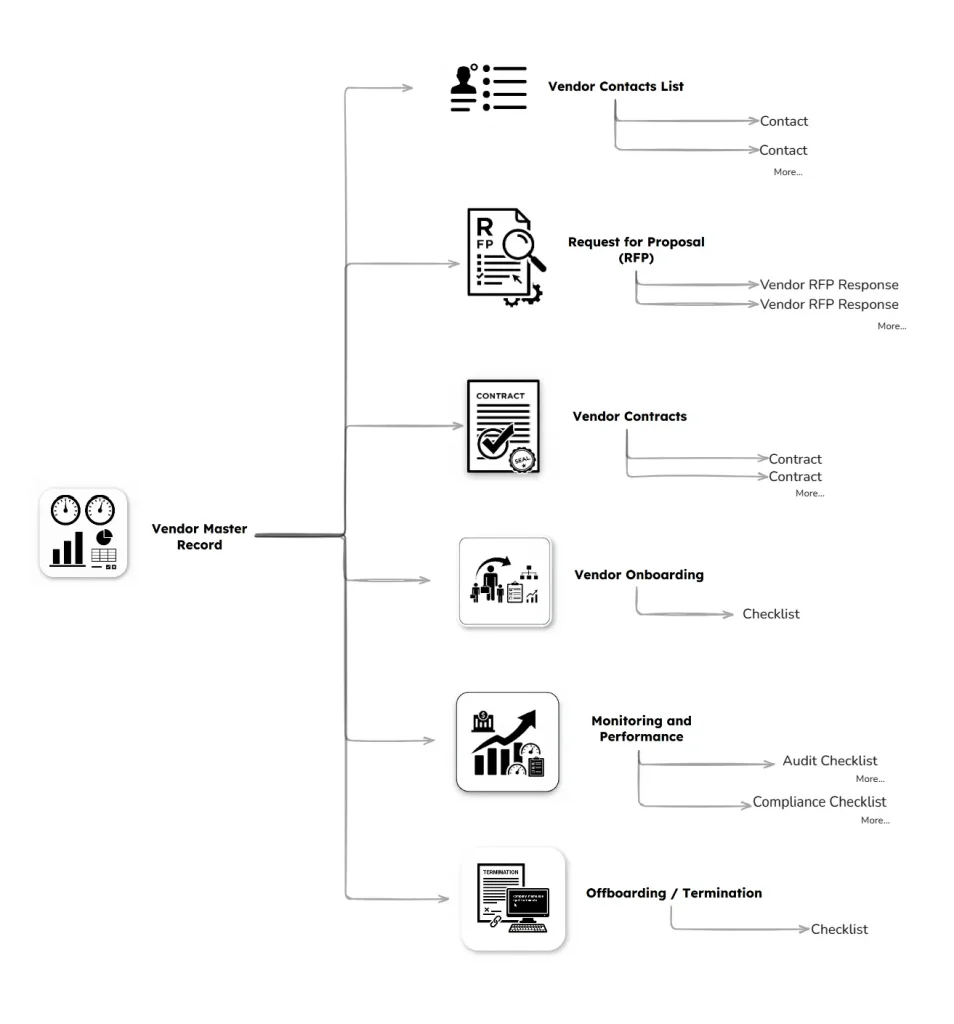
Suppliers can also be linked to contracts, invoices, and files, creating a relational structure that allows teams to work from the same source of truth without re-entering data.
What Should a Vendor List Include?
For the vendor list to stay reliable, fields need to be standardized. This prevents missing details and keeps purchasing workflows organized. The essential fields include:
- Company name
- Contact details
- Service categories
- Documents and certifications
- Contract status
- SLA notes
- Pricing history
- Performance ratings
- Renewal timelines
All fields should be created using named cells inside the grid, so each team sees only the data relevant to their work.
The relational model makes the list even more useful, since a supplier can be connected to incidents, audits, invoices, or contracts. Permissions ensure only authorized team members can edit sensitive information.
Vendor List Use Cases Across Industries
The structure changes depending on the operation, but all industries benefit from keeping supplier data in one workspace. Common use cases include:
- Vendor list for cleaning services: Teams can track cleaning crews, materials, routes, and compliance documents.
- Vendor list for real estate agents: Used to manage maintenance providers, inspection companies, landscaping crews, and legal services.
- Vendor list for business operations: Useful for IT providers, logistics partners, consultants, HR services, and more.
- Vendor list for events: Includes catering companies, AV teams, equipment rental, and security providers.
With AnyDB, teams can work in the same workspace using Teams & Databases. Each department gets its own database with permission-controlled access, keeping everything organized and secure.
How to Build a Vendor List (step-by-step guide)
Building a clear and consistent list follows a familiar flow, strengthened by a relational environment. Consider the steps below:
- Map service categories and purchasing needs
This helps structure your database and prevents duplicated suppliers.
- Define evaluation criteria and minimum requirements
Examples include pricing, capacity, compliance, certifications, and past performance.
- Adopt a standardized structure using a template
Templates like the ones in AnyDB keep data uniform from the start.
- Collect supplier data consistently
Named fields reduce errors and keep formatting stable over time.
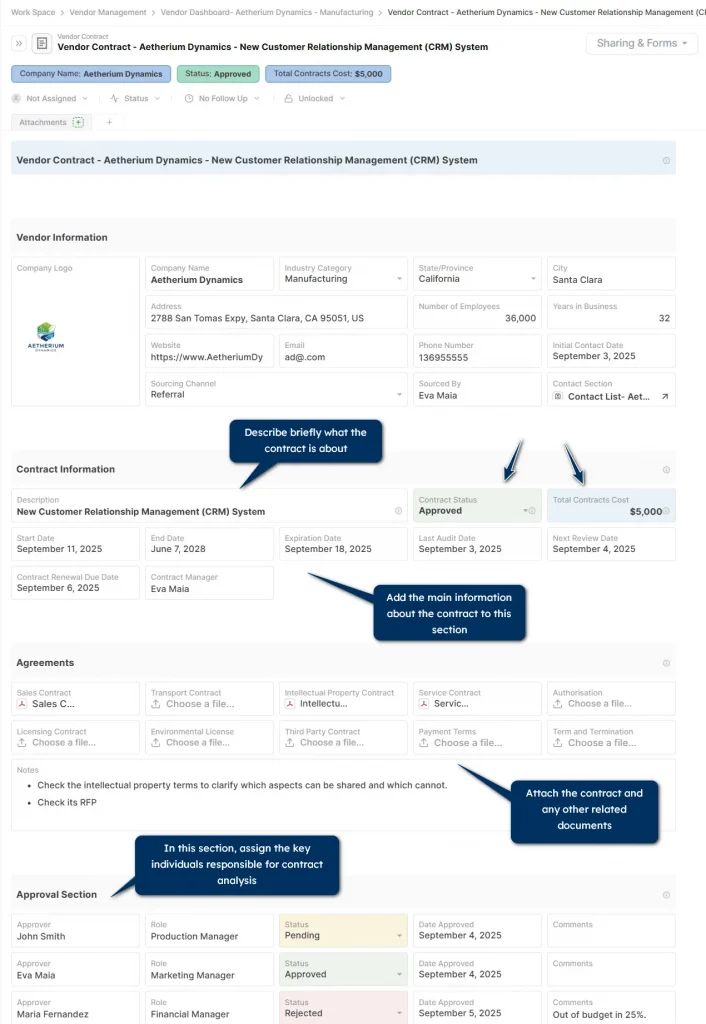
- Connect suppliers to contracts, invoices, and documents
Use the Parent–Child structure, with the supplier as the parent and related records as children.
- Review and update records regularly
The relational setup centralizes everything, making maintenance easier.A clean and simple layout ensures automatic summaries are easy to read without depending on technical teams.
Limitations of Spreadsheet-Based Vendor Lists
Spreadsheets work for personal use, but introduce challenges in corporate environments. Common issues include:
- Lack of access control
- Duplicate records
- Version conflicts
- Missing documents
- No change tracking
- Manual errors
These issues lead to fragmented data, confusing workflows, and unexpected tool costs when companies need features not available in basic spreadsheet plans.
Why Vendor Lists Need a Unified Data Platform
Vendor management relies on multiple types of records: contracts, SLAs, certificates, purchase requests, invoices, and performance reviews.
These elements need a relational structure, since their connections influence purchasing decisions, renewals, and supplier evaluations.
With everything stored in one system, purchasing cycles become easier to manage and reviews take less time.
How AnyDB Helps You Build a Live, Searchable Vendor Lists
AnyDB offers a Vendor Contacts database inside the Vendor Management Database Template. It links suppliers to contracts, invoices, compliance documents, and performance reviews.
Permissions can be set by team, database, or individual cell. The interface looks like a spreadsheet but includes relational links and advanced security rules.
The template ensures each supplier follows the same structure and allows teams to add new information without disorganizing the database.
Access the template here.
Best Practices for Maintaining an Accurate List
A reliable supplier database requires consistent upkeep. Consider:
- Quarterly audits
- Performance scoring tracked over time
- Expiration alerts for compliance and insurance
- Version control for documents
- Centralized communication logs
- Standardized onboarding and offboarding
- Use of badges and dynamic item names for quick status visibility
These elements help teams work faster and avoid uncertainty. Centralize every supplier record. Build a vendor list that stays updated automatically. Start for free!
FAQs About Vendor List
Here are the questions people usually ask when setting up or improving their vendor list:
What is the best way to keep a vendor list updated?
Through continuous checks, scheduled audits, and renewal alerts.
Where can I download a vendor list template for small businesses?
AnyDB’s Vendor Management Template Library offers a stronger structure with relationships and governance.
How do I evaluate vendors before adding them to my vendor list?
Pricing, quality, compliance, capacity, references, and SLA history. In AnyDB, these details stay linked to both the supplier and the contract.
What software helps maintain a supplier list?
There are ERPs, procurement tools, and workflow platforms. AnyDB stands out for combining structured data, relational links, a simple interface, and predictable pricing.

The End-to-End Operations System that Finally Fits Your Reality.
No more scattered spreadsheets or rigid, disconnected tools.
AnyDB is a modern, customizable platform for managing business records and operations across teams, clients, and partners.
Learn More


Phone: (512)-761-7979
© 2024 Humanly Inc. All rights reserved.
What is AnyDB?
AnyDB is a unified, customizable data store designed to streamline and empower your entire organization. Effortlessly store, organize, and share custom business data to drive both internal and external operations across teams. Think of it as spreadsheets on steroids.Perfect for Sales, Marketing, Operations, HR, and beyond. Discover AnyDB