Vendor Management with AnyDB
Manage vendor relationships, contracts, RFPs, onboarding, compliance, and offboarding in one connected workspace. AnyDB helps operations, procurement, and compliance teams keep vendor data, documents, approvals, and performance tracking in sync.
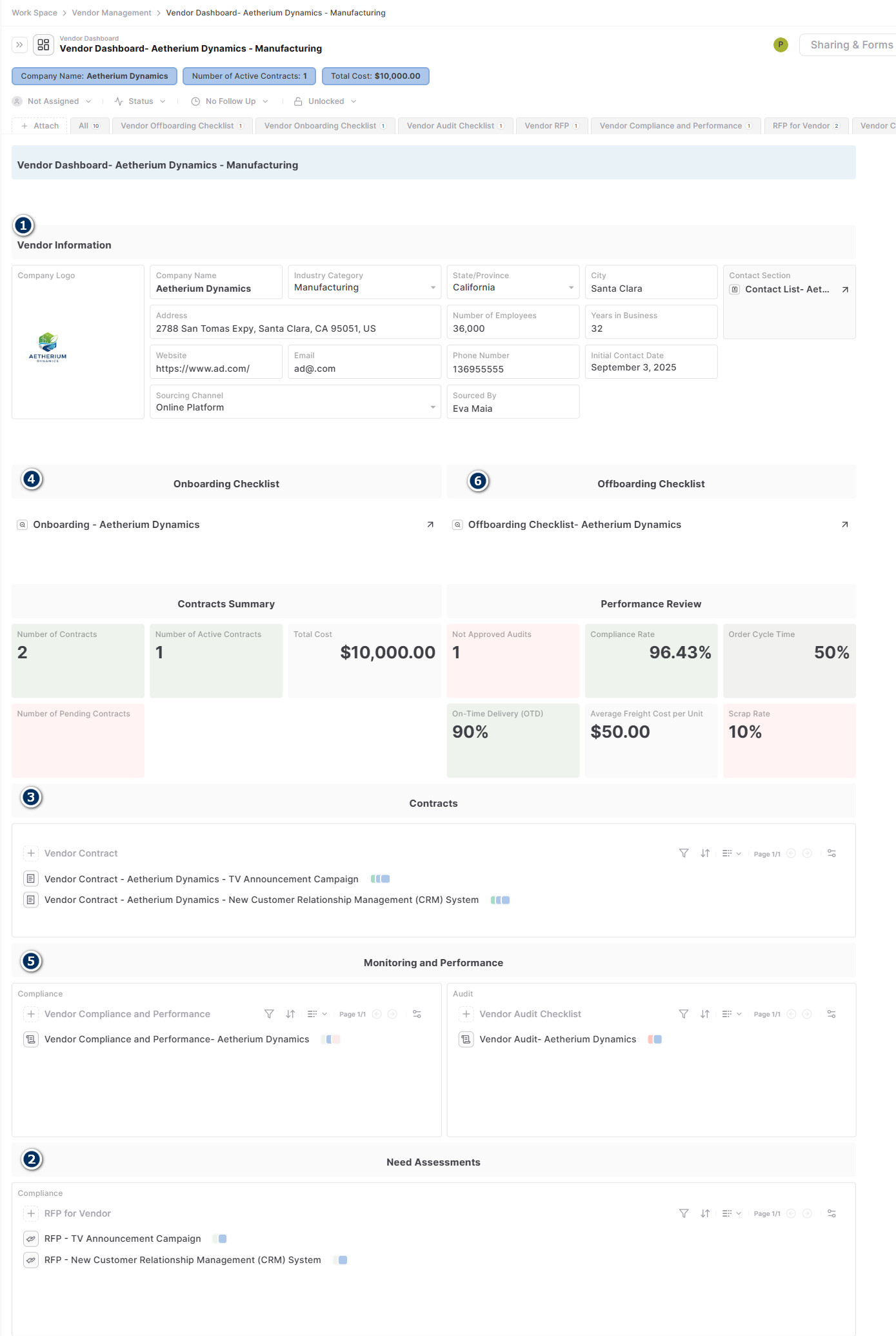
The vendor master record connects the main operational workflows in one place.
One system for the full vendor lifecycle
Track evaluation, contracts, onboarding, compliance, and offboarding without splitting the process across tools.
Documents and approvals stay attached
Keep certificates, payment terms, RFP responses, contracts, and audit materials linked to the right vendor record.
Operational and compliance visibility
Monitor active contracts, performance KPIs, cost totals, and vendor status from the same dashboard.
Why vendor relationships need more than a contact list
Vendor management breaks down when contact details, contracts, RFPs, compliance requirements, and renewal steps live in different systems. That creates operational inefficiency, higher cost, and avoidable risk.
Business problem
Ineffective vendor or supplier management leads to stock issues, missed compliance obligations, increased cost, and relationship risk. Teams need a system that keeps commercial, operational, and compliance information connected instead of scattered.
Solution summary
- +Manage vendor contacts, contracts, and Requests for Proposals.
- +Follow up on vendor onboarding and offboarding processes.
- +Store and link related documents, notes, assets, payment terms, and certificates.
- +Use dashboards to monitor KPIs, audit summaries, compliance, and cost rates.
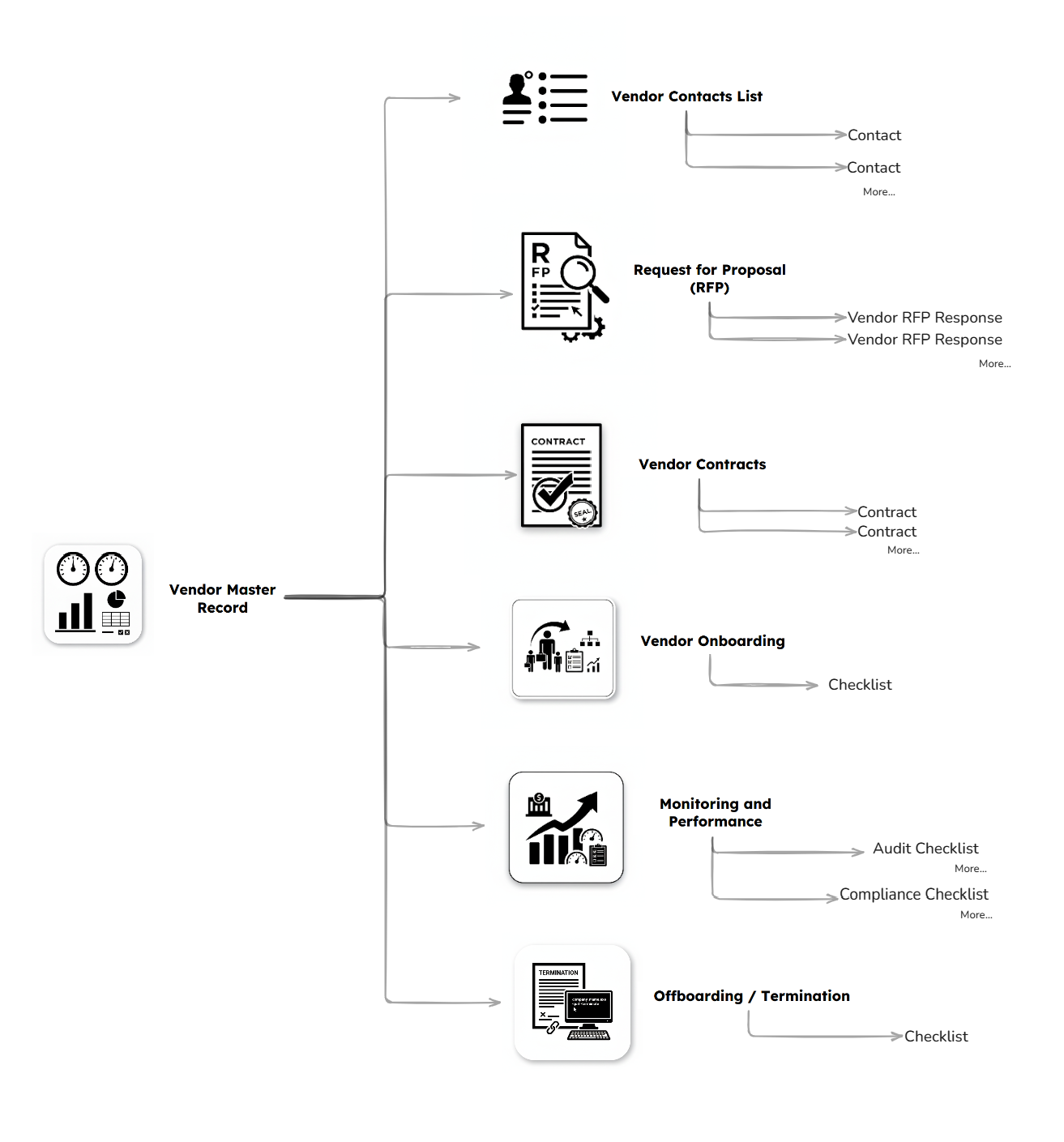
A connected vendor workflow for contacts, contracts, onboarding, compliance, and offboarding.
A clean vendor model to start with
Start with a vendor dashboard record that connects the main parts of the relationship: contacts, RFPs, contracts, onboarding, monitoring, and offboarding.
Vendor Dashboard
Use one central record as the master view of the vendor relationship and all related workflows.
Commercial and compliance records
Track contracts, RFPs, audit materials, performance KPIs, and related documents in structured linked records.
Lifecycle checklists
Manage onboarding and offboarding tasks with approvals, comments, and responsible owners.
How to set up the vendor management workflow
Follow the setup sequence below to capture vendor information, run RFPs, manage contracts, and maintain onboarding, compliance, and offboarding workflows.
- +Once a vendor is selected, add vendor's info in the section.
- +Then click on Contact section arrow.
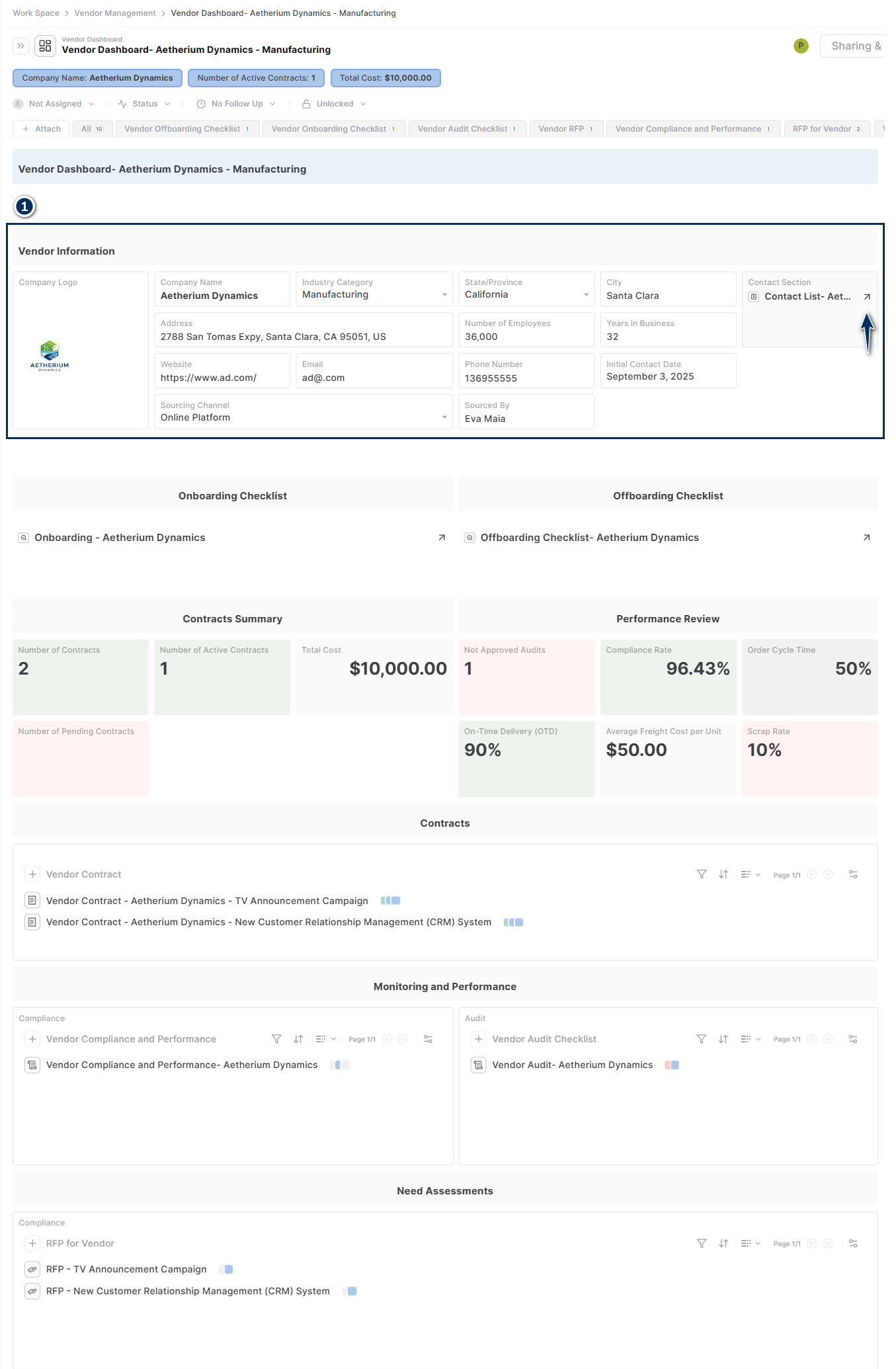
- +Add vendor's info in the section and click on +Vendor Contact.
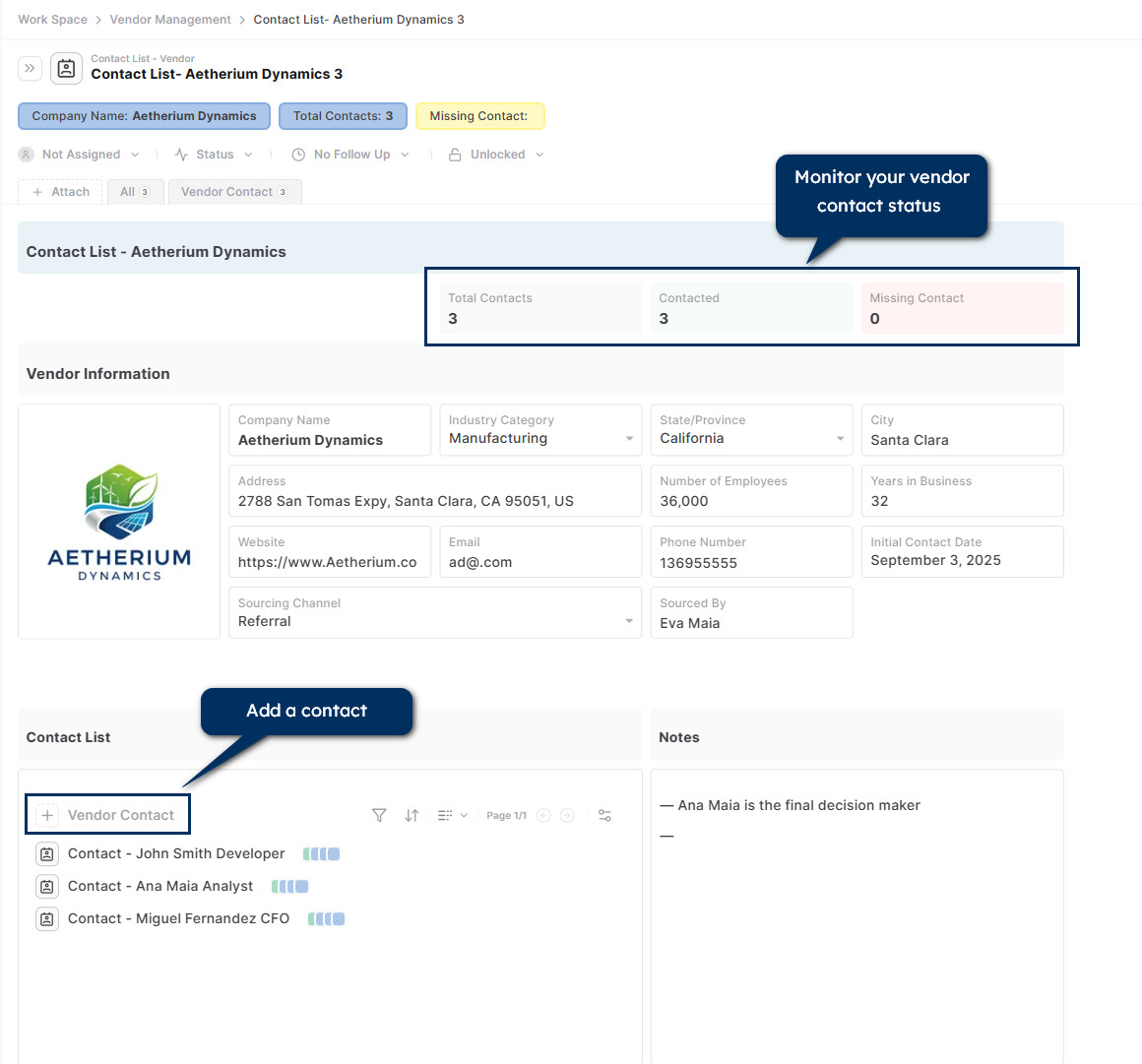
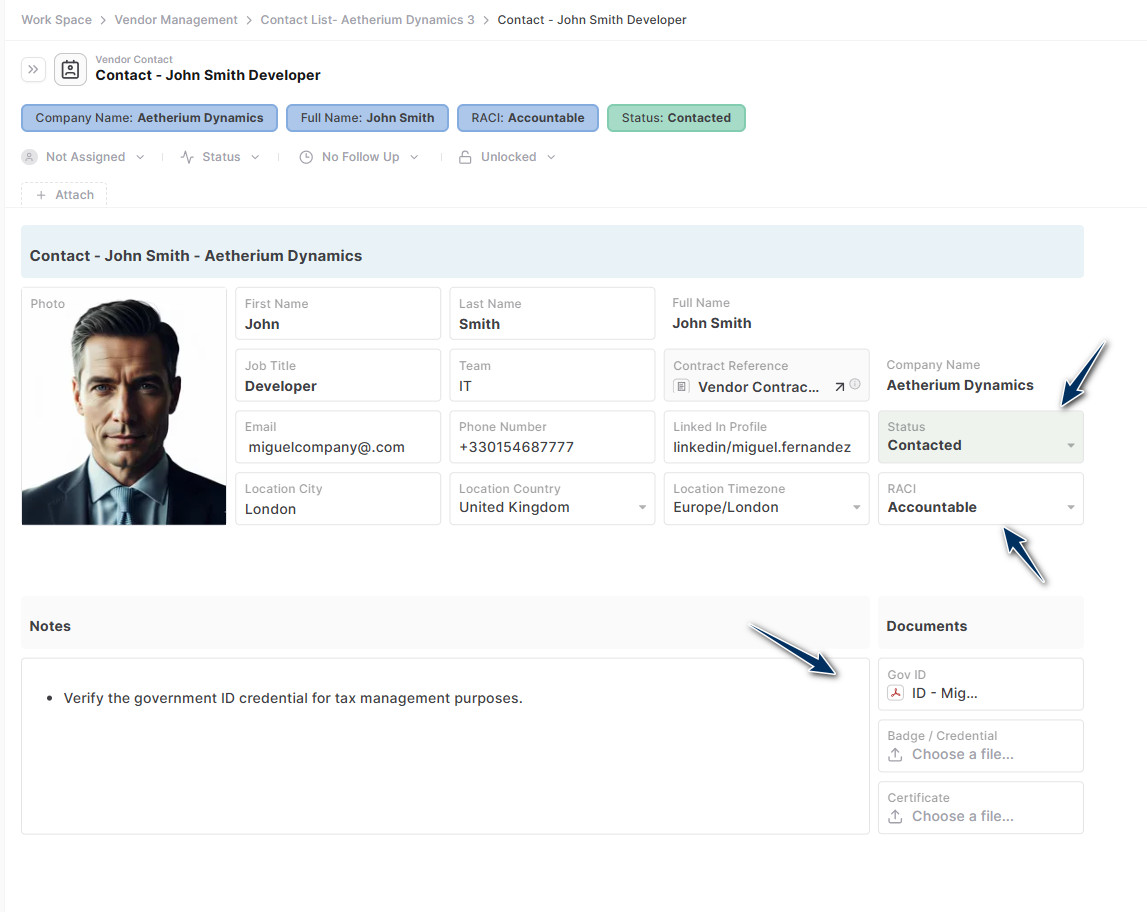
- +Add contact details, status updates, RACI information, and notes. You can also attach documents such as credentials or IDs.
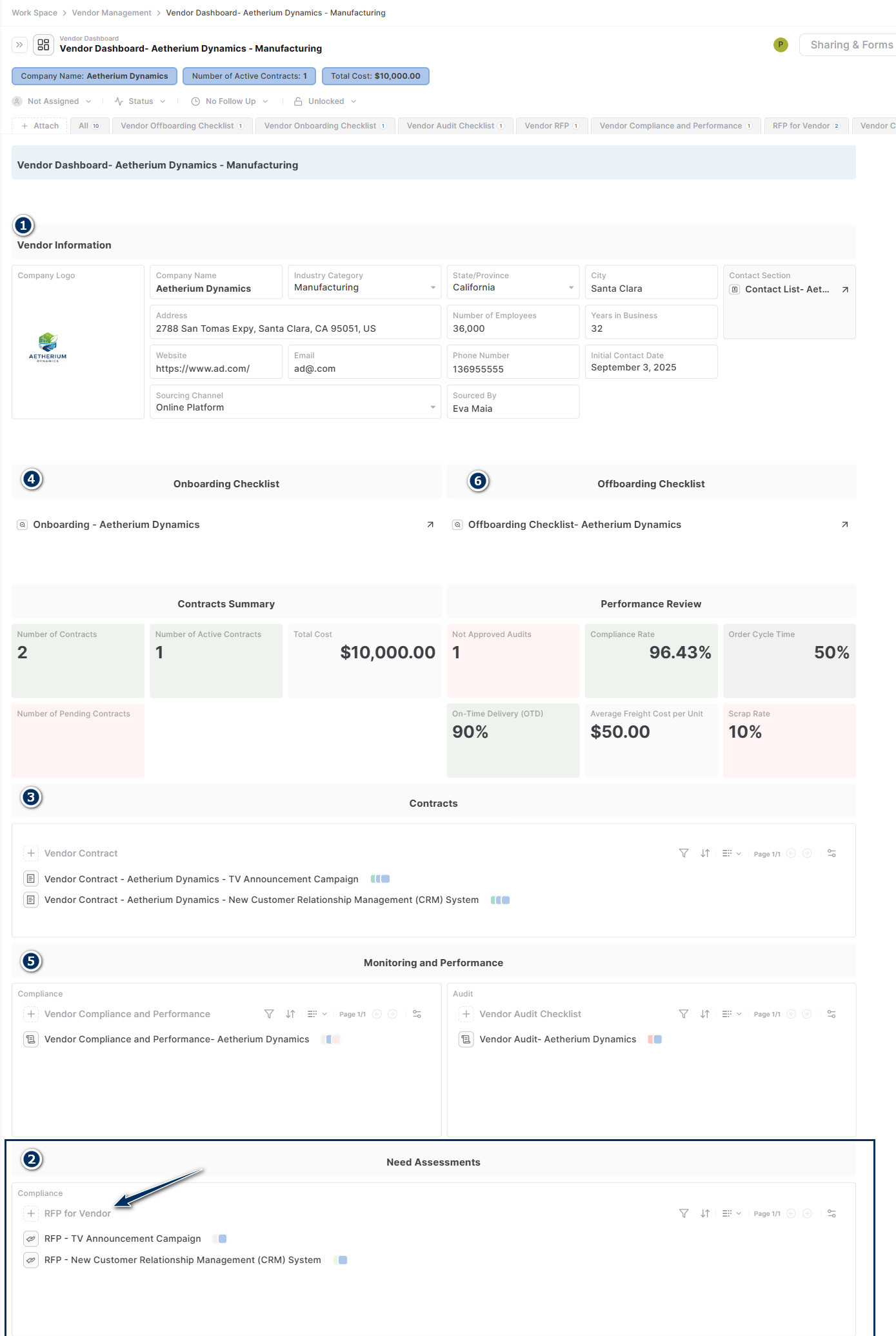
- +In the Need Assessment section, click on + RFP for Vendor.
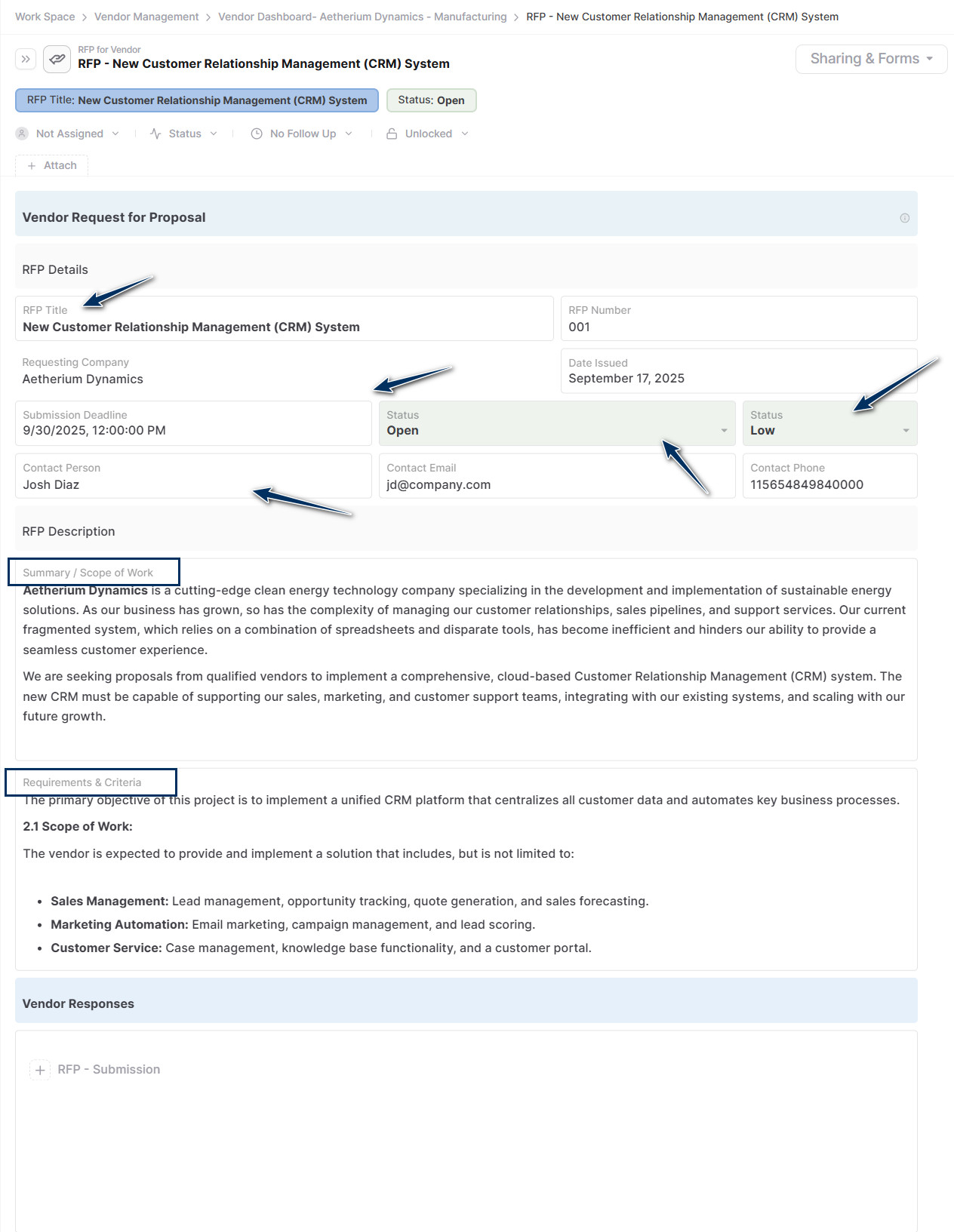
Add:
- +A title.
- +Due date.
- +Assigned owner.
- +Priority and status such as Low/Medium/High and Open/Closed/Cancelled/Awarded.
- +Summary / Scope of work.
- +Define requirements and criteria.
- +Share it with the vendor in order to get the RFP Vendor Response.
- +See how to share, here.
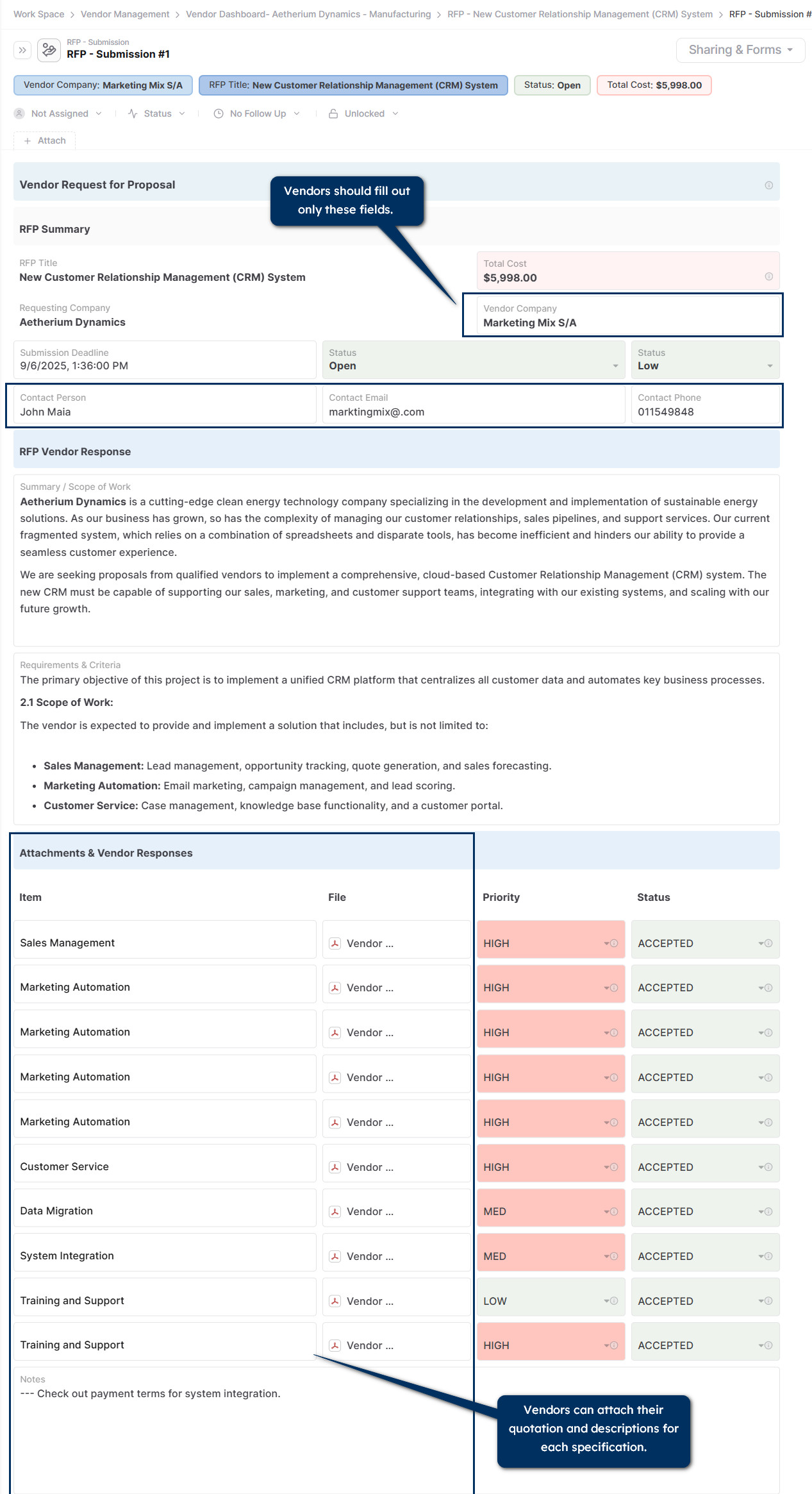
- +In order to submit a RFP Vendor Response, vendor will click on + RFP - Submission.
Vendor will fill out:
- +Vendor Company Name.
- +Contact.
- +Email Address.
- +Phone Number.
- +Attach documents and quotations as needed.
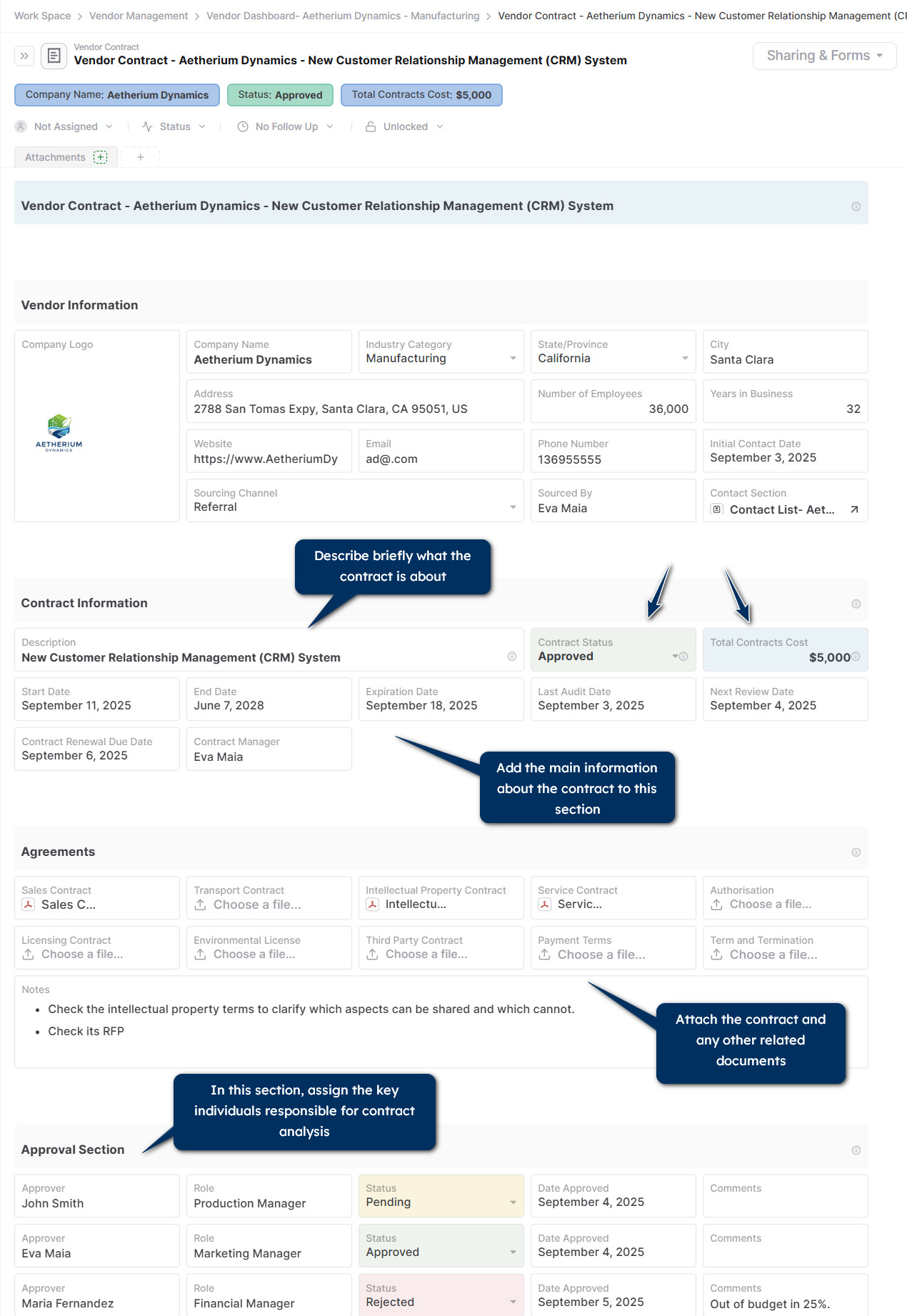
Use this section to summarize contract information. Add:
- +Vendor information.
- +Contract description.
- +Start date, end date, expiration date, last audit date, next review date.
- +Contract status such as Approved, Cancelled, Pending, or Vetting.
- +Total contract cost.
- +Attach the agreement files, such as the contract, payment terms, or licenses.
- +Use the approval section to get alignment from key team members or leaders.
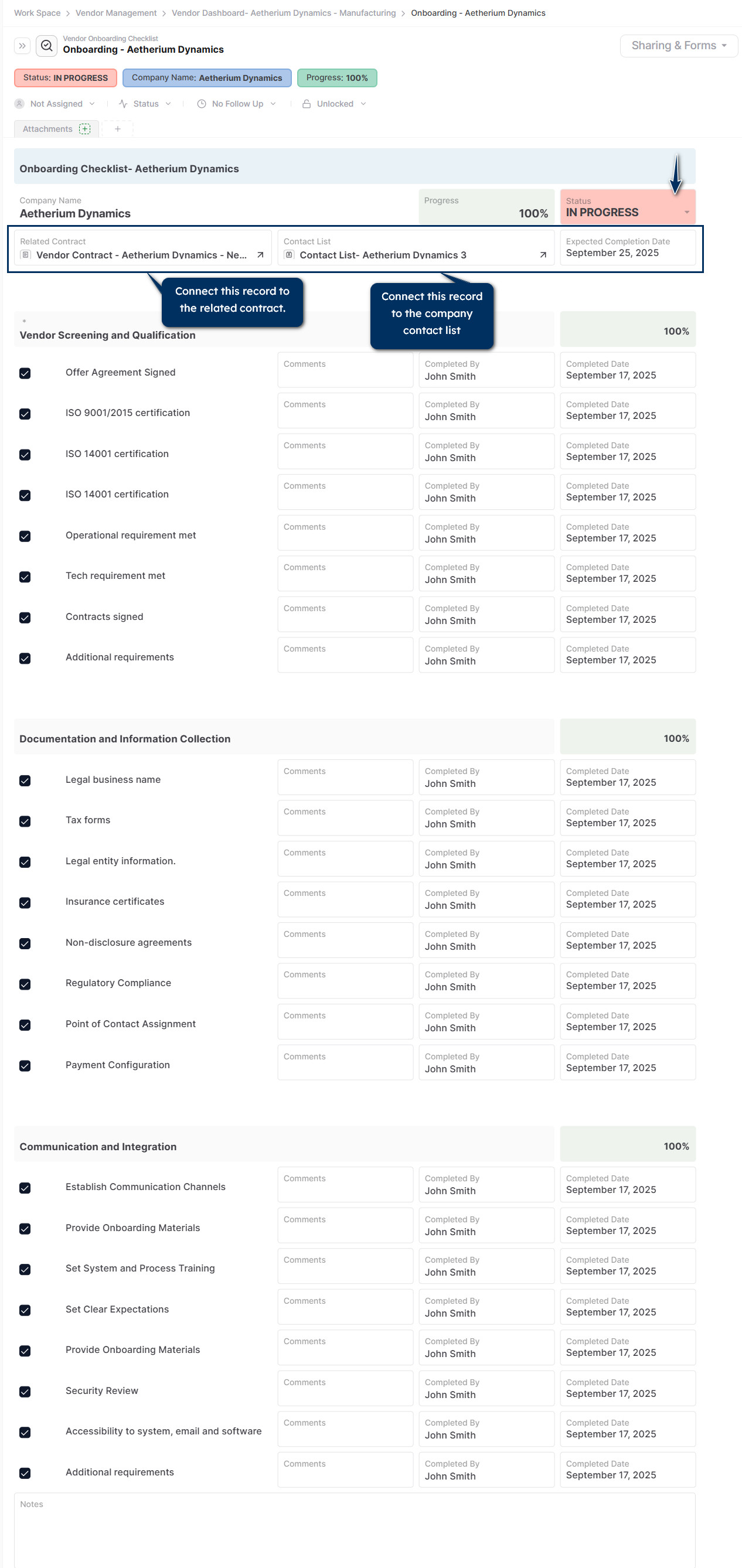
Ensure that necessary information, documents, and approval are collected and verified before the vendor can begin providing goods or services.
- +Link the onboarding checklist to its related contract and contact list.
- +Mark the checkbox as long as the criteria are met.
- +Add comments, responsible, and completion date.
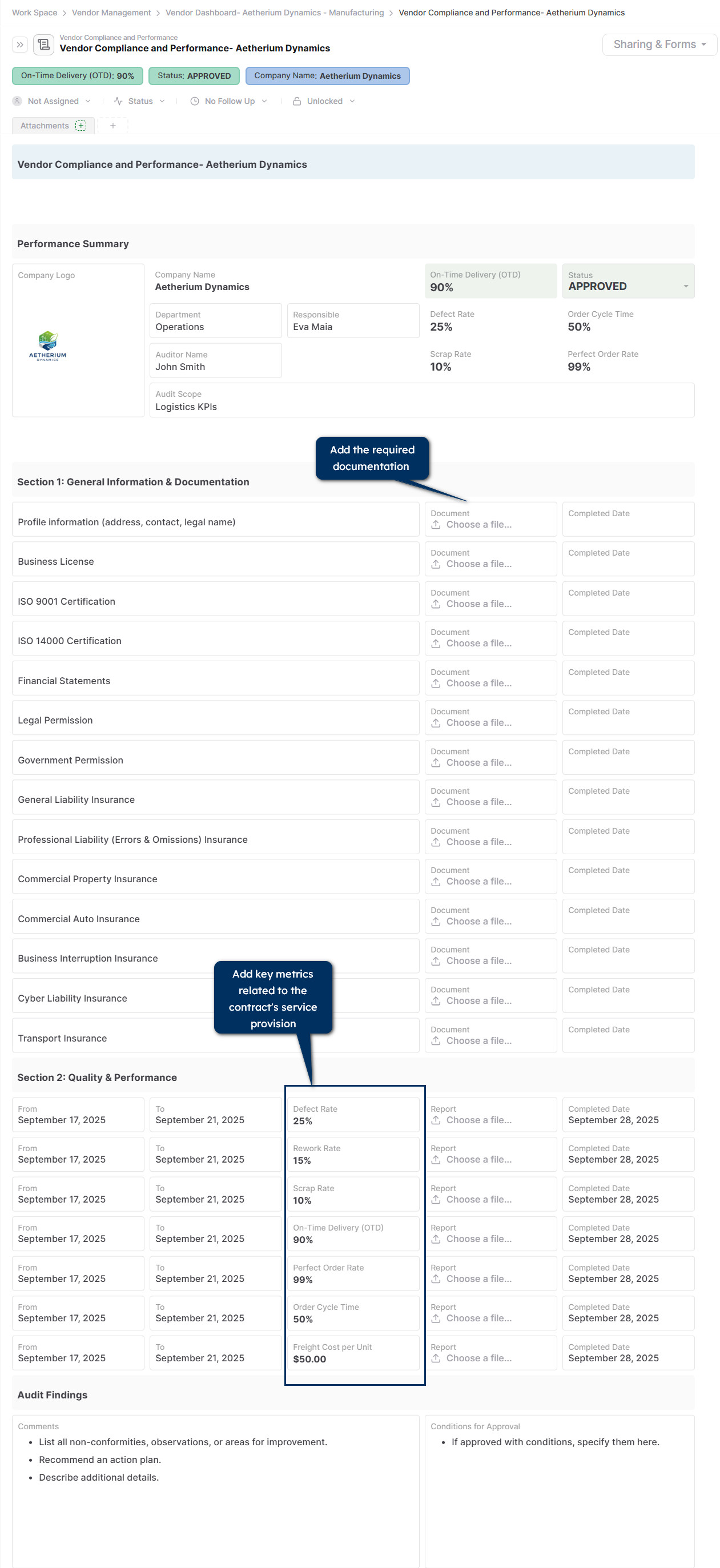
Ensure that the vendor meets contractual obligations and supports your business's goals, standards, policies, and legal or regulatory requirements and monitor vendor performance by adding key metrics.
- +In section 1, Add all necessary document names to the list and attach the vendor's documents to each.
- +In section 2, add KPIs, document report and time period for evaluation.
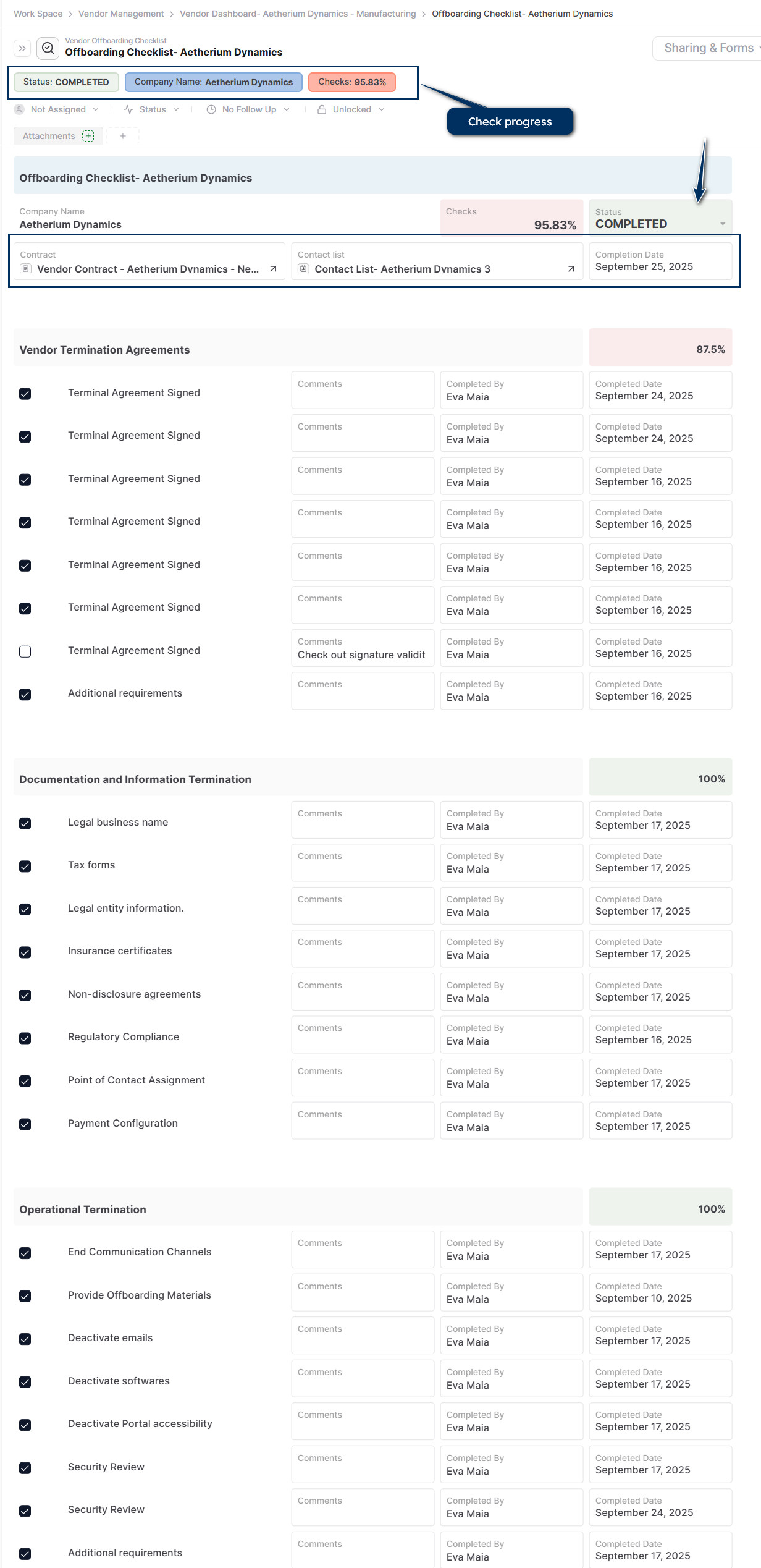
List all the actions you must take to formally and securely terminate a business relationship with the vendor.
- +Change the contract status in the contract record.
- +Link the onboarding checklist to its related contract and contact list.
- +Cancel accessibilities.
- +IT systems, databases, and applications.
- +Physical locations such as key fobs or ID badges.
- +Shared drives and communication channels.
- +Set up termination agreements.
- +Conduct operational termination.
Watch an overview here:
Data model reference
| Field | Description |
|---|---|
| Vendor Dashboard | Overview |
| Request for Proposal | RFP Response |
| Vendor Contract | Agreements / Attachments / Approval |
| Onboarding | Checklist |
| Monitoring and Performance | Compliance and Audit |
| Offboarding | Checklist |
Reporting and views
- +RFPs.
- +Contracts.
- +Audit checklists.
Check the dashboard to monitor:
- +Number of contracts.
- +Number of active contracts.
- +Total costs of active contracts.
- +KPIs such as delivery rate, OIT, and others.
Sharing and collaboration
- +Assign project ownership and task-level responsibility.
- +Use comments and status fields to provide updates.
- +Share filtered views or dashboards with leadership or clients.
- +Collaborate in real time with team-based access and permissions.
Tips and best practices
- +Use color-coded priority fields to flag high-risk tasks.
- +Add follow-up dates for key milestones or reviews.
- +Use folders or tags to group projects by type or initiative.
- +Link each task or project to the OKRs they support.
- +Use Pages for unstructured notes, retrospectives, or planning docs.
Pro Tip: Clone.
Related guides that strengthen this solution
- +Sharing for vendor communication and controlled access.
- +Filesharing for exchanging documents with vendors.
- +Search for locating contracts, RFPs, audits, and vendor records quickly.
- +Files for keeping certificates, payment terms, and supporting documents attached to the right record.