Due Diligence with AnyDB
Manage diligence requests, ownership, status, supporting documents, and external collaboration in one secure workspace. AnyDB gives teams a structured way to run M&A, fundraising, vendor evaluation, and audit processes without relying on scattered spreadsheets and file shares.
Move from fragmented diligence trackers to a single workspace where requests, files, owners, status, and reviewer notes stay connected.
One place for diligence requests
Replace disconnected trackers and folders with a structured request list that teams can actually run.
Document-heavy workflows fit naturally
Files, comments, missing items, and follow-up notes stay attached to the diligence item they belong to.
Designed for internal and external review
Share securely with investors, buyers, legal teams, consultants, or auditors without opening the entire workspace.
Why due diligence benefits from an object-based workspace
Due diligence often breaks down because requests, status, supporting files, and reviewer communication live in different systems. AnyDB brings those pieces back together so the diligence item becomes the unit of work, not a loose spreadsheet row.
Business problem
Due diligence often involves fragmented spreadsheets, scattered file shares, and manual status tracking. This leads to versioning issues, unclear accountability, and missed documents, slowing down transactions and increasing risk.
Solution summary
- +Create due diligence checklists with clearly defined sections and items.
- +Track progress, ownership, and document status for each item.
- +Store supporting documents and comments directly in the system.
- +Assign items to team members or external advisors.
- +Share access with buyers, investors, or legal teams securely.
A clean due diligence model to start with
Keep the model simple at first. The goal is to create a structure that is easy to operate during a live diligence process while still giving you enough room for progress tracking, secure sharing, and documentation.
Diligence Category
Use categories such as legal, finance, product, HR, compliance, or IP to organize the request set clearly.
Request Item
Track each required document, response, or task with ownership, priority, due date, and completion state.
Supporting File and Notes
Attach contracts, reports, cap tables, product documentation, and reviewer comments directly to the item.
Data model reference
Keep the field list focused on what reviewers and internal owners need to operate the process day to day.
| Field | Description |
|---|---|
| Category | Section of diligence (Legal, HR, IP, etc.) |
| Item Name | Specific document or request (e.g., Cap Table, IP List) |
| Owner | Person responsible for the database |
| Status | Not Started / In Progress / Completed / N/A |
| Priority | High / Medium / Low |
| Due Date | Deadline for the database |
| Description | Additional context or instructions |
| File Upload | Supporting document(s) attached to this item |
| Comments | Internal notes or clarification requests |
Build and run the workflow in one guided section
The full setup walkthrough stays together here so the instructional flow, videos, and screenshots remain easy to follow.
- +Go to team database section, click on: "+" sign.
- +Type a database name.
- +Click + New Item then select a diligence category such as Legal, Finance, or Product.
- +Add line items using child rows or a related checklist template.
Each item can include a description, priority, file uploads, notes and status. Check it out here:
- +Assign the database to a team manager.
- +Set a priority level such as High, Medium, or Low.
- +Update status fields to track progress: Not Started, In Progress, Completed, N/A.
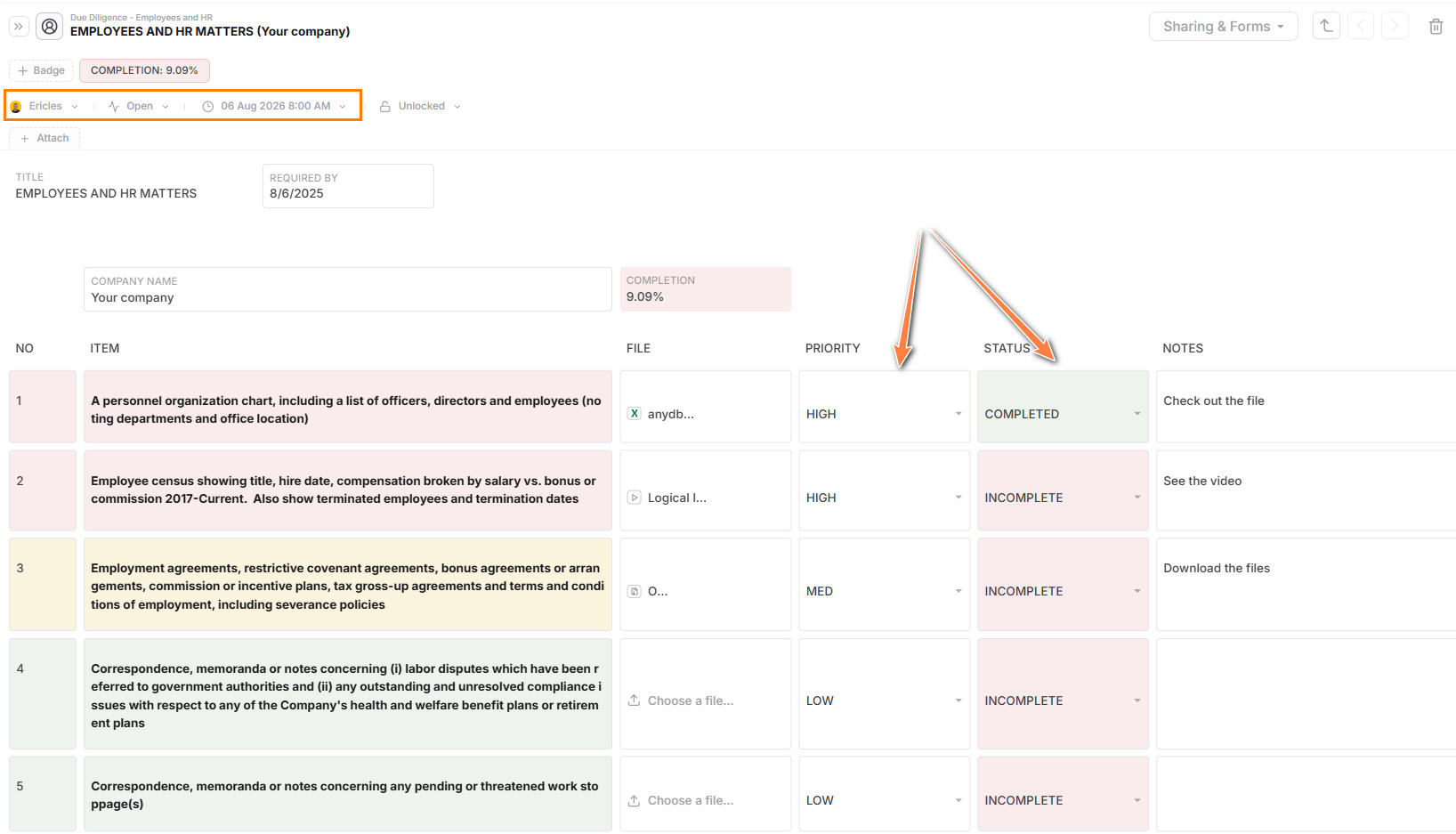
- +Attach contracts, reports, org charts, product specs, and more directly to each line item.
- +Use comments for clarifications or notes from legal, finance, or executive reviewers.
- +Invite guests such as investors, buyers, or consultants to access the database.
- +Set view-only or edit access depending on the role.
- +Use link-based sharing or guest accounts with expiration dates.
- +Click "share and forms".
- +Create a public link or assign emails to share with.
- +Select the Access Level as viewer or editor and activate attachments access if needed.
- +Then click on invite or share the link.
Reporting and views
Use filters, saved views, and dashboards to keep the transaction or audit process visible for internal teams and external reviewers.
- +Open or overdue items by owner.
- +Completed items by category or team.
- +High-priority items that need follow-up.
- +Uploaded vs. missing documents.
- +% completion across categories.
- +Total open items by status or assignee.
- +Documents uploaded by type or category.
- +Approvals or blockers flagged by reviewers.
Sharing and collaboration
The workflow works best when internal owners and external participants can collaborate without losing control of access.
- +Assign checklist items to internal owners.
- +Collaborate with external advisors, buyers, or legal teams securely.
- +Use internal notes and file uploads to maintain a full paper trail.
- +Share filtered views with different stakeholders based on permissions.
Tips and best practices
- +Create a template by diligence phase such as Pre-Term Sheet or Post-Term Sheet.
- +Use color-coded badges for quick visual status.
- +Tag documents for easy filtering such as Uploaded, Missing, or Reviewed.
- +Track unresolved comments and questions for follow-up meetings.
Pro Tip: Use folders to organize diligence by category and restrict access as needed for legal, HR, finance, or product teams.
Who this solution is for
- +Founders and Executives preparing for M&A, investment, or strategic audits.
- +Legal Teams managing risk, documentation, and compliance.
- +Finance Teams preparing financial reports, cap tables, and forecasts.
- +Buyers and Investors reviewing structured documentation efficiently.
- +Consultants and Advisors contributing to and tracking items across the deal.
Why use AnyDB for due diligence
| Benefit | How AnyDB Supports It |
|---|---|
| Centralized Tracker | One place for requests, status, documents, and comments |
| Assignable Ownership | Hold teams accountable for their sections |
| Real-Time Visibility | Always know what is done, what is pending, and what is late |
| Secure File Sharing | Attach documents directly and control who sees them |
| Reusable Templates | Use across deals, vendors, or audits |
| Flexible Access Control | Share by item, category, or entire folder as needed |
Related guides that strengthen this solution
These guides help extend the diligence workspace into a more complete review and document-sharing process.
Sharing
Control access to records, documents, and views for internal teams and external reviewers.
Portals
Create controlled external experiences for buyers, investors, advisors, or vendors.
Files
Store and organize supporting diligence documents directly in the operational workspace.
Search
Quickly find open items, missing documents, and records by owner, category, or status.
Sheets
Browse and update diligence data in a spreadsheet-like view for fast operational work.
Document Generation
Generate structured exports and formal outputs from diligence records when needed.