Employee Performance Review with AnyDB
Run employee performance reviews in a structured, shareable workflow with org dashboards, team dashboards, employee review forms, approval steps, and progress tracking. AnyDB gives HR, managers, and leadership one connected system for the full review cycle.
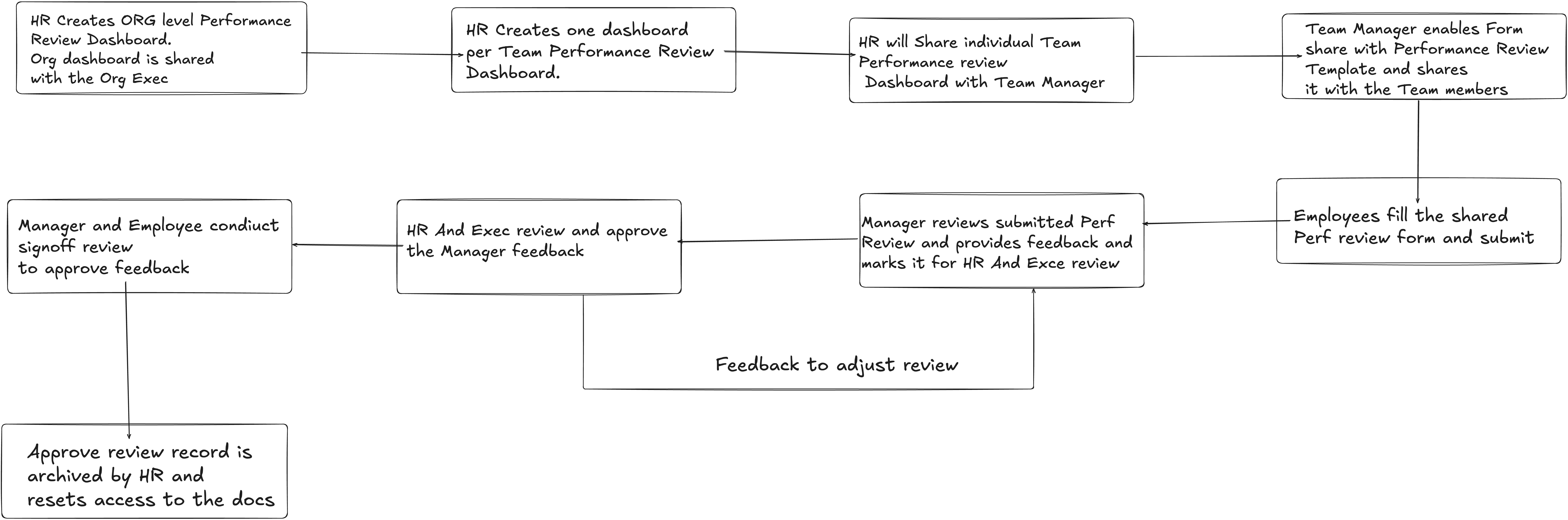
An example review flow across employee, manager, org lead, and HR stakeholders.
One process across multiple stakeholders
Keep employees, managers, org heads, and HR aligned in the same structured review workflow.
Dashboards plus forms
Combine high-level tracking dashboards with employee-specific forms and review records.
Progress stays visible
Track where each review sits in the cycle instead of chasing updates through email and spreadsheets.
Why performance reviews need a structured review system
Performance reviews usually involve multiple stakeholders, structured forms, time-bound cycles, and multiple approval steps. Without a clear system, the process becomes inconsistent and difficult to monitor.
Business problem
Companies often run annual or periodic performance reviews across departments and teams. The process involves employees, managers, org heads, and HR, and the focus areas vary depending on the team. Without a structured system, review visibility and process control weaken quickly.
Solution summary
- +Create dashboards to monitor the overall progress of the review process.
- +Create sub-dashboards to allow visibility to managers for specific areas of the process.
- +Provide custom access to the reviews for various stakeholders.
- +Assign action items to drive the process from a central location.
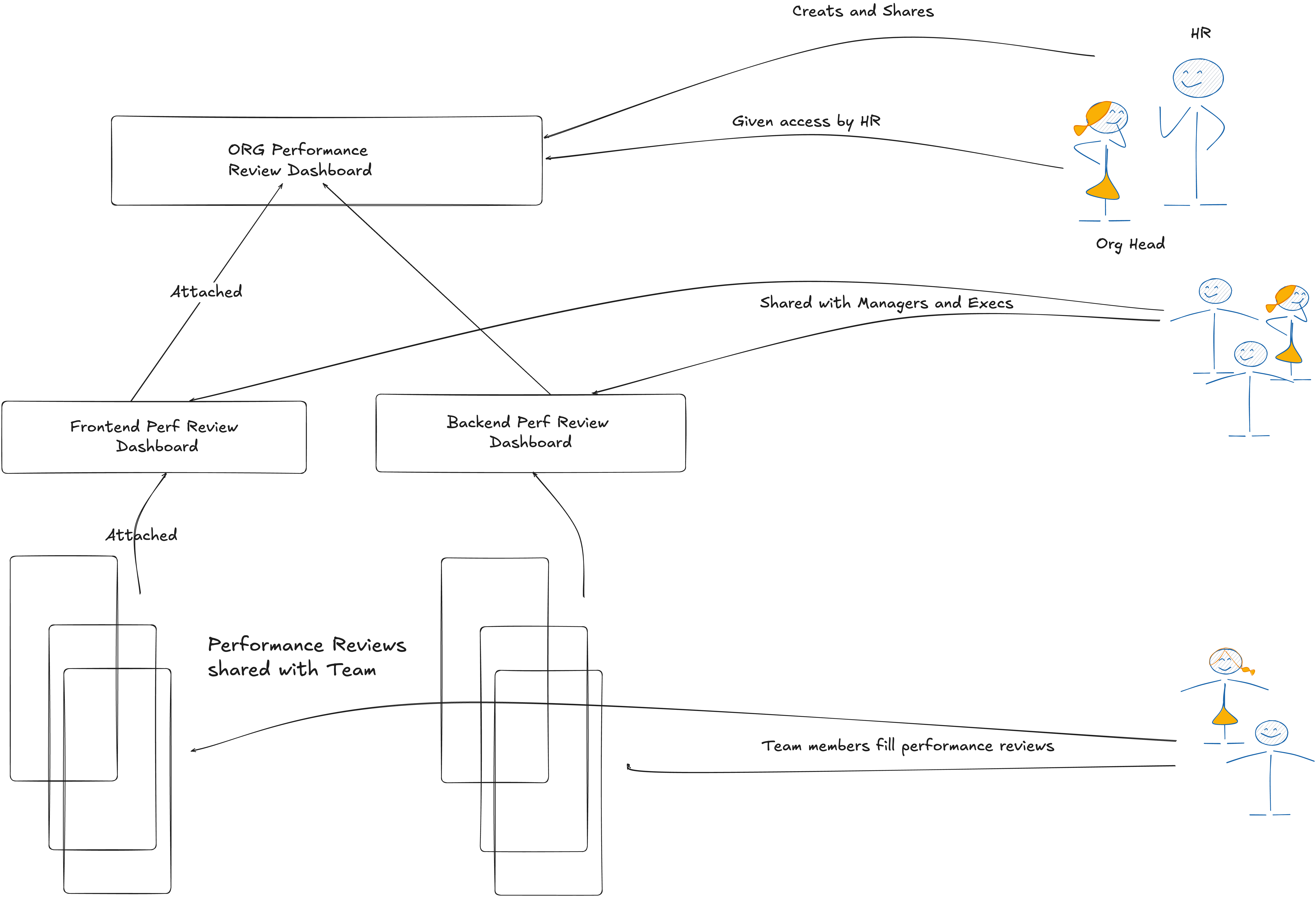
Example structure for an organization-level review process with team dashboards underneath.
A simple performance review model to start with
This example assumes a performance review conducted for one organization with two teams underneath it, but the structure can be extended to any team hierarchy.
Org Dashboard
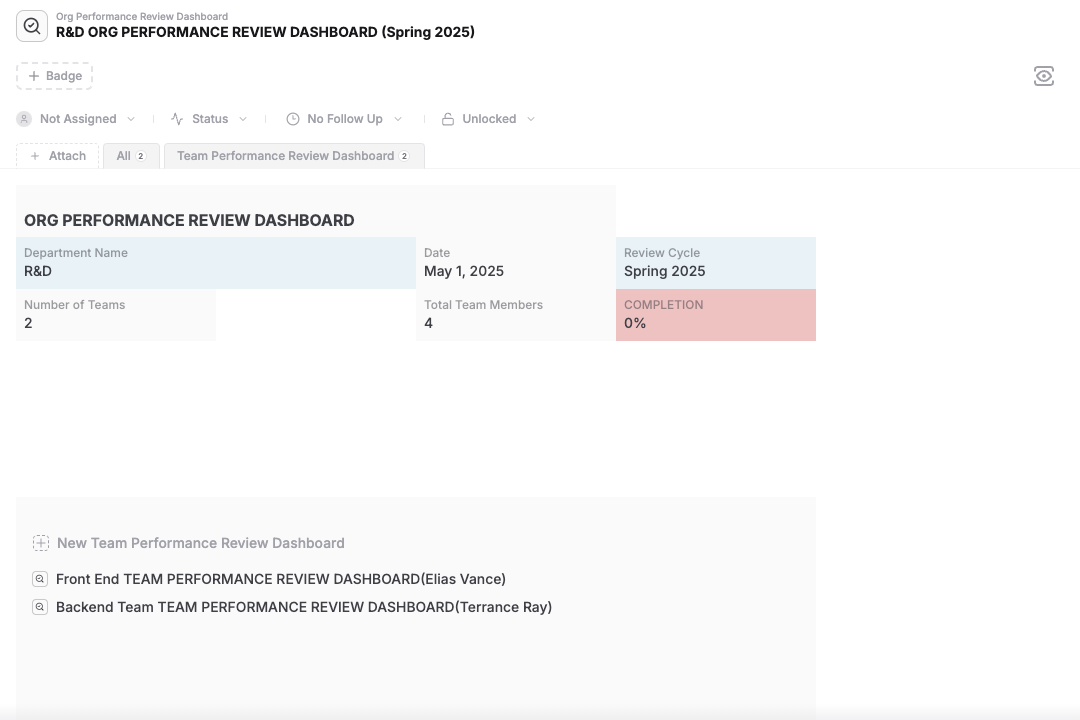
Track the overall review cycle for a department or organization and monitor completion progress across teams.
Team Dashboards
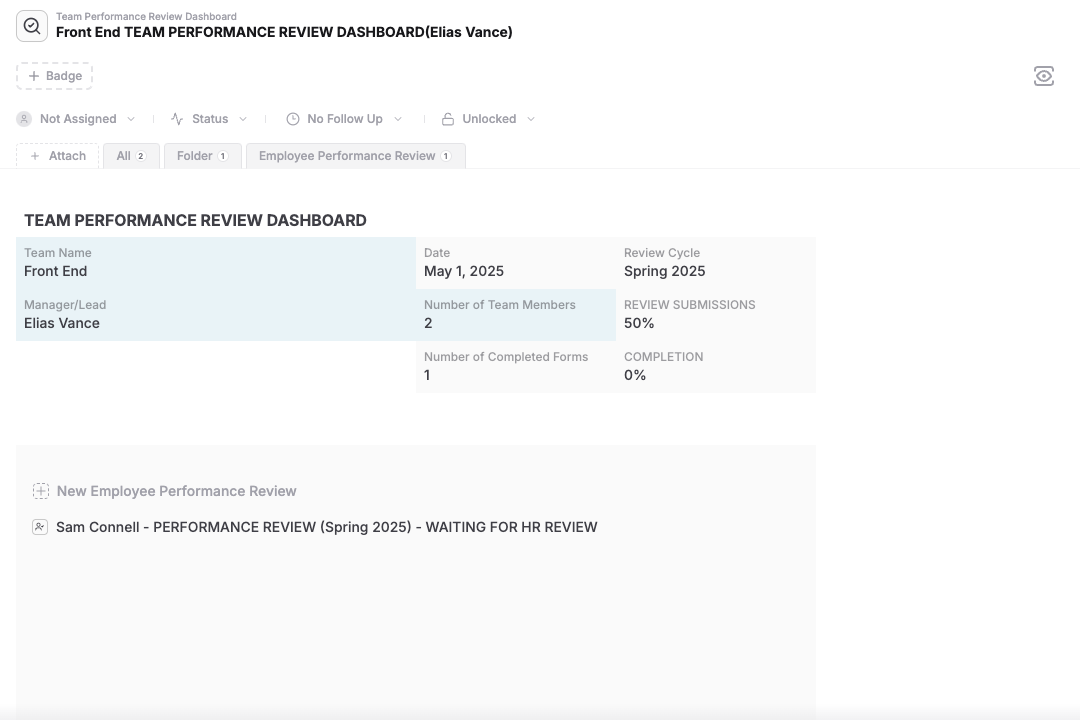
Give each team manager a focused review dashboard connected to employee review submissions.
Employee Review Forms
Use connected forms and role-based access to collect self-reviews and move them through the full review lifecycle.
How to set up the performance review workflow
Follow the setup sequence below to create the org dashboard, attach team dashboards, share forms with employees, and complete the review cycle.
- +Go to your People or HR database.
- +Click + New Item.
- +Select the Org Performance Review Dashboard template.
- +Fill in fields Department Name and Review Cycle.
- +You can share this dashboard to additional members such as the head of the org using the Sharing button then Share Document, with Access Attachments permission enabled.
The data will be populated once full structure is built. Here is an example. This shows the Org Performance Review Dashboard showing two Team Dashboards attached.
- +Click on Attach then New and search for Team Performance Review Dashboard.
- +Once the dashboard is created, fill the fields Team Name, Manager Name, and Number of Team Members.
- +Repeat the same for creating another Team Performance Review Dashboard for the Backend Team.
- +Share each dashboard to the team manager using the Sharing button then Share Document, with Access Attachments permission enabled.
Here is a Team Performance Review Dashboard shared with Employees.
- +Enable Forms for each of the Team Performance Review Dashboard.
- +In the Sharing & Forms button, select Create Form.
- +In the Select Main Template option, select Employee Performance Review.
- +In Guest with access, provide the list of employee accounts or employee group information.
At this point, the employees will have a new form in their My Forms section that they can use to complete the review and submit. Note that the Employee Performance Review Template can be customized and used with this dashboard as well.
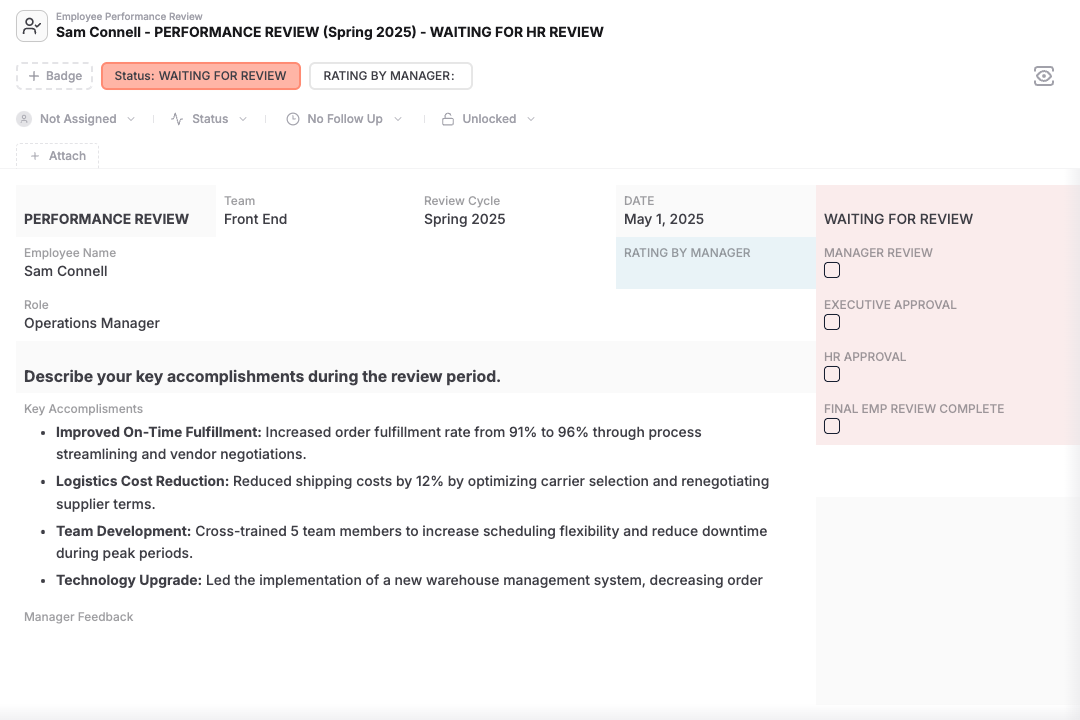
Here is a performance review submitted and is ready for manager review.
- +Once an Employee submits form, it will be available as an attachment to the Team Performance Review Dashboard. The progress in the dashboard will be updated.
- +The submitted Employee Performance Review form will have a WAITING FOR REVIEW state.
- +At this point, the manager can complete rest of the fields to give feedback and Rating.
- +Manager can then request approval from Org Head and HR by checking the appropriate checkbox in the Form.
- +Once HR and Org head complete and approve the review, the status will change to WAITING FOR FINAL REVIEW state.
- +Manager can complete the final review with the Employee and mark it as FINAL REVIEW COMPLETE. The state of the form will be in REVIEW COMPLETE state.
- +The progress will be updated both in the Team Performance Review Dashboard and Org Performance Review Dashboard.
- +Once all reviews are complete, HR can archive the whole board for records.
Tips and best practices
- +Customize the templates to match your specific requirement and use that to perform the review.
- +Use folders or databases to group employees by office, function, or employment type.
Note: The free plan supports unlimited employee documents but has storage limits. Upgrade for larger file support and advanced HR workflows.
Who this solution is for
- +HR Teams for conducting performance review.
- +Execs and Managers for taking part in the performance review process.
- +People Ops for performance and engagement workflows.
- +Employees to participate in the review process.
Related guides that strengthen this solution
These guides help connect performance review workflows to broader people operations and permissions controls.
Employee Management
Connect review workflows to broader employee records, onboarding, documents, and HR operations.
Forms
Use forms to collect self-reviews and structured employee submissions.
Sharing
Share review dashboards and records with managers, org heads, and HR with controlled access.
Permissions
Control visibility for sensitive review records and limit access by role.
Search
Find reviews by team, cycle, manager, or completion status using saved views and filters.
Files
Attach supporting review materials and related employee documents directly to the workflow.