
Published on February 27, 2026


When teams look for better approval workflows, they are usually trying to move faster and avoid confusion as work scales.
What starts as a simple email or message quickly turns messy. Files get duplicated, context is lost, and it becomes unclear who approved what or when.
Approvals that should keep work moving end up slowing everything down. That is when they stop being a formality and start affecting cost and trust.
This article looks at what an approval workflow really means in day-to-day operations, why approval processes tend to break as teams grow, and how automation can improve clarity without adding friction.
Why Approval Workflows Break Down in Growing Teams
Most approval workflows do not fail overnight. They start informally and often work just fine when a team is small.
Everyone knows each other, context lives in people’s heads, and decisions move quickly. The trouble starts when the team grows and those informal habits stay in place.
Requests arrive without enough context or supporting documents, forcing approvers to chase details before they can even make a decision.
The result is that teams spend more time following up on approvals than doing the work those approvals were meant to unlock.
The takeaway is simple. Approval problems are usually about issues other than people doing their jobs.
They are about systems that do not reflect how decisions actually flow across a growing team.
Here’s What a Practical Approval Workflow Should Actually Do
In day-to-day operations, an approval workflow acts as a control layer that adds structure and context to decisions, without making the process feel heavy for the people involved.
When approvals work well, they fade into the background. When they do not, everything slows down.
A solid approval workflow should include:
- A single record for each request: All data, documents, and comments live in one place, so no one has to piece together context from scattered messages or attachments.
- Clear ownership and routing: Each step shows who needs to act next and what happens after approval or rejection, even when roles change or someone is out.
- Context built-in: Approvers see the relevant details, supporting files, and history directly in the request, without hunting through inboxes or shared drives.
- Status visibility: Teams can instantly see what is pending, approved, rejected, or blocked, which makes follow-ups far less awkward.
- History and accountability: Every decision is recorded with timestamps and reviewers, creating a clear audit trail that holds up when questions come later.
Viewed through an operational lens, this means that when a manager opens the system, they know exactly what is waiting, who owns it, and why it matters.
A successful approval workflow finds the balance. It adds control where it matters, keeps work moving, and avoids unnecessary friction.
Use Cases: See how teams manage document approval with AnyDB.
How AnyDB Enables Approval Workflows That Match Real Operations
AnyDB is built for approval workflows as they happen in real teams.
Centralized Approval Records
Each approval workflow in AnyDB lives as a single structured record. Documents, comments, files, and status updates stay connected, so teams always know what was reviewed and which version was approved.
This removes the guesswork that often breaks document approval processes.
Flexible Routing That Follows Business Rules
Workflows for approval can adjust to the actual decision-making process. Single or multiple approvers, sequential or parallel steps, and routing based on amount, type, or risk are all supported.
The workflow adjusts to the context instead of forcing teams into exceptions and workarounds.
Controlled Collaboration Without Risk
Internal teams and external reviewers can take part with role-based access that limits what each person can see or edit. Every action is logged, keeping approvals auditable while avoiding shared inboxes or unsafe file exchanges.
Reusable Templates and Clear Visibility
Approval workflows can be reused across invoices, vendor onboarding, marketing reviews, or software releases.
Dashboards show what is pending or overdue, giving managers clarity without constant follow-ups.
| Benefit | How AnyDB Supports It |
| Centralized workflow | One record for document, status, comments, and approval history. |
| Flexible routing | Add multiple reviewers and assign by team, department, or role. |
| Visibility and ownership | Track who’s responsible and what’s pending. |
| Built-in file handling | Upload or link files directly inside approval workflows. |
| Structured follow-up | Use due dates and reminders to avoid delays. |
| Real-time collaboration | Leave notes, assign tasks, and update status in one place |
AnyDB brings clarity and structure to your approval process, so you can move faster, stay compliant, and keep everyone in the loop.
To Create a Document Approval Workflow in AnyDB, Follow These Steps:
1. Create a Document for Approval
Navigate to your Document Approvals workplace.
- Go to the team database section and click on the “+” sign.
- Click on “Optional: Start with our pre-built solution.”
- Then, click on “Document Approval”, set up a name, and click on the “Add” button.
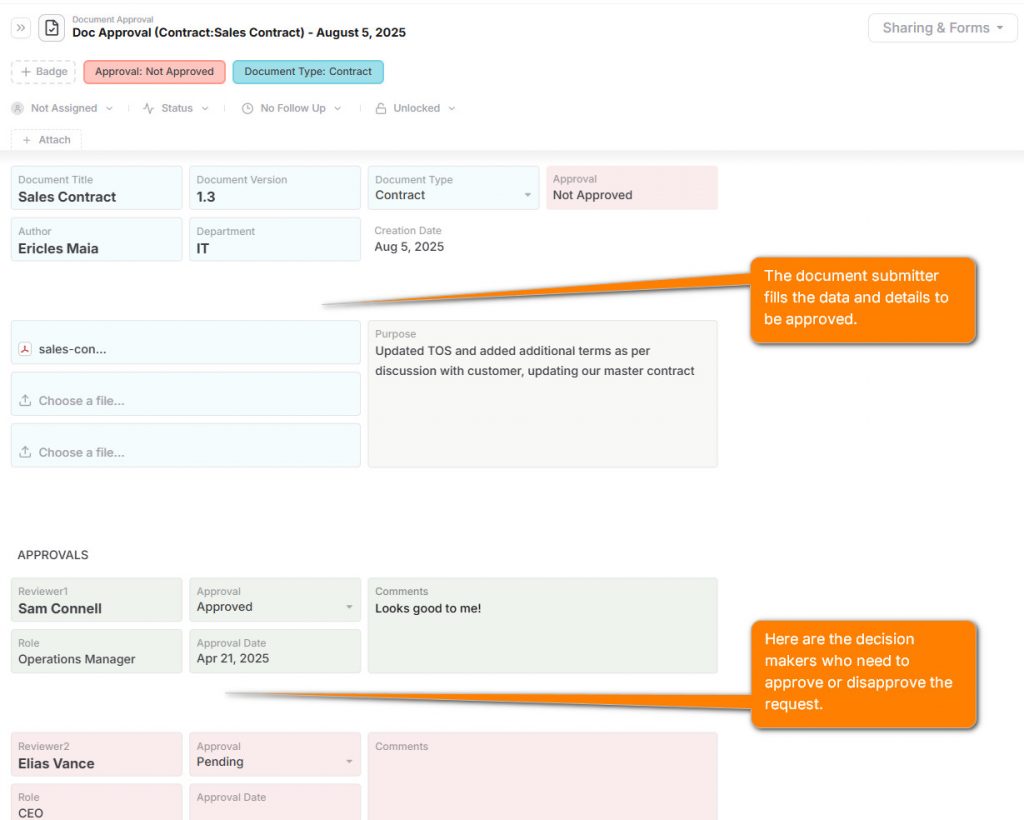
Fill in fields like document name, type, owner, and submitter.
Upload the document or link to an external file.
2. Add Reviewers and Approval Steps
- Add one or more approvers using reference fields or dropdowns.
- Assign a due date and priority level.
- Use a status field to track progress: Pending, In Review, Approved, Rejected.
- Use the comments field for reviewer notes or questions.
3. Track Approval Progress
- Use badges to visually display approval status and due dates.
- Add a “Last Updated” field to track recent changes or comments.
- Tag documents that are blocked, overdue, or need escalation.
4. Complete and Archive
- Once approved, the badge status is changed automatically to Approved.
- Record the approval timestamp and name of the final approver.
- Archive the document or link it to a related record (e.g., project, client, contract).
Build Approval Workflows That Keep Work Moving
Approval workflows are not synonymous with bureaucratic procedures. They are how teams protect decisions, move faster, and build trust without second-guessing.
When approvals live in inboxes or spreadsheets, clarity disappears and risk follows close behind.
AnyDB gives teams a practical way to replace scattered approvals with structured, visible workflows that adapt as work evolves. No rigid systems. No hidden costs.
Sign up for a free AnyDB workspace, apply an approval workflow template, and experience how clean approvals actually feel.
Frequently Asked Questions About Approval Workflows
Below are answers to common questions teams ask when approvals start slowing work down instead of supporting it.
What is an approval workflow in day-to-day operations?
An approval workflow is a structured way to route requests, assign reviewers, and record decisions in one place.
It ensures every approval has context, ownership, and a clear outcome instead of living in scattered messages.
Why do approval workflows break once teams grow?
What works for a small team often collapses at scale. As volume increases, inbox approvals lose visibility, spreadsheets lack control, and no one can confidently answer who approved what or when.
Are approval workflows only about compliance and control?
No. While compliance matters, a good approval workflow also improves speed and trust. Teams spend less time chasing decisions and more time moving work forward with confidence.
Can approval workflows work with external reviewers or vendors?
Yes. Modern approval workflows allow external reviewers to take part through controlled access, without exposing unrelated data or creating manual follow-ups.
Can AnyDB replace email and spreadsheet approvals without adding complexity?
Yes. AnyDB keeps approvals simple on the surface while adding structure underneath. Teams get clear records, visibility, and history without forcing rigid systems or slowing adoption.

The End-to-End Operations System that Finally Fits Your Reality.
No more scattered spreadsheets or rigid, disconnected tools.
AnyDB is a modern, customizable platform for managing business records and operations across teams, clients, and partners.
Learn More


Phone: (512)-761-7979
© 2024 Humanly Inc. All rights reserved.
What is AnyDB?
AnyDB is a unified, customizable data store designed to streamline and empower your entire organization. Effortlessly store, organize, and share custom business data to drive both internal and external operations across teams. Think of it as spreadsheets on steroids.Perfect for Sales, Marketing, Operations, HR, and beyond. Discover AnyDB