
Published on November 14, 2025


A good customer portal isn’t just a nicer way to share files.
When projects, invoices, and client updates live across spreadsheets, emails, and chat threads, things slip through the cracks fast. A portal solves that by giving clients one organized space to check project status, upload documents, or approve tasks.
The real value, though, comes from what’s underneath. In a connected system, the portal uses the same live database your internal team works in.
When a client uploads a file, it’s instantly linked to the right record; when your team marks a task complete, the client sees it in real time.
That level of sync turns what used to be a constant back-and-forth into a smooth, traceable workflow. It’s faster, cleaner, and makes both sides feel like they’re working in the same system, because they actually are.
Let’s dive into what makes customer portals a game-changer!
What Is a Customer Portal?
A customer portal is a secure online gateway where clients can log in, access key documents, track updates, and communicate with your team. Think of it as a shared workspace between your team and your clients.
In today’s customer-driven world, clients expect real-time visibility into their projects, invoices, or requests. That’s where a customer portal comes in: it bridges transparency, efficiency, and professionalism.
They see only what’s relevant to them, you keep full control over what’s visible, and everyone stays aligned without extra messages or manual updates.
For example, a marketing agency might share campaign performance dashboards and billing in real time, while a manufacturer could let distributors check production status or shipment records directly.
Why Customer Portals Matter for Businesses
Customer portals reshape how businesses build trust and scale relationships with their clients. Here are some of the reasons why:
- Transparency: clients can check progress, download files, and review updates anytime, no need to wait for replies.
- Efficiency: teams spend less time answering repetitive emails and more time solving real problems.
- Security: granular permissions prevent oversharing and keep sensitive information protected.
- Customer Experience: a branded, self-service environment communicates professionalism and reliability.
Research shows that businesses using digital self-service tools reduce customer support time. Portals transform service from reactive to proactive, giving clients control while freeing your team to focus on higher-value work.
Challenges of Traditional Customer Portal Tools
Many teams try to build customer portals by combining tools like Airtable and Softr, Stacker, or SharePoint. At first glance, these setups seem flexible, but they often become a patchwork of disconnected systems.
Common pain points include:
- Data silos: portals that aren’t truly connected to live internal databases.
- Limited control: difficulty defining who can view or edit specific data.
- Extra costs: paying per external user quickly becomes unsustainable.
- Rigid design: generic templates that don’t reflect your brand and needs.
- Fragile integrations: workflows that break with every API update.
These solutions often look good in demos but become fragile as your business grows. That’s why many organizations look for a data-centric approach, i.e. one that connects internal and external collaboration seamlessly.
How to Build a Customer Portal With AnyDB
Creating a secure, connected portal doesn’t have to mean custom code or complex integrations. With AnyDB, you can build a fully branded customer experience in just a few steps:
- Design Your Database
Start by defining your core tables: clients, projects, contracts, invoices, support tickets. You can use a ready-to-go template, create your own or use AI to automatically create records.
- Link Your Records
Connect data points easily. A client record can be linked to multiple projects, and each project can include deliverables, deadlines, and responsible teams.
- Set Permissions
Control visibility at the cell, record, or table level. For instance, your team can see internal notes, while clients only access approved information.
- Build Forms and Views
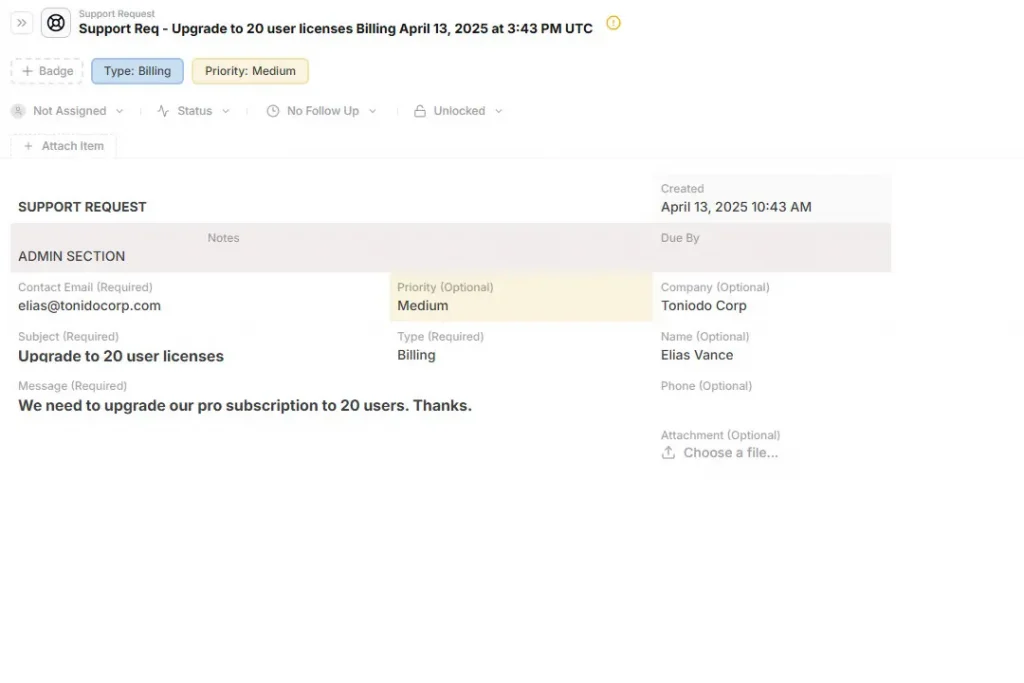
Create branded forms for clients to upload files, approve deliverables, or share feedback. Use dynamic views to display dashboards, timelines, or invoices.
- Share Securely
Invite clients via secure viewer links, no per-seat costs or external layers. Data stays within your database, ensuring real-time updates without duplication.
- Brand Your Portal
Customize the interface with your logo, color palette, and domain. Your clients should feel like they’re in your environment, not a third-party platform.
Key Features of a Great Customer Portal
Not all portals are created equal. The best ones share a few critical traits:
- Connected Data: Clients view the same live data your team works with, no exports or sync delays.
- Granular Permissions: Maintain transparency without compromising confidentiality.
- Unlimited Guests: Collaborate freely without worrying about user limits or surprise charges.
- Custom Branding: Reinforce your visual identity across every client interaction.
- Integrated Workflows: Automate approvals, notifications, and document collection.
- Dashboards & Reports: Display KPIs and progress metrics in real time.
- Secure File Management: Store and preview PDFs, images, and Word files directly within the portal.
These capabilities turn the portal from a passive viewing tool into an active collaboration hub, where data and people connect effortlessly.
Why AnyDB is Better for Customer Portals
Most customer portals are just fancy facades. You set up a beautiful interface in Softr or Stacker, but behind the scenes, you’re constantly wrestling with data synchronization, duplicate records, and security headaches.
AnyDB eliminates this fundamental disconnect by creating truly unified portals where external stakeholders access the same live data your internal team uses daily.
Real Connected Data Architecture
Unlike Notion or Airtable portals that overlay interfaces on static tables, AnyDB creates genuine data relationships. When a client uploads a contract amendment through their portal, it doesn’t create a separate “portal record”: it instantly attaches to their existing project file that your project manager is already tracking.
This means no more manual data transfers, no version control nightmares, and no wondering whether the client is seeing the most current information.
Surgical-Level Access Control
Most platforms force you into binary choices: give clients full database access or lock them out completely. AnyDB implements granular permission architecture that controls visibility down to individual cells and records.
Your automotive supplier logs in and sees only their purchase orders and delivery schedules, not your other vendors’ pricing or internal cost structures. Your enterprise client accesses their project dashboard, invoices, and support tickets, but never glimpses your HR records or competitive analysis.
This cell-level security means you can safely expose operational data without creating sanitized “client-safe” copies that immediately become outdated.
Consolidated Portal Infrastructure
AnyDB replaces your entire portal stack. Instead of juggling Softr for interfaces, Google Drive for file sharing, Typeform for data collection, and email chains for updates, everything consolidates into one secure, branded environment.
Clients submit change requests through custom forms that automatically trigger internal workflows. They upload sensitive documents directly into encrypted project folders. They track milestone progress through dynamic dashboards that reflect real project status.
Unlimited Stakeholder Access
While Airtable charges per guest user and Stacker limits portal seats, AnyDB provides unlimited guest accounts at no additional cost. This pricing model transforms how you can scale client relationships.
Manufacturing companies can invite every supplier, distributor, and key customer without budget constraints. Professional services firms can create dedicated portals for each client team member, from procurement to end users, without per-seat penalties.
Custom-Branded Experience Architecture
Generic portal templates scream “third-party tool.” AnyDB lets you build custom record templates and branded interfaces that mirror your company’s operational language and visual identity.
Your construction clients see project phases labeled with industry-standard terminology, not generic “task” and “milestone” labels. Your SaaS customers access dashboards that match your product’s UI patterns, creating seamless brand continuity.
This way, the entire portal feels like a natural extension of your core business system.
Reduced Technical Fragility
Complex portal setups typically involve multiple integration points: Softr frontend + Airtable backend + Zapier automation + third-party authentication. Each connection creates potential failure points.
AnyDB operates as a single integrated system, eliminating most integration dependencies, although you still can use Zapier, Make and APIs if you need.
We are currently developing a built-in workflow automation. In the meantime, the unified architecture already provides more reliability than multi-tool portal stacks.
When to Choose AnyDB for Customer Portals
AnyDB stands out when your business needs clarity, control, and scale.
Choose AnyDB if:
- You’re managing client or vendor data in spreadsheets and need secure sharing;
- You work with multiple external partners and require detailed access controls;
- You want data, forms, and dashboards in one place;
- You need a branded, professional interface without relying on developers;
- You’re done paying per external user or managing fragile integrations.
With AnyDB, your business data becomes the foundation of customer collaboration, not a barrier to it.
Start building your secure customer portal today with free templates, live dashboards, and unlimited guest access.
Turn Transparency Into a Competitive Advantage
Customer portals are no longer optional, they’re how modern businesses build trust, deliver transparency, and operate efficiently.
A well-designed portal transforms how teams collaborate with clients, replacing cluttered inboxes with clarity and control.
With AnyDB, you can create secure, connected, and branded customer portals in minutes, without developers, add-ons, or complex setups.
FAQs About Customer Portal
Still have questions? Here are some of the most common things people ask when getting started with customer portals.
What is a customer portal used for?
It’s a secure platform where clients can log in to view documents, project updates, and invoices, improving communication and trust.
How do I create a customer portal?
You can build one using a database-driven platform like AnyDB, where you design tables, set permissions, and customize branding, no coding required.
What makes a customer portal secure?
A secure portal uses encryption, granular access permissions, and a zero-trust approach to ensure only authorized users access data.
Can I customize a customer portal?
Yes. AnyDB lets you personalize your portal with your company’s logo, colors, and messages for a cohesive brand experience.
What’s the difference between a client portal and a CRM?
A CRM manages internal relationships and sales data. A client portal is external-facing, giving customers controlled access to specific information.

The End-to-End Operations System that Finally Fits Your Reality.
No more scattered spreadsheets or rigid, disconnected tools.
AnyDB is a modern, customizable platform for managing business records and operations across teams, clients, and partners.
Learn More


Phone: (512)-761-7979
© 2024 Humanly Inc. All rights reserved.
What is AnyDB?
AnyDB is a unified, customizable data store designed to streamline and empower your entire organization. Effortlessly store, organize, and share custom business data to drive both internal and external operations across teams. Think of it as spreadsheets on steroids.Perfect for Sales, Marketing, Operations, HR, and beyond. Discover AnyDB