
Published on November 14, 2025


Most teams only realize there’s a bottleneck once it’s already caused an impact. It might be a delayed approval, a communication gap with suppliers, or a simple data-entry error. While this reactive approach is common, it’s also costly. Business Process Monitoring (BPMo) changes that dynamic.
By continuously tracking internal and external workflows to spot risks early, organizations can ensure compliance and drive continuous improvement through data-driven insights.
In practice, BPMo relies on performance metrics such as average throughput time, error rate, or SLA adherence to detect deviations before they escalate. But it’s more than just analytics. It’s about building a culture of visibility and immediate action, where teams respond quickly based on reliable data.
Ready to take your workflow efficiency to the next level? Let’s explore how Business Process Monitoring can transform your operations!
What Is Business Process Monitoring?
Business Process Monitoring (BPMo) is the practice of tracking workflow performance across departments and systems, providing a clear, end-to-end view of how each process actually runs in real life.
It’s important not to confuse BPMo with Business Process Management (BPM). While BPM focuses on designing and structuring business processes, BPMo represents the operational layer that keeps those strategies running efficiently. Together, they form the foundation of a resilient and data-driven organization.
Key benefits of BPMo include:
- Early detection of inefficiencies, minimizing delays and costs;
- Audit-ready compliance and accountability;
- Data-driven decision-making powered by live metrics.
Imagine having your entire organization under control, from hiring and financial approvals to supplier performance, logistics, and customer experience. BPMo covers both internal and external workflows, giving leaders the full picture to make informed decisions in real time.
Learn more about Internal and External Processes!
How Business Process Monitoring Works
Business Process Monitoring follows a simple yet powerful logic: turning workflow tracking into a continuous, predictable operation. Instead of reacting to errors or delays after they happen, your teams can identify and correct deviations the moment they occur. Here’s how the cycle works:
- Define KPIs
Start by selecting key performance indicators that truly represent process success, such as throughput time, error rate, SLA compliance, or cost per transaction.
- Collect data
Pull data from forms, databases, or API integrations to capture both human and automated interactions across systems.
- Analyze and Visualize
Transform data into dashboards and alerts that reveal real-time trends and anomalies. This makes it easier to spot issues visually and prioritize corrective actions.
- Take Action Through Alerts and Automation
When a metric crosses a defined threshold, such as a missed SLA, the system automatically triggers tasks, notifications, or approval workflows. This ensures continuous visibility and reduces the need for manual reporting.
Within AnyDB, this monitoring experience is even more seamless. Metrics and permissions are managed within a unified platform, allowing data to flow naturally between forms, records, and dashboards.
Internal vs. External Process Monitoring
Businesses grow by connecting people, data, and workflows. That’s exactly where Business Process Monitoring splits into two essential dimensions: internal and external. Both are critical for operational excellence, but each serves different goals, users, and challenges. Here’s how they compare:
| Aspect | Internal Processes | External Processes |
| Definition | Workflows that occur within the organization across teams, managers, and departments | Workflows involving external parties such as customers, suppliers, partners, or auditors |
| Common Examples | Employee onboarding, document approvals, internal audits, monthly compliance reviews | Supplier onboarding, support requests, partner registrations, external audits, or maintenance scheduling |
| Primary Goal | Boost efficiency and traceability of internal operations | Increase transparency, speed, and control over external interactions |
| Data Collection | Through internal forms and structured records | Through public or shareable forms that don’t require login |
| Assignments & Notifications | Automatic assignment: every new submission is routed to a designated internal owner, who receives an email notification | The assigned handler is notified instantly when a customer or partner submits a form |
| Organization & Visualization | Folder views like “New Requests,” “Assigned to Me,” and “Completed” | Filtered dashboards such as “New Vendor Requests,” “Pending,” and “Closed” |
| Related Attachments | Checklists, signed approvals, follow-up forms | Contracts, compliance documents, and service records |
| Continuous Improvement | Dashboards and audit trails to identify bottlenecks. | Automated assignments, role-based permissions, and performance reports. |
Both internal and external workflows can be managed within AnyDB without duplicating data. The platform seamlessly connects internal records with external submissions under a unified database, maintaining the right level of access and security for each audience.
Core Metrics and Dashboards for Process Monitoring
The real strength of Business Process Monitoring lies in its metrics. They act as sensors that measure the health of every workflow, revealing where time is spent, where errors occur, and how resources can be optimized.
Below are the key indicators every organization should track, and how visual dashboards can transform them into actionable insights:
- Throughput Time: Average time spent per task or process, helping identify slow stages.
- Error or Rejection Rate: Tracks the frequency of failed transactions or rework cases.
- SLA Adherence: Monitors whether processes meet predefined service levels.
- Resource Utilization: Shows how effectively people, systems, or assets are being used.
- Process Cost per Transaction: Evaluates financial efficiency across workflows.
Visual dashboards turn these metrics into a live narrative of performance. They help leaders quickly detect trends, compare departments, and make informed adjustments before small inefficiencies escalate.
Real-World Examples of Business Process Monitoring
Business process monitoring becomes more valuable when applied to everyday workflows that directly affect performance and customer satisfaction. Here are some practical examples of how organizations use real-time dashboards, automated reminders, and data connections in AnyDB to keep operations running smoothly.
Approval Processes
Approval processes, whether for contracts, marketing materials, or HR policies, can easily stall due to delayed feedback or lack of visibility. By monitoring approval cycle times and identifying where bottlenecks occur, teams can accelerate sign-offs and reduce administrative friction.
With the Document Approval Template, managers can track every step of a document’s lifecycle:
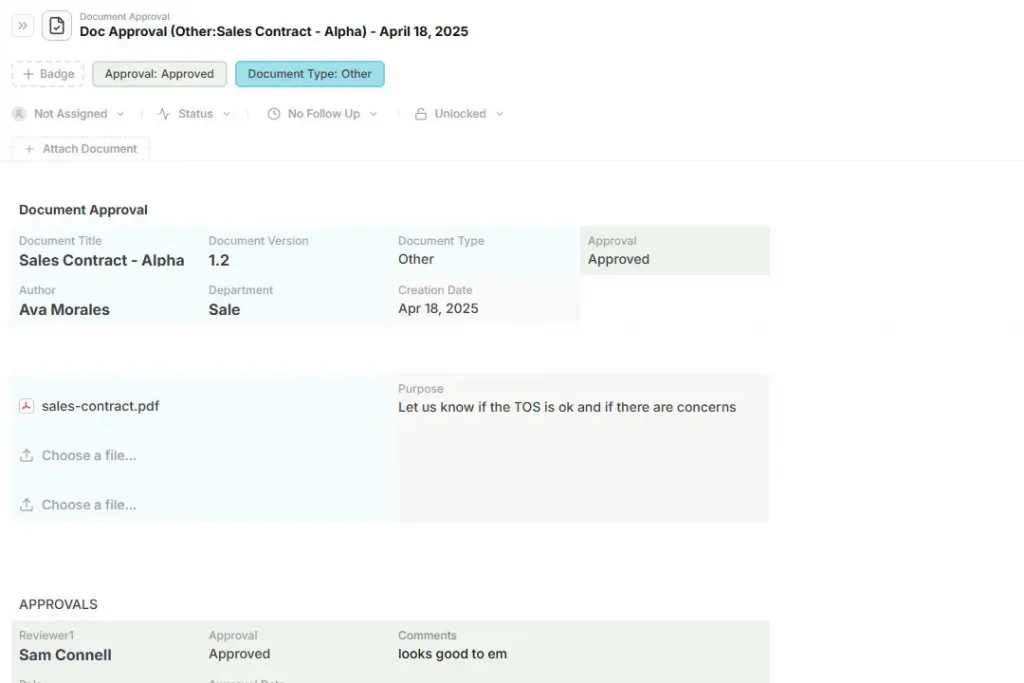
This template captures key metadata (department, version, reviewers), auto-calculates global approval status, and color-codes each record for instant visual clarity in dashboards. Automated notifications remind reviewers of pending actions, while decision histories ensure full traceability.
Vendor onboarding
New vendor onboarding often involves verifying documents, compliance certifications, and payment details. Monitoring completion rates and average validation times helps organizations shorten procurement cycles and improve supplier satisfaction.
AnyDB enables this through connected forms and SLA-based triggers that flag overdue tasks before they impact operations.
Customer support processes benefit immensely from structured, measurable workflows. The Support Request Template provides a consistent intake form for capturing issue details, urgency, and attachments.
Built-in fields for priority and request type allow teams to triage tickets automatically, while dashboards visualize resolution time and satisfaction levels in real time.
And whether in IT, HR, or operations, AnyDB allows teams to connect related workflows, such as linking support requests to incident logs or HR onboarding data. Live dashboards make it easy to compare performance across departments, ensuring consistent service levels and faster decision-making.
How to Implement Business Process Monitoring
The goal of implementing Business Process Monitoring is to gain a clear view of operational performance and identify, in real time, where adjustments can boost efficiency. Here’s a step-by-step guide to get started:
- Identify your critical workflows: begin by mapping the processes that most impact your results. These are the top candidates for monitoring.
- Define metrics that truly matter: determine relevant indicators for each process, such as average execution time, cost per transaction, error or rework rate, and compliance levels.
- Centralize your process data: avoid fragmented information scattered across spreadsheets, emails, and disconnected systems by centralizing everything in one unified platform.
- Use dashboards to visualize and detect deviations: charts and alerts help teams quickly identify anomalies or delays, enabling corrective actions before issues affect final outcomes.
- Automate repetitive or approval-heavy tasks: automated approval flows, notifications, and smart records save time and reduce human error while maintaining operational consistency.
- Continuously improve based on data: regularly review performance results, identify bottlenecks, and adjust workflows as trends and insights evolve.
Start using AnyDB’s free templates to monitor both internal and external workflows in a fully connected and easily customizable system.
Turn Every Process Into a Source of Insight
Real-time business process monitoring transforms how teams detect issues, act on data, and maintain consistent performance.
With AnyDB, you can connect internal and external processes, automate alerts, and ensure full transparency at every stage.
This way, every workflow becomes a continuous source of learning and improvement. Try AnyDB for free and experience the difference!
FAQs About Business Process Monitoring
Want to learn more about Business Process Monitoring? Here are some quick answers to common questions:
What is meant by process monitoring?
It’s the real-time tracking of workflows to detect inefficiencies, delays, or compliance issues.
What’s the difference between business process monitoring and process management?
Monitoring focuses on measurement and improvement; management designs and governs the overall process.
What are L1, L2, L3, and L4 processes?
L1 shows the main business areas, L2 breaks them into core processes, L3 details specific subprocesses, and L4 maps individual tasks or activities within each process.
What’s an example of process monitoring?
Tracking supplier onboarding time or approval delays using automated dashboards.
Is SAP a BPM?
SAP includes BPM modules for process management and monitoring; however, it’s better suited for enterprise-scale implementations.

The End-to-End Operations System that Finally Fits Your Reality.
No more scattered spreadsheets or rigid, disconnected tools.
AnyDB is a modern, customizable platform for managing business records and operations across teams, clients, and partners.
Learn More


Phone: (512)-761-7979
© 2024 Humanly Inc. All rights reserved.
What is AnyDB?
AnyDB is a unified, customizable data store designed to streamline and empower your entire organization. Effortlessly store, organize, and share custom business data to drive both internal and external operations across teams. Think of it as spreadsheets on steroids.Perfect for Sales, Marketing, Operations, HR, and beyond. Discover AnyDB