
Published on May 12, 2026


Order management becomes structurally important the moment orders stop being isolated transactions and start moving across multiple operational systems.
A single order no longer sits in one place: it moves through sales, inventory, fulfillment, logistics, and finance, with each team depending on accurate information to do its part.
That is where many operations begin to break. Sales data lives in one system, stock levels in another, shipment updates elsewhere, and invoicing in a separate workflow.
As a result, teams spend time checking stock, confirming shipment progress, and correcting mismatched records instead of moving orders forward.
Order management exists to solve that problem.
What Is Order Management?
Order management is the operational process of receiving, processing, tracking, and fulfilling customer orders from the moment they are created until they are completed.
Its purpose is to ensure that every order moves through the business with the correct products, quantities, status, and downstream actions attached to it.
In practice, order management is not limited to order entry. It includes:
- Validating what was ordered;
- Confirming stock availability;
- Coordinating fulfillment;
- Updating delivery status; and
- Maintaining visibility throughout the process.
Each order becomes an operational record that must stay accurate as it moves across different teams and systems.
The more orders a business handles, the more important this structure becomes. Without it, even simple transactions begin to create operational noise, such as duplicate work, status confusion, fulfillment delays, and inconsistent reporting.
At its core, order management is the discipline that keeps order execution controlled, traceable, and scalable.
What Does an Order Include?
At a minimum, an order is a structured record that brings together everything needed to execute a transaction without ambiguity:
- Customer: who is buying (or requesting)
- Products: what is being ordered
- Quantities: how much of each item
- Pricing: unit price, discounts, totals
- Status: where the order stands (pending, fulfilled, shipped, etc.)
- Payment: method, approval, and financial status
- Shipment: how and where the order will be delivered
The Order Management Process
Order management follows a structured sequence. Each step depends on the previous one being accurate, and this is where most operations either stay controlled or start to break.
- Order capture
The order enters the system, whether from ecommerce, a sales rep, or manual input. At this stage, completeness matters, and missing or inconsistent data will cascade downstream.
- Order validation
Before anything moves, the system checks availability, pricing, and payment. This is where stock mismatches or pricing errors should be caught.
- Order processing
Inventory is reserved, and operational documents (pick lists, invoices, confirmations) are generated. The order transitions from intent to execution.
- Fulfillment
The physical work happens: items are picked, packed, and shipped. Accuracy here depends entirely on the quality of earlier steps.
- Delivery and confirmation
The customer receives the order, and the system updates status accordingly. Visibility at this stage is critical for both operations and customer experience.
- Post-order operations
Returns, support cases, adjustments, and invoicing are handled. This phase often gets overlooked, but it directly impacts margins and customer retention.
The Biggest Challenge: Keeping Orders Consistent Across Systems
Order management usually fails because the order gets fragmented across too many of them. The order may start in an ecommerce platform, get pushed into an ERP, depend on stock data from a warehouse system, trigger updates in a shipping tool, and still end up being manually adjusted in spreadsheets.
At that point, there is no longer one reliable operational record, only versions of the same order living in different places.
That is when familiar problems appear:
- Inventory looks available in one system but not in another;
- The same order gets duplicated during sync failures;
- Statuses stop matching across tools;
- One team sees the order as fulfilled, another still sees it as pending; etc.
This gets worse as operations scale. Orders start coming from multiple channels, inventory is split across warehouses, shipments are fulfilled in parts, and returns create new status changes after delivery.
A common example is a single order being split between two warehouses. One part ships immediately, while the other stays pending. Without those updates being structurally connected, teams end up manually checking what shipped, what is delayed, and what still needs to be invoiced.
How AnyDB Structures Order Management
AnyDB structures order management as a connected operational model that unites sales, warehousing, and shipping teams around a single source of truth, rather than relying on fragmented spreadsheets or rigid software.
It achieves this through an object-based workflow built on these primary, interconnected record types:
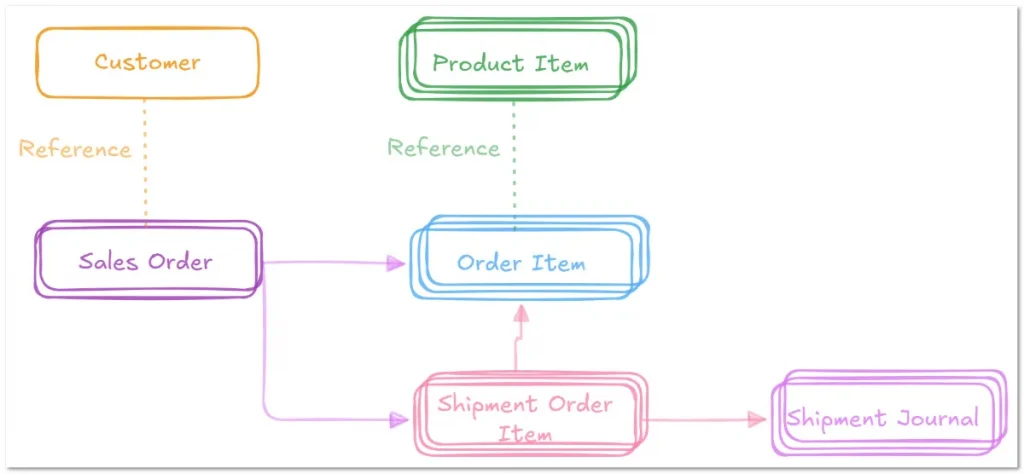
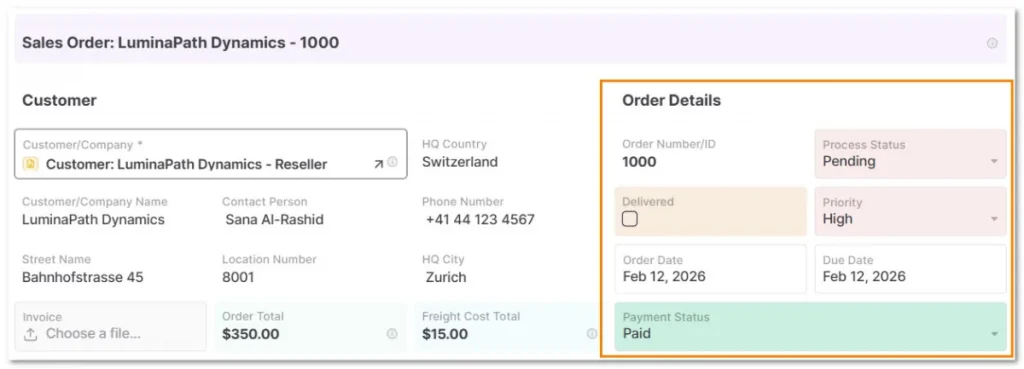
- Customer Profiles & Sales Orders: Customer records act as the reusable anchor for all account and shipping activity. Then, a new Sales Order links directly to the customer profile through a reference cell, carrying over relevant context such as order priority and status.
- Product Items & Order Items: Instead of manually typing product details, AnyDB uses an independent Product Item database that acts as your catalog (storing SKUs, descriptions, unit costs, and images). As you add Order Items to a Sales Order, you simply link them to these product records via reference cells.
- Shipment Orders & Journals: Shipment Orders & Journals: Teams create Shipment Order Items to track destinations, freight details, and transport modes during fulfillment. They attach the specific order items from the Sales Order directly to each shipment, ensuring the warehouse knows exactly what to pack. Shipment Journals then log real-time delivery events, such as “In Transportation” or “Delivered,” along with dates, notes, and photographic proof.
By structuring operations through these connected objects, AnyDB ensures that context stays visible across the entire order-to-shipment lifecycle.
This model eliminates the coordination errors, blind spots, and manual data re-entry that typically occur when teams work from separate tools.
This guide walks you through building a single source of truth for your customer organizations, product catalogs, and shipping logistics.
Don’t want to build it yourself? Claim your free setup service and we will design your custom fulfillment workflows for you!
Order Management Works When the Operation Stays Structured
Good order management is about keeping the operational record intact as the order moves through sales, inventory, fulfillment, shipping, and post-order workflows.
When that structure is missing, teams compensate with manual checks, status confirmations, and spreadsheet fixes. That approach is simply not sustainable.
A well-structured order management system keeps orders connected to the data that actually matters (products, stock, payments, shipments, and customer status) so operations remain visible, consistent, and scalable.
If your current process depends too much on reconciliation and not enough on structure, it may be time to redesign how your operation handles orders.
Book a free demo call to see how AnyDB can help you structure your order management workflow!
Frequently Asked Questions About Order Management
Still have questions? Check out more FAQs on the topic below.
What is order management?
Order management is the process of receiving, tracking, fulfilling, and updating customer orders from creation to completion.
What is an order management system?
An order management system (OMS) is software that helps teams manage orders, inventory, fulfillment, and status updates in one workflow.
How does order management work?
It works by moving orders through key steps: capture, validation, processing, fulfillment, delivery, and post-order handling.
Do small businesses need an OMS?
Yes. Once orders, channels, or fulfillment steps grow, an OMS helps avoid delays, stock errors, and manual reconciliation.

The End-to-End Operations System that Finally Fits Your Reality.
No more scattered spreadsheets or rigid, disconnected tools.
AnyDB is a modern, customizable platform for managing business records and operations across teams, clients, and partners.
Learn More


Phone: (512)-761-7979
© 2024 Humanly Inc. All rights reserved.
What is AnyDB?
AnyDB is a unified, customizable data store designed to streamline and empower your entire organization. Effortlessly store, organize, and share custom business data to drive both internal and external operations across teams. Think of it as spreadsheets on steroids.Perfect for Sales, Marketing, Operations, HR, and beyond. Discover AnyDB