
Published on March 3, 2026


A barcode inventory system is often the first upgrade companies make when manual tracking and spreadsheets begin to limit accuracy and speed. Instead of typing product codes, counting items repeatedly, and reconciling inconsistent records, teams scan labels and instantly update stock data.
The real improvement, however, comes from how information is structured behind the scan. When items, locations, and movements are connected as records, scanning becomes a reliable operational workflow rather than a simple counting tool.
This shift reduces manual errors, accelerates daily tasks, and creates the visibility needed to manage inventory with confidence.
What Is a Barcode Inventory System?
A barcode inventory system uses machine-readable labels and scanners to identify items and update stock records automatically. Each scan replaces manual data entry, ensuring that movements such as receiving, transfers, and sales are recorded quickly and accurately.
Unlike spreadsheet tracking, where updates depend on manual typing and version control, barcode workflows register changes in real time. As soon as an item is scanned, quantities, locations, and statuses reflect the new state.
This real-time visibility improves accuracy while allowing teams to trust the data they use to make operational decisions. In practice, a barcode scanning system for inventory replaces manual tracking with fast, reliable data capture, ensuring stock records remain accurate as operations grow.
How it Works
Barcode workflows follow a simple operational cycle that replaces manual tracking with automated updates. These workflows rely on standardized bar codes for inventory, ensuring each item can be identified, tracked, and updated without manual lookup.
Items receive unique labels linked to identifiers such as SKU or serial number. During receiving, storage, transfers, or sales, staff scan the label instead of typing data.
Each scan updates inventory records instantly, ensuring quantities and locations remain current.
Barcode Inventory Systems for Small Businesses
Small companies often begin with a barcoding system for small business environments, using mobile devices instead of specialized hardware. A smartphone camera or handheld scanner can register items during receiving, counting, and fulfillment.
This simplicity works well when processes are consistent and inventory volumes remain manageable. Problems emerge when growth introduces multiple locations, similar products, or higher transaction frequency.
Key Components of a Barcode Inventory System
The effectiveness of a barcode inventory system depends on how data is captured, structured, and updated across workflows:
- Barcode Labels and Printers: Labels attach unique identifiers to items, bins, or shelves, enabling consistent scanning and traceability throughout warehouse operations.
- Barcode Scanners and Mobile Devices: Handheld scanners and mobile devices capture data quickly at receiving, picking, and transfers, minimizing typing errors and workflow interruptions.
- Inventory Software and Datastores: Software transforms scanned inputs into structured records, linking products, locations, and movements to maintain a reliable inventory history.
Together, these components create a connected data flow that turns physical movements into accurate, real-time inventory records. Some organizations begin with a free barcode inventory system template to test workflows before implementing a fully integrated solution.
Benefits of Using a Barcode Inventory System
Barcode-enabled workflows improve both operational speed and data reliability, enabling teams to make decisions with confidence and:
- Improved Accuracy: Scanning replaces manual entry and ensures consistent item identification.
- Faster Inventory Counts: Cycle counts and audits take minutes instead of hours.
- Better Visibility: Real-time updates reveal current stock levels and exact locations.
- Reduced Manual Errors: Automation eliminates duplicate entries and common typing mistakes.
- Real-time Stock Updates: Inventory reflects movements immediately, supporting faster fulfillment decisions.
Over time, these improvements reduce operational friction, strengthen customer service levels, and allow organizations to scale without losing inventory control.
How to Create a Barcode Inventory System
Building a barcode inventory system is not just about printing labels and buying scanners. To deliver accurate data and reliable workflows, implementation must follow a clear operational sequence.
The steps below outline how to structure your inventory, deploy barcodes, and ensure the system supports daily warehouse activities:
- Structure your inventory as connected objects, not flat lists
Instead of dumping products into a flat spreadsheet, set up your database so that real-world entities are connected. Create “Warehouse” or “Storage Bin” records, and directly attach specific “Inventory Item” records to them. This ensures that when a barcode is scanned, the system instantly understands not just what the item is, but its exact physical context and relationships.
- Generate system-linked barcodes natively
Avoid the common trap of duct-taping third-party barcode generators to your database, which causes sync errors and broken links. Instead, use a platform where every single record automatically supports and generates its own unique QR code or barcode. This guarantees that the physical label you stick on a bin is permanently and natively tied to its digital profile.
- Deploy mobile-first scanning workflows
Establish scanning procedures for receiving, internal transfers, and shipping that can be executed directly from mobile devices. When a worker on the floor scans a code, it should instantly pull up a rich, interactive profile of that exact item, allowing them to take immediate action.
- Log transactions instead of overwriting data
Standardize your team’s processes so that scanning a barcode doesn’t just overwrite a static “Total Stock” number. Instead, every scan should log a specific transaction, such as a “Stock In,” “Stock Out,” or “Adjustment”. This creates an immutable, audit-proof history of every movement, allowing your live dashboards to calculate accurate, real-time stock levels automatically.
Warehouse Barcode Inventory Systems
In warehouse environments, a warehouse barcode system supports high-volume workflows and location-based tracking. Identifying an item is only part of the task; knowing exactly where it is stored determines how quickly it can be picked or replenished.
Many teams start with a barcode system for inventory free tools, but upgrading becomes necessary as transaction volume and operational complexity increase.
With AnyDB, every record supports QR and barcode scanning. Staff can scan a bin or product label to open the correct record instantly and log a Stock In transaction.
Suppliers can even submit digital packing slips before deliveries arrive, reducing manual entry at the dock with integrated forms.
Also, inventory items are linked to specific warehouse records. When a product is scanned or searched, users see a real-time breakdown by location rather than a single total quantity.
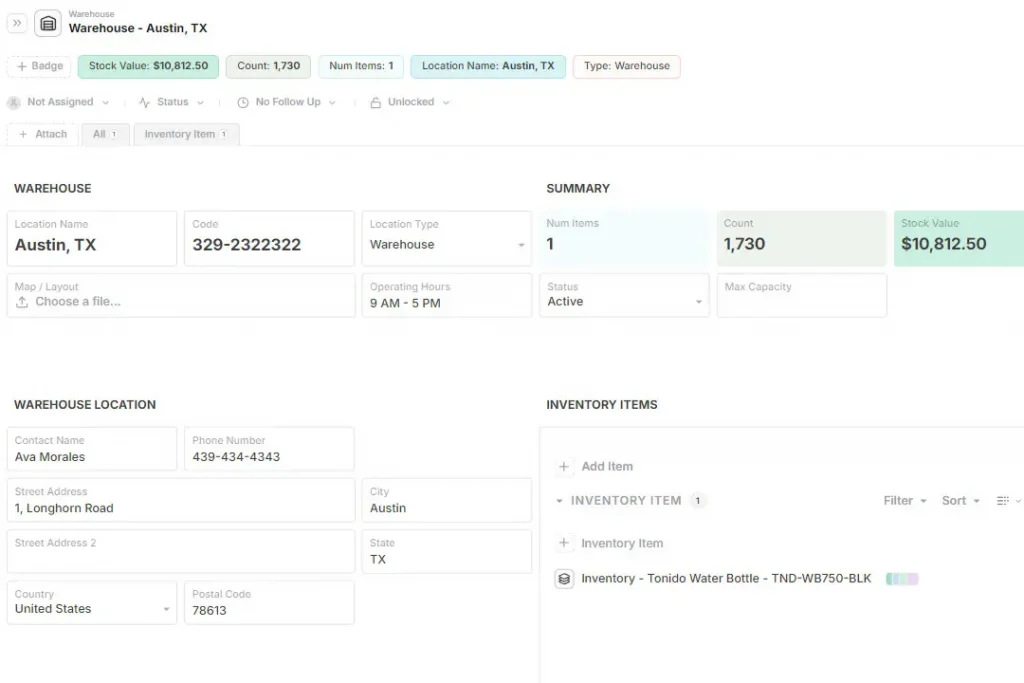
This level of visibility supports efficient picking routes, accurate replenishment, and better space utilization across storage zones.
How AnyDB Supports Barcode Inventory Systems
AnyDB treats barcodes as part of a structured inventory workflow rather than a standalone scanning feature. Barcodes function as dynamic fields linked to item records. Products exist as structured objects connected to locations, movements, and suppliers.
When a scan occurs, it updates a transaction record rather than overwriting a quantity. This ledger-based approach preserves history while recalculating current stock automatically.
AnyDB’s barcode cell type generates machine-readable codes from stored identifiers, allowing teams to label products, bins, or assets consistently. Supported formats include Code 39, Code 128, and ITF, which are commonly used in logistics and warehouse environments.
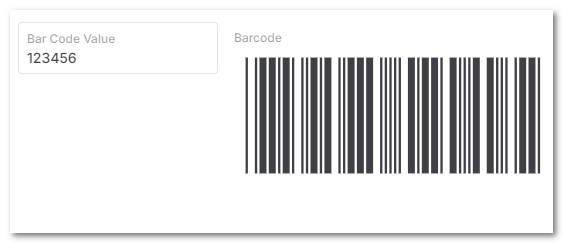
For example, a product ID stored in one field can automatically render a scannable barcode. When scanned, the system retrieves the correct record and updates inventory activity without manual lookup.
Key capabilities include:
- Barcode-ready fields embedded in records;
- Linked data across products, locations, and movements;
- Real-time quantity updates;
- Mobile access for warehouse and field use;
- Custom views and filters for operational roles;
- Flexible workflows beyond rigid inventory apps.
This structure ensures scanning feeds accurate inventory control instead of simply counting items.
Transitioning to a new barcode system shouldn’t disrupt your operations. That is why we offer a complimentary “build-it-with-you” setup service. Book a free call, and our experts will partner with you to design your data model, map your barcode scanning workflows, and migrate your existing spreadsheets.
We will set up your custom AnyDB workspace in just two weeks, so your team can start tracking instantly.
Frequently Asked Questions
Still have questions? Check out more FAQs on the topic below.
How does a barcode inventory system work?
Items receive scannable labels linked to identifiers. Scanning during receiving, movement, or sales updates inventory records instantly.
Are free barcode inventory systems reliable?
Free tools can work for simple operations, but reliability depends on data structure, workflow discipline, and real-time updating.
Do small businesses need barcode inventory systems?
Even small teams benefit from scanning because it reduces errors, speeds counts, and improves visibility as inventory grows.
What’s the difference between barcoding and inventory management software?
Barcoding captures item data quickly. Inventory software organizes, updates, and connects that data to support operational decisions.

The End-to-End Operations System that Finally Fits Your Reality.
No more scattered spreadsheets or rigid, disconnected tools.
AnyDB is a modern, customizable platform for managing business records and operations across teams, clients, and partners.
Learn More


Phone: (512)-761-7979
© 2024 Humanly Inc. All rights reserved.
What is AnyDB?
AnyDB is a unified, customizable data store designed to streamline and empower your entire organization. Effortlessly store, organize, and share custom business data to drive both internal and external operations across teams. Think of it as spreadsheets on steroids.Perfect for Sales, Marketing, Operations, HR, and beyond. Discover AnyDB