Migrating AnyDB Templates
When you edit an existing template in AnyDB, you may need to migrate records that were created using an older version of that template.
Migration ensures that all records stay consistent with the latest structure and layout defined in your updated template.
When to Migrate Records
After creating records from a template, you might later update that template to:
- Add or remove fields
- Modify formulas or field types
- Rearrange layout or sections
When you save the updated template, AnyDB automatically prompts you to review and migrate existing records.
Template Save Prompt
When you click Save, AnyDB shows a dialog listing all detected changes.
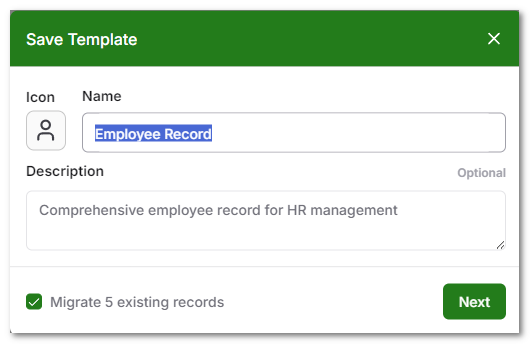
You will then see a detailed change summary showing exactly what was modified.

Understanding Template Change Types
Each change type affects your records differently. The table below summarizes what happens during migration for each type of change.
| Change Type | Description | Impact During Migration |
|---|---|---|
| New Fields Added | New fields are added to the template. | Added to all existing records with default values (empty, zero, or null). |
| Fields Removed | Fields deleted from the template. | Permanently removed from all records. Data in these fields will be lost. |
| Fields Modified | Type or formula changed (e.g., Text → Number). | Old data is preserved internally, but may not display correctly if incompatible with the new type. |
| Fields Moved | Field positions rearranged in layout. | Layout updates automatically. No data is lost if field names remain unchanged. |
New Fields Added
When you add new fields, AnyDB automatically includes them in all existing records during migration.
💡 Tip: You can later use formulas or automation to populate new fields with default or computed values.
Fields Removed
If you delete a field from the template, migration will remove that field from all records.
⚠️ Warning: Any data in removed fields will be permanently deleted.
Export your data or back up the database before performing this type of migration if you need to retain historical values.
Fields Modified
When you change a field’s type or formula, AnyDB preserves the existing data as much as possible.
If the new type is incompatible with the old data, the field may appear blank or show default values after migration.
Examples:
- Changing a text field to number: numeric values remain visible, non-numeric ones appear blank.
- Changing a date field back to text: original text value is restored.
💡 Tip: If you expect type incompatibility, consider creating a new field instead of changing the existing one.
Fields Moved
When you rearrange fields in the layout:
- The visual layout of existing records updates automatically.
- No data is lost as long as field names remain the same.
✅ Safe Operation: You can freely reorder fields without risk to record data. Make sure to keep the field name the same when making layout changes.
Performing the Migration
After reviewing and confirming changes, AnyDB will begin migrating all records created from the previous version of the template.
What happens next:
- Migration runs automatically in the background.
- Existing records are updated to match the new template structure.
- A progress indicator shows ongoing migration activity.
⚠️ Important:
Do not edit records or modify the template again until the migration process finishes.
This helps prevent inconsistencies between record data and template structure.
Best Practices
- Schedule migrations during off-peak hours if you have a large number of records.
- Always review the change summary carefully before confirming.
- If removing fields, export your data beforehand to avoid accidental loss.
- Avoid making additional edits to the same template until migration completes.
- For critical templates, test migration with a few sample records first.
Summary
Template migration in AnyDB ensures that your records stay consistent and up to date with the latest template version.
By understanding how each type of change behaves, you can confidently evolve your data structure while maintaining integrity and minimizing disruption.