AnyDB Lookup Cell
The Lookup cell type allows you to display data from a linked record inside the current record.
Instead of duplicating information, a Lookup cell reads a value from a related record and displays it dynamically. When the source record updates, the Lookup cell updates automatically.
Lookup cells are commonly used in:
- CRM systems (show Company Name inside a Deal)
- Order management (show Customer Address inside an Order)
- Asset tracking (show Location Name from a linked Location record)
- Vendor management (show Vendor Risk Score inside Contracts)
How Lookup Works
A Lookup cell:
- Selects an existing Linked Record cell
- Chooses a specific field from the linked record
- Displays that field inside the current record
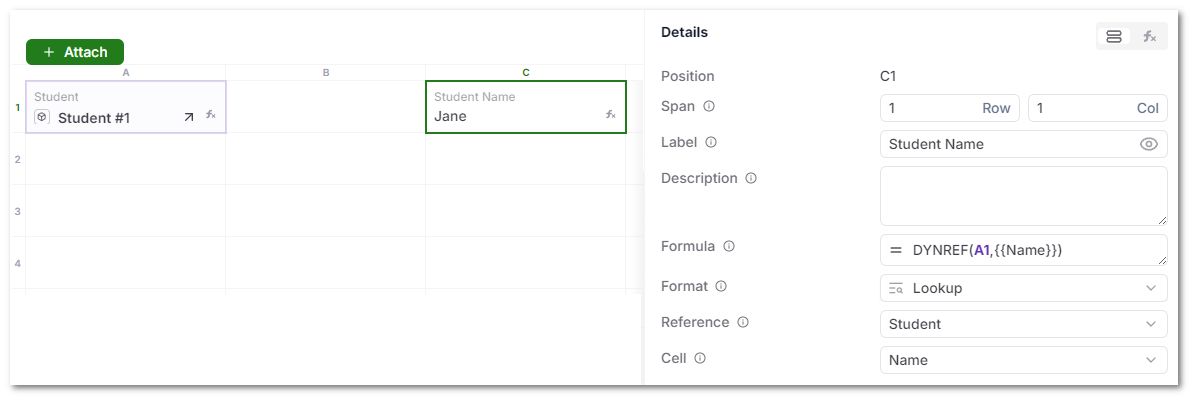
Under the hood, the Lookup cell uses a DYNREF() formula to dynamically reference the related record.
Example internal formula:
=DYNREF(A1, {{Name}})
However, users do not need to write formulas manually. The Lookup configuration handles this automatically.
Configuration Options
When configuring a Lookup cell, you will specify:
- Reference – The Linked Record cell to use
- Cell – The field from the linked record to display
Once configured, the Lookup cell behaves like a live mirror of that field.
Automatic Updates
Lookup cells are reactive.
If the linked record changes:
- The Lookup cell updates automatically
- No manual refresh is required
- Data remains consistent across records
This ensures a single source of truth across your system.
Why Use Lookup Instead of Copying Data?
Copying values between records creates:
- Data duplication
- Sync issues
- Manual maintenance
- Inconsistent reporting
Lookup keeps data connected.
You store information once and display it wherever needed.
Practical Example
Scenario: Deal linked to Company
- A Deal record links to a Company record
- The Company record contains:
- Name
- Industry
- Risk Level
Inside the Deal, you can add Lookup cells to display:
- Company Name
- Industry
- Risk Level
If the Company changes its Risk Level, all related Deals immediately reflect the update.
Best Practices
- Use Lookup for display-only related data
- Use Linked Record cells to define relationships
- Avoid duplicating important data across records
- Combine Lookup with Automation to trigger workflows based on related values