
Published on March 10, 2026


Product lookup is one of the most frequent workflows in inventory operations. Whenever a team member picks an order, checks availability, validates a physical item, or answers an internal request, they rely on the ability to locate a product and trust the information linked to it.
This workflow sits at the intersection of data structure, access speed, and operational accuracy. When these layers are misaligned, the effects are immediate: wasted time, decisions based on partial data, and constant corrective actions across teams.
In modern inventory systems, lookup becomes a core navigation layer that connects items, locations, movements, and historical records in real time. The quality of this experience directly shapes how efficiently teams operate across warehouses, production areas, and distribution networks.
What Is Product Lookup in an Inventory Management System?
Product lookup refers to locating and identifying a specific item using attributes such as SKU, barcode, serial number, product name, or physical location. Its real purpose, however, is not simply finding a record, but accessing accurate, contextual information without friction.
This capability supports daily activities like order picking, cycle counting, stock transfers, and availability checks. Each of these processes depends on fast, consistent access to reliable data to avoid interruptions and rework.
The distinction between manual searches and system-based lookup lies in data modeling.
Spreadsheets and informal controls depend on text, memory, and version discipline. On the other hand, in a structured system, each product exists as a dedicated record with defined attributes and clear relationships to locations, suppliers, and movements.
Why Product Lookup Matters in Inventory Management
Inefficient lookup quickly affects productivity. Small delays in individual queries accumulate, slowing down entire workflows. Misidentification also creates cascading issues, such as inaccurate availability data leads to stockouts, overstocking, delayed fulfillment, and unnecessary handoffs between teams.
Common consequences include:
- Excessive time spent validating or searching for items;
- Inventory inconsistencies and preventable shortages;
- Operational delays in warehousing, production, or shipping;
- Bottlenecks between purchasing, logistics, and customer support
When product information is easy to access and trustworthy, operations flow more smoothly. Teams spend less time confirming data and more time executing, improving accuracy and overall resource utilization.
Common Product Lookup Methods
Different operational contexts require different lookup approaches. Each method offers specific advantages and limitations depending on the environment.
Barcode and QR Code Scanning
Barcode and QR code scanning are widely used in physical environments such as warehouses and distribution centers. This method minimizes typing errors and accelerates identification at the point of execution.
In AnyDB, every record supports native QR codes and bar codes. They can be assigned to products, bins, or shelves, allowing mobile scans to open the exact record instantly, without manual navigation or data entry.
This removes a common failure point in physical workflows: reliance on memory or visual interpretation under operational pressure.
Keyword and SKU Search
Keyword and SKU-based search is common in administrative and planning contexts. It works well when identifiers are known and naming conventions are consistent.
Challenges arise in environments with similar SKUs, inconsistent labels, or incomplete information. In these scenarios, text-only search increases ambiguity and often requires additional validation steps to confirm the correct item.
Filtered and Attribute-Based Lookup
Filtering by attributes such as category, status, location, or supplier allows users to narrow results and identify relevant subsets of inventory more efficiently.
AnyDB supports both List View, optimized for structured data, and Grid View, designed for visual identification.
For example, a manager can locate a “red valve” by reviewing images directly in the results instead of decoding textual descriptions, reducing ambiguity in item-heavy environments.
Key Features of Inventory Management System Product Lookup
In real operational settings, locating an item requires understanding what it is, where it is, its current status, and how it connects to other records.
The capabilities below function as an integrated system, reinforcing one another to support accurate queries and timely decisions.
Instant Search by SKU, Barcode, or Serial Number
In fast-paced operations, users expect immediate access. Navigating menus or memorizing system paths slows execution.
AnyDB’s global search acts as a single entry point. By typing part of a SKU, serial number, or relevant term, users are directed straight to the correct record.
Search results retain context. Alongside the item, users can access connected records such as movements, orders, contracts, and operational logs, eliminating fragmented views and parallel validations.
Real-Time Inventory Data Across Locations
Finding an item without knowing its physical location limits decision-making. Quantity alone does not support picking, replenishment, or transfer planning.
In AnyDB, each item is linked to specific location records. When queried, the system displays distribution by site, calculated in real time from movement data.
Instead of a generic stock count, users see details like:
- Austin DC: 40
- New York: 60
This enables immediate, informed action.
Advanced Filtering and Sorting
Many operational queries begin with conditions rather than identifiers. Filters by status, category, quantity, location, or date reduce noise and highlight what matters most.
Sorting helps prioritize critical items such as low stock, aging inventory, or materials nearing expiration. This supports proactive management, allowing teams to address issues before they disrupt operations.
Detailed Product Records
Effective product lookup does not end when an item is found. It must deliver a full operational context. In AnyDB, each one has a dedicated record that serves as a central information hub. It consolidates:
- Movement history;
- Images and documents;
- Operational status;
- Relationships with suppliers and locations.
This transforms lookup into a rapid analysis tool, removing the need to switch between systems or screens.
Mobile and On-the-Go Lookup
Many queries occur away from desks, on warehouse floors, production lines, or during audits. In these moments, effectiveness depends on data structure, not screen size.
AnyDB provides mobile access to the same structured records, allowing operators to validate information and take action without relying on handwritten notes or follow-up checks.
Product Lookup Examples in Practice
When lookup is structured and connected, gains become visible across different operational contexts. For multi-warehouse environments, teams verify item availability before initiating transfers, reducing logistics costs.
Across industrial settings, parts are located by serial number or application, lowering error rates in maintenance, assembly, and replacement processes.
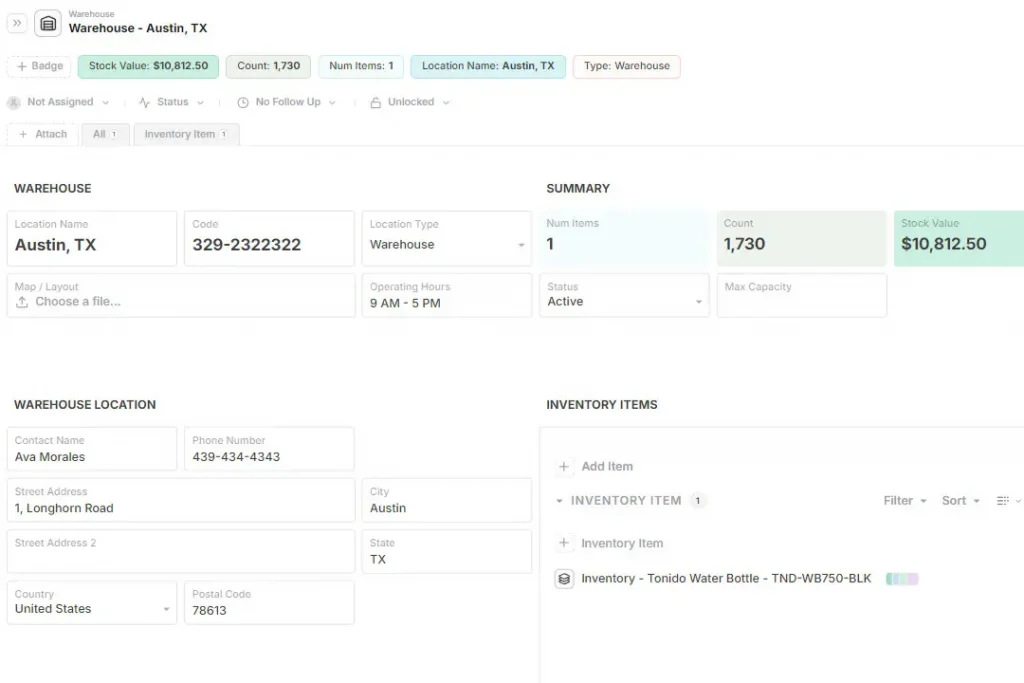
In retail, real-time visibility prevents inaccurate customer commitments and improves the buying experience, especially in omnichannel operations, as shown in the Warehouse Template below:
Limitations of Spreadsheet-Based Product Lookup
Spreadsheets still appear as inventory tools, but they show clear structural limitations when used for item lookup. Search relies on Ctrl+F, manual scrolling, and updated versions.
There is no guarantee the displayed data is current, nor proper support for images, history, or multiple locations.
Small editing mistakes can break formulas, erase relationships, or create inconsistencies that are difficult to trace.
While spreadsheets are flat structures, AnyDB works with deep, connected records. Each row becomes a navigable object with history, relationships, and operational context. The result is less fatigue, fewer errors, and significantly higher confidence in day-to-day queries.
How AnyDB Enables Flexible Product Lookup
AnyDB organizes products as structured records connected to locations, suppliers, and movements. Identifiers such as SKUs, codes, and keywords coexist within the same object, with data always kept current.
Custom filters, flexible views, and mobile access allow lookup to adapt to real operational contexts without imposing rigid system constraints.
The key differentiator is the combination of global search and visual recognition. Instead of forcing exact terms or exposing users to confusing lists, AnyDB supports locating items through text, images, and contextual cues.
The result is a system that adapts to the existing inventory model, not the other way around.
Frequently Asked Questions About Product Lookup
Below are some of the most common questions teams have when evaluating how product lookup fits into real inventory operations.
Can I look up products across multiple warehouses?
Yes. Modern systems allow you to search a single item and instantly see its availability across all locations, with quantities updated in real time.
Do small businesses need inventory product lookup systems?
As soon as inventory grows beyond a few SKUs or locations, structured lookup helps reduce errors, save time, and support better purchasing decisions.
Can spreadsheets handle product lookup effectively?
Spreadsheets work for basic lists, but they struggle with real-time updates, multiple locations, history, and reliable search as operations scale.

The End-to-End Operations System that Finally Fits Your Reality.
No more scattered spreadsheets or rigid, disconnected tools.
AnyDB is a modern, customizable platform for managing business records and operations across teams, clients, and partners.
Learn More


Phone: (512)-761-7979
© 2024 Humanly Inc. All rights reserved.
What is AnyDB?
AnyDB is a unified, customizable data store designed to streamline and empower your entire organization. Effortlessly store, organize, and share custom business data to drive both internal and external operations across teams. Think of it as spreadsheets on steroids.Perfect for Sales, Marketing, Operations, HR, and beyond. Discover AnyDB