
Published on October 9, 2025


Audit management software should make one thing easy to prove: how an audit moved from planning to execution, review, findings, and closure.
While many organizations routinely conduct internal, supplier, and compliance audits, the lack of data connectivity often creates operational bottlenecks. To demonstrate compliance effectively, stakeholders must be able to instantly retrieve:
- What was planned;
- Which schedule applied;
- Which checklist or standard guided the review;
- What evidence was collected;
- What failed;
- Who owned the finding;
- Who approved the review;
- Whether the corrective action was completed.
Strong audit tracking depends on connected records. Audit plans, schedules, checklists, standards, evidence, findings, owners, approvals, corrective actions, and audit trails need to stay linked throughout daily work.
That is what separates useful audit management tools from systems that simply store files after the review is done.
What Is Audit Management Software?
Audit management software is a system used to plan, schedule, execute, document, report, and follow up on audits.
A useful audit management system should support the full audit lifecycle, including:
- Risk assessment;
- Audit planning;
- Scheduling;
- Checklist creation;
- Field execution;
- Evidence gathering;
- Findings documentation;
- Reporting;
- Corrective action tracking;
- Audit trail preservation.
The value comes from keeping these stages connected. An audit record has limited value if it is not linked to the evidence collected, the findings identified, the owner assigned, the approval history, and the corrective actions that close the review.
This matters across several audit types. Internal audits, supplier audits, quality audits, ISO audits, IT audits, financial audits, operational audits, and regulatory audits all depend on the same basic structure: a planned review, documented evidence, accountable owners, and a clear trail from finding to resolution.
Many audit tools manage this through checklists and files. AnyDB takes a more connected approach. Audits can be structured as business records linked to departments, suppliers, assets, compliance requirements, evidence, findings, approvers, and remediation tasks.
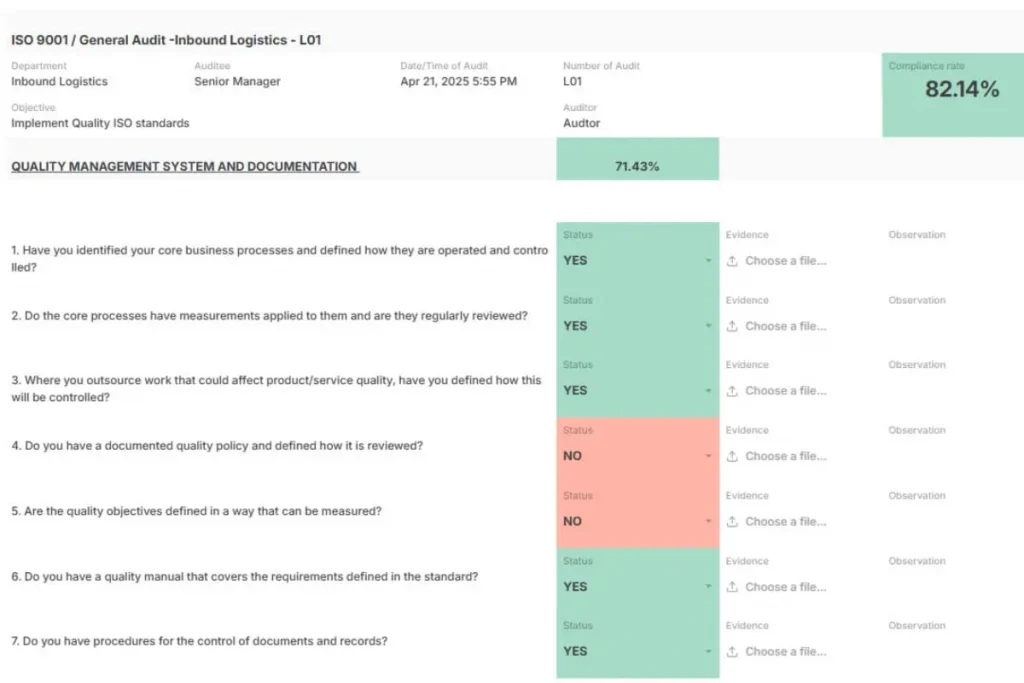
That structure helps teams move from isolated audit files to a review process that remains traceable across the organization.
Core Features Of Audit Management Software
The best audit management software should do more than move audit tasks into a digital format. It should preserve the relationships between schedules, standards, evidence, findings, owners, approvals, and corrective actions.
Automated Scheduling
Audit schedules lose value when they depend on calendar reminders and manual follow-ups.
Recurring internal audits, supplier audits, compliance audits, financial audits, and operational reviews need clear ownership from the beginning.
The schedule should connect to the audit type, scope, department, applicable standard, responsible auditor, and due date.
That structure prevents missed review cycles and helps teams understand why each audit is happening, who owns it, and what requirement it supports.
In AnyDB, audit schedules can connect to responsible owners, departments, standards, follow-up dates, and recurring workflows. This keeps audit timing inside daily operations instead of leaving it isolated in a calendar.
Pro Tip: reminders from software are often more effective than the twentieth “just checking in” email from your audit lead. Automated alerts keep tasks on track, and overdue items can escalate to leadership before they become liabilities.
Digital Checklists
A checklist is only useful when it reflects the current standard, requirement, or internal procedure.
Paper forms and static spreadsheets make it difficult to standardize audit execution across teams, sites, and departments. When a standard changes, such as ISO, TISAX, or GDPR requirements, outdated checklist versions can remain in circulation.
Digital checklists help teams execute audits consistently and update review criteria across locations with less friction.
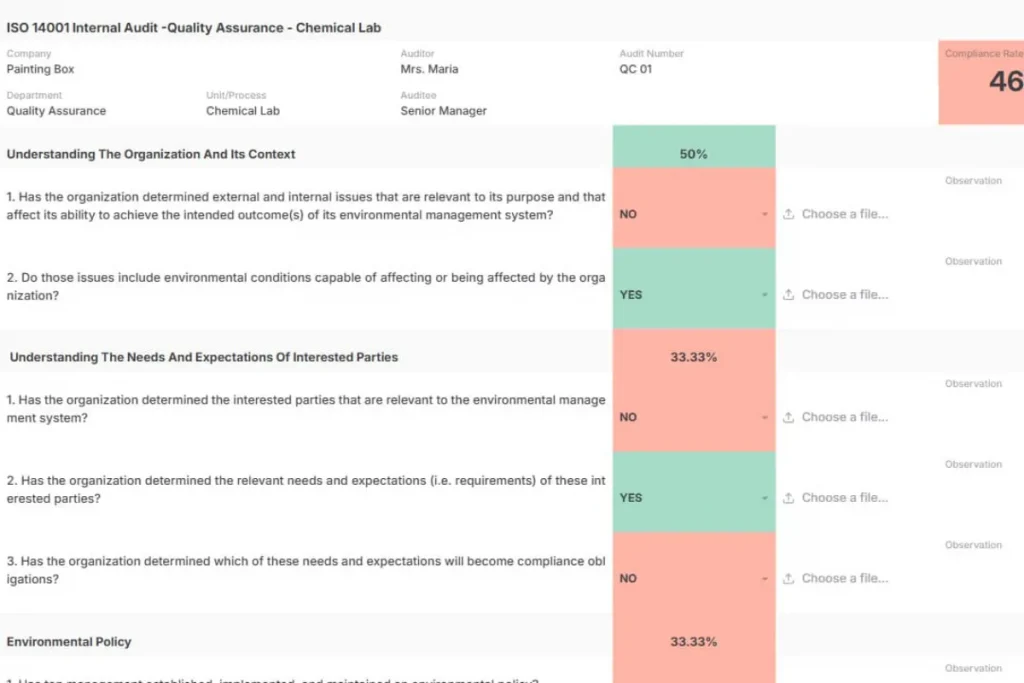
In AnyDB, checklist templates can connect to audit records, compliance requirements, departments, evidence fields, and corrective action workflows. This keeps the checklist tied to the operational review, not stored as a separate file.
Evidence Gathering
Evidence should remain attached to the audit question it supports.
During audits, teams may collect photos, documents, screenshots, notes, signatures, inspection records, or reports. If that evidence is stored separately from the finding, reviewer, or requirement, teams lose the context needed to defend the review later.
This matters in remote audits, supplier reviews, field inspections, and factory-floor audits, where evidence is often captured during active work.
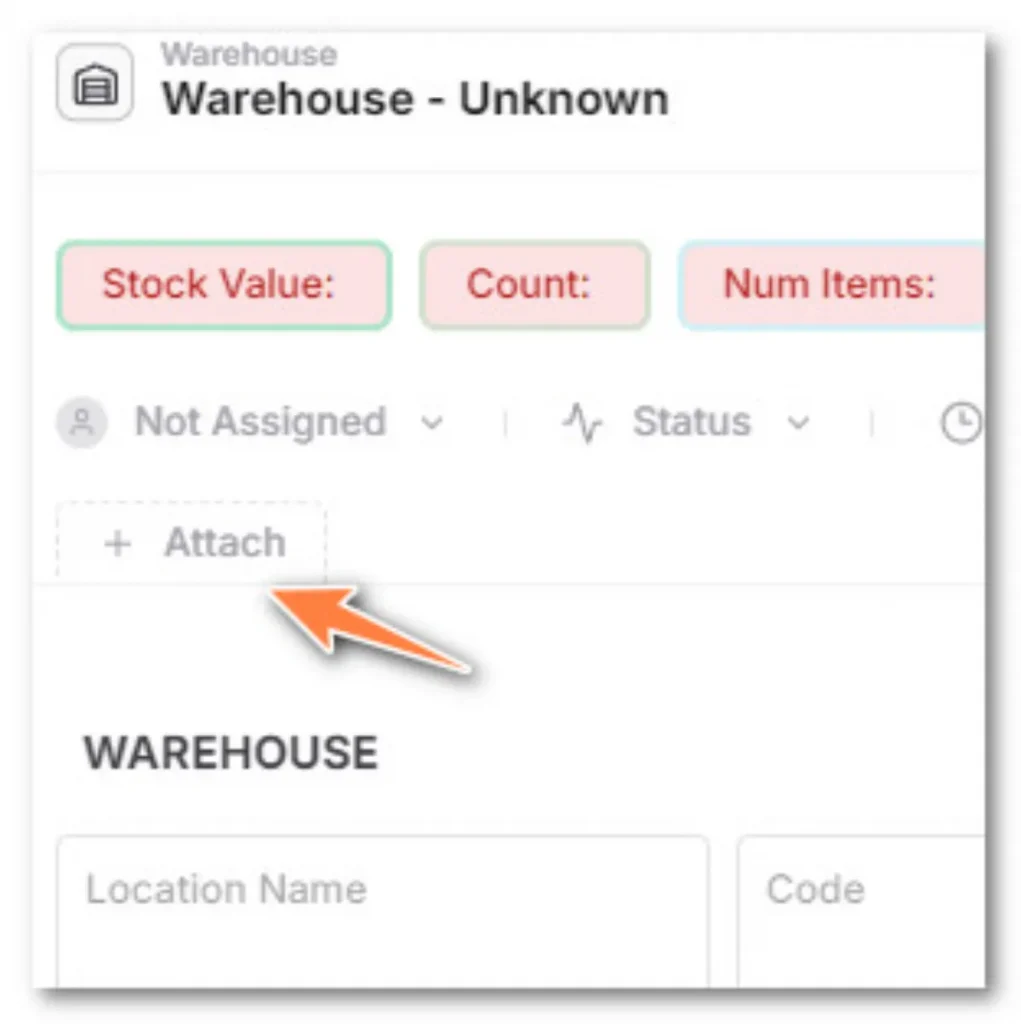
AnyDB allows teams to attach files, photos, notes, and documents directly to audit records, findings, assets, suppliers, or compliance requirements. The evidence stays connected to the review trail from the moment it is collected.
Corrective Action Tracking
An audit is incomplete when findings are documented but follow-up is not controlled through closure.
Non-conformances should connect to assigned owners, deadlines, progress updates, status changes, approvals, and proof of completion. Otherwise, audit reports become records of problems rather than drivers of improvement.
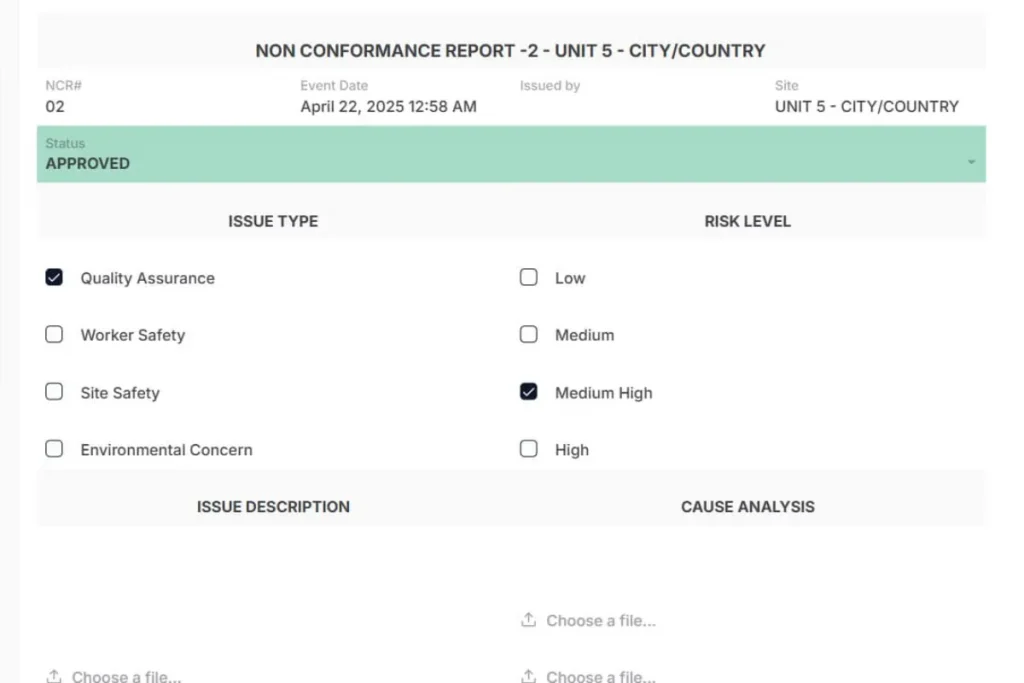
In AnyDB, findings can link to corrective action records, owners, due dates, evidence, approvals, and final completion status. This gives teams a clearer way to manage remediation from assignment to closure.
Audit Trails
An audit trail preserves the history of what changed, who changed it, when it changed, and why it changed.
This history matters for regulator reviews, financial audits, compliance documentation, and internal accountability. In some markets, this is also described as “revisionssicherheit,” or revision-proof documentation.
A strong audit trail helps teams prove that the review process was controlled, not reconstructed after the fact.
Collaboration and access control
Auditors, compliance officers, and stakeholders often work across teams and geographies. Secure sharing, role-based permissions, and discussion threads keep collaboration smooth while ensuring that sensitive information is only visible to those who need it.
How To Choose The Right Audit Management Software
Choosing audit management software starts with one question: can the system preserve the full review trail while adapting to how your organization conducts audits?
- Map Your Audit Types
List the audits your team manages, such as supplier audits, internal audits, ISO audits, financial reviews, operational audits, or compliance audits. Each audit type may require different checklists, evidence, owners, approvals, and corrective actions.
- Evaluate Workflow Flexibility
Check whether the software can reflect how each audit actually moves from planning to closure. If every review must follow the same rigid path, teams will eventually create workarounds outside the system.
- Review Checklist And Evidence Management
Assess how the platform handles checklist customization, evidence collection, file attachments, notes, photos, and documentation. Evidence should stay connected to the audit item, finding, requirement, and reviewer.
- Check Corrective Action Tracking
A useful system should assign corrective actions, define owners, track deadlines, show status updates, and store proof of completion. Findings lose value when follow-up is managed separately.
- Confirm Audit Trail And Permission Controls
The system should show what changed, who changed it, when it changed, and why. It should also control access to sensitive audit records, especially in financial, supplier, or compliance reviews.
- Look Beyond Standalone Audit Tools
Audit work becomes harder when each audit type requires another specialized tool. Spreadsheets are flexible but fragile, enterprise platforms can be rigid, and narrow tools often create new silos.
- Prioritize Connected Operational Records
The strongest model connects audits to requirements, vendors, assets, departments, employees, documents, approvals, and remediation tasks. AnyDB supports this structure by allowing teams to build audit workflows around connected business records without breaking the review trail.
Using AnyDB For Audit Management
AnyDB helps teams manage audits as connected operational workflows rather than isolated review files.
The platform already includes structured compliance and audit templates, including ISO 14001 Internal Audit and ISO 9001 Internal Audit templates. These templates give teams a practical starting point while still allowing them to adapt fields, records, workflows, forms, and relationships to their own audit process.
This flexibility matters because audit work rarely stays inside one department.
A quality audit may involve production records, supplier documentation, asset inspections, employee training, and corrective actions. A regulatory review may require compliance requirements, policy approvals, evidence files, owners, and audit trails. In AnyDB, those records can stay connected in the same environment.
Imagine a team running an internal audit while preparing for a regulatory compliance review. Instead of managing one workflow in spreadsheets and another in a separate compliance tool, AnyDB allows both processes to share the same operational foundation.
Findings connect to evidence. Evidence connects to requirements. Corrective actions connect to owners, deadlines, approvals, and proof of completion.
To log audit process becomes easier to control because the system preserves the relationships behind the work.
The Importance of Audit Management
Audit management has always been about discipline and oversight, but the way organizations approach it has changed dramatically. Traditional audits often lean on spreadsheets, endless email threads, and evidence scattered across systems.
For small teams, this can be frustrating. For complex organizations, it becomes a real bottleneck.
This is where audit management steps in as more than a compliance exercise. It becomes a strategic function. Strong audit practices protect organizational integrity, prevent risks before they escalate, and provide leadership with insights that guide better decisions.
The shift is clear. Manual oversight keeps teams reactive, chasing down evidence and patching issues after the fact. Audit management software changes the game by making audits proactive.
It provides visibility across operations, ensures traceability of every action, and applies data analytics to uncover patterns that manual reviews would miss.
The organizations that recognize this are the ones building resilience in an increasingly complex regulatory environment.
Technology has reshaped almost every business function, and audit is no exception.
Audit Management Software As A System For Operational Review
Audit management software is valuable because it standardizes how organizations review work, collect proof, assign follow-up, and preserve accountability.
The strongest audit processes do more than document findings. They keep the full review trail connected from planning to closure.
When audit data is disconnected, teams spend time reconstructing what happened after the review is complete. They search for files, validate spreadsheets, confirm approvals, and rebuild the chain between evidence and action.
A connected audit model keeps that story available continuously.
AnyDB allows teams to build audit workflows around connected business records rather than rigid audit modules. Audit plans can link to checklists, evidence, findings, responsible owners, approvals, corrective actions, suppliers, assets, compliance requirements, and operational records.
This gives operations leaders, compliance managers, quality teams, and finance leaders a clearer way to manage audits as part of daily operations, with stronger traceability when proof is needed.
Book a free demo call with AnyDB and see how your team can build audit workflows with stronger traceability, better review control, and more flexible operations.
Frequently Asked Questions About Audit Management Software
Before choosing audit management software, it helps to clarify a few concepts that influence software evaluation, audit readiness, and long-term operational fit.
What Is Audit Management Software?
Audit management software is used to plan audits, manage checklists, collect evidence, document findings, track corrective actions, and preserve audit trails.
What Is The Best Audit Software?
The best audit software depends on audit type, company size, compliance requirements, and whether the organization needs a dedicated audit tool, GRC platform, or flexible operational system.
What Are The Big 4 Audit Platforms?
Big 4 firms use a mix of proprietary audit platforms, analytics tools, and enterprise systems. For most companies, the better question is which platform fits their audit workflow and evidence requirements, such as AnyDB.

The End-to-End Operations System that Finally Fits Your Reality.
No more scattered spreadsheets or rigid, disconnected tools.
AnyDB is a modern, customizable platform for managing business records and operations across teams, clients, and partners.
Learn More


Phone: (512)-761-7979
© 2024 Humanly Inc. All rights reserved.
What is AnyDB?
AnyDB is a unified, customizable data store designed to streamline and empower your entire organization. Effortlessly store, organize, and share custom business data to drive both internal and external operations across teams. Think of it as spreadsheets on steroids.Perfect for Sales, Marketing, Operations, HR, and beyond. Discover AnyDB