
Published on January 20, 2026


Spreadsheets in Excel or basic purchase systems are often the first step to gain more control over inventory. But as your operations grow, errors like negative stock, duplicate orders, and lack of visibility start to appear. With this opportunity to improve internal processes, it’s worth taking a closer look at an inventory system for small business.
Over time, it helps prevent waste, organizes purchasing, and ensures your team works with reliable information, without relying on fragmented or overly complex solutions.
Below, we’ll explore what makes a good inventory system for small businesses and which features are essential.
What is an Inventory System for Small Business?
An inventory system is a tool that records, tracks, and manages product stock in real time, including quantity levels, locations, and incoming or outgoing movements.
Manual spreadsheets, for instance, don’t automatically sync information, making them highly prone to errors.
On the other hand, compared to ERPs, an inventory system is simpler, more affordable, and faster to deploy without large investments or lengthy implementation periods.
Here are some of the main benefits of investing in an inventory system for small business:
- Maintain the right stock balance to meet demand without tying up too much working capital;
- Track each SKU, batch, or item reliably;
- Automate reorder processes to simplify operations;
- Gain real-time visibility into stock across stores, warehouses, or sales channels simultaneously.
Key Features to Look For
Here are the main features you should look for in an inventory system for a small business:
- Real-time tracking: Every sale, return, or stock entry is recorded instantly, preventing discrepancies and enabling faster decision-making.
- Low-stock alerts: Automatic notifications when stock levels reach the minimum threshold, triggering reorders before you run out.
- Multi-location support: Stores, warehouses, and online channels stay synchronized, keeping inventory accurate across all points of sale.
- Barcode, QR Code & serial tracking: Speeds up receiving, picking, and traceability, including warranty management and movement history.
- Reporting & dashboards: Actionable dashboards on turnover, COGS, and aging stock, helping make strategic decisions.
- Integrations: Connect your POS, e-commerce platforms, and accounting tools, reducing duplication and manual work.
- User access control: Define who can view, edit, or approve records, ensuring security and accountability.
Best Inventory Systems for Small Businesses
Now that you know the essential features, let’s look at some of the best inventory systems for small businesses. We’ll highlight which type of business each tool is best for, its core capabilities, practical benefits, and any limitations or watch-outs.
1. AnyDB
Most small businesses outgrow spreadsheets long before they can justify an ERP. AnyDB bridges that gap by giving teams a structured, relational system with the simplicity of a spreadsheet and the power of a connected database.
Best For
Businesses that need to track inventory across warehouses, manage suppliers, and connect purchasing, finance, and fulfillment workflows in one place.
Key Features
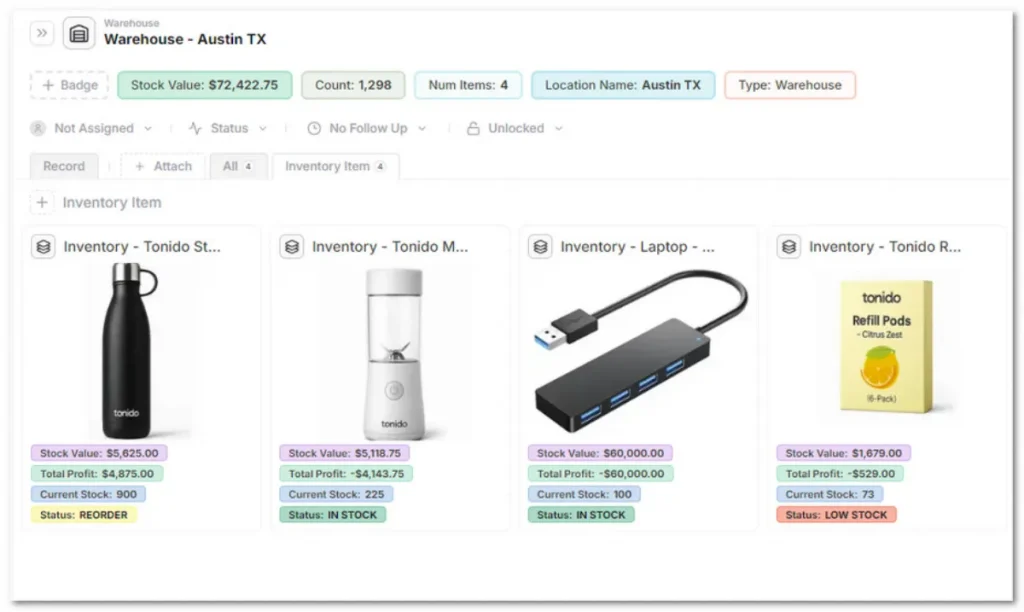
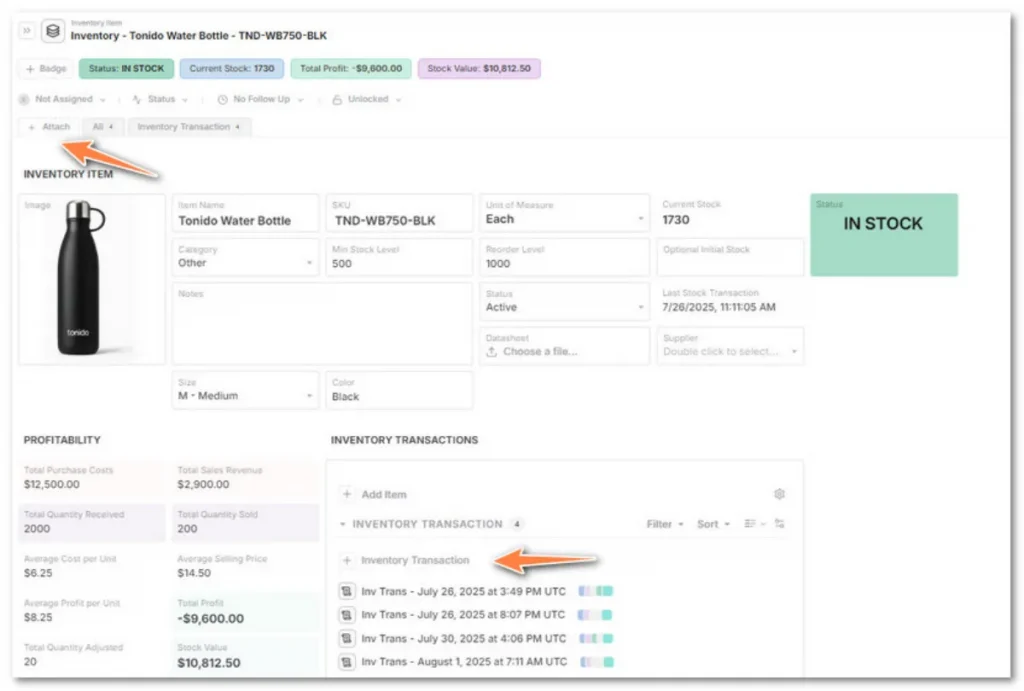
- Create linked databases for Warehouses, Inventory Items, and Transactions;
- Import products or SKUs directly from Excel or CSV (no developer setup needed);
- Use pre-built Inventory templates or start from scratch with your own record fields;
- Automatically calculate stock levels, item value, and profit per SKU based on live transactions;
- Record Stock In/Out, Transfers, and Adjustments with attached POs, shipping docs, or inspection notes;
- View low-stock alerts and reorder warnings with color-coded formulas;
- Share filtered views with finance, warehouse, or vendor partners (no extra seat fees);
- Define cell-, record-, or group-level permissions for precise data visibility;
- Add inspection notes, compliance documents, and supplier certifications directly to each record;
- Build dashboards to monitor inventory value, turnover, or supplier performance in real time;
Filter data by warehouse, item category, or stock status for better decision-making; - Every time a new record is created a QR code is created with it;
- CSV/XLSX import/export, API access, Zapier, and Make automations.
Watch-outs
- No offline mode yet;
- Internal advanced automation is still in development, but you can already achieve this using Make, Zapier, or our API.
2. Zoho Inventory
Zoho Inventory is a practical solution, integrated with the Zoho suite, an option for beginner teams that need stock control.
Best For
Small businesses already using Zoho or looking for a free, easy-to-set-up tool.
Key Features
- Full integration with other Zoho apps;
- Real-time inventory control with low-stock alerts;
- Order, sales, and shipment management directly from the Zoho dashboard;
- Basic reports for monitoring stock turnover.
Watch-outs
- Limited data analytics and reporting compared to more flexible, connected systems;
- High long-term costs, as many advanced features or additional users require paid upgrades;
- Rigid structure makes it difficult to adapt workflows as the business evolves;
- Most customizations require technical users or external support, increasing dependency and cost;
- Learning curve can be steep for non-technical or non-managerial staff, often requiring extra training;
- Common complaints on user forums (e.g., Reddit) highlight slow configuration, limited flexibility, and challenges scaling processes over time.
3. Sortly
Sortly is a visual, mobile-first inventory system with barcode support, ideal for teams managing up to 1,000 SKUs.
Best For
Small businesses or teams prioritizing an intuitive interface and fast mobile inventory management.
Key Features
- Visual product catalog with photos;
- Barcode and QR code support;
- Product tracking by location or category;
- Low-stock alerts and automatic notifications.
Watch-outs
- Less suitable for very large inventories or complex processes;
- Advanced features require paid plans.
4. inFlow Inventory
inFlow Inventory combines a simple UI with advanced paid features like barcode scanning and a B2B showroom.
Best For
Small businesses needing advanced functions such as barcode scanning, multi-warehouse management, and B2B sales.
Key Features
- Clean and user-friendly interface;
- Barcode support and product tracking;
- Order and inventory management across multiple locations;
- Detailed reports on sales, stock turnover, and inventory;
- Integration options with POS and accounting on advanced plans.
Watch-outs
- Steeper learning curve for advanced features;
- Full functionality requires paid plans, potentially adding costs.
5. Katana
Katana is designed for small manufacturers needing control over BOMs (Bill of Materials), WIP (Work in Progress), and production planning, offering specialized solutions for light manufacturing.
Best For
Small manufacturers or businesses handling production, managing raw materials, production orders, and manufacturing schedules.
Key Features
- Real-time production planning and WIP tracking;
- Material control and BOM management;
- Multi-channel sales support and e-commerce integration;
- Detailed reports on production, inventory, and costs.
Watch-outs
- More complex initial setup and longer implementation time;
- Advanced features may require paid plans, increasing investment.
Choose the Right Inventory System For Your Small Business
Here’s a practical checklist to help you choose the right inventory system based on your business complexity and needs:
- Business complexity: How many SKUs do you manage? How many stock locations? What’s your growth stage?
- Implementation time: Assess how quickly your team can go live.
- Budget and scalability: Consider total cost, including additional fees or extra users.
- Security and permissions: Ensure proper audit trails and access control.
- Pilot test: Import a small data sample before fully migrating.
- Tool flexibility: Check whether the system lets you adapt fields, workflows, and inventory processes without relying on developers or paid support.
Ready to try a reliable inventory system for small businesses? Start testing with AnyDB’s free Inventory template. Import your SKUs, connect your vendors, and see how much smoother stock management can be!
FAQs About Inventory System For Small Businesses
Learn more about inventory systems for small businesses by checking the answers to the most common questions.
What’s the best inventory system for small businesses?
It depends on your scale and integration needs. AnyDB offers flexibility for both retail and light manufacturing, adapting as your business grows.
Can I manage inventory with Excel?
Yes, but spreadsheets are prone to errors, lack live updates, and provide no traceability. AnyDB centralizes and automates stock management in real time.
Is SAP an inventory system?
SAP includes inventory modules as part of a full ERP suite. For most small businesses, this is overly complex and costly.
What’s the cheapest inventory management option?
Start with a free or low-cost tool like AnyDB, and upgrade only when your SKU count or operational complexity increases.

The End-to-End Operations System that Finally Fits Your Reality.
No more scattered spreadsheets or rigid, disconnected tools.
AnyDB is a modern, customizable platform for managing business records and operations across teams, clients, and partners.
Learn More


Phone: (512)-761-7979
© 2024 Humanly Inc. All rights reserved.
What is AnyDB?
AnyDB is a unified, customizable data store designed to streamline and empower your entire organization. Effortlessly store, organize, and share custom business data to drive both internal and external operations across teams. Think of it as spreadsheets on steroids.Perfect for Sales, Marketing, Operations, HR, and beyond. Discover AnyDB