Invite AnyDB Support
Before AnyDB Support can help with setup, configuration, or troubleshooting, an admin must add the AnyDB Support team to your AnyDB team.
Adding support gives the AnyDB team the access needed to review your team configuration and investigate the issue directly.
Before You Begin
- You must be a team owner or team admin.
- Open the AnyDB team where you need help.
- Add AnyDB Support before sending a troubleshooting request, so the support team can check the issue without delays.
Add AnyDB Support to Your Team
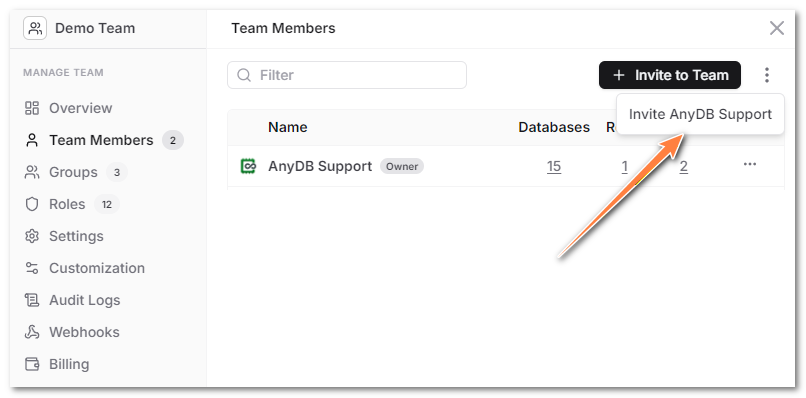
- Open your AnyDB team.
- Click the Manage Team icon in the left sidebar.
- Select Team Members.
- Click the menu next to Invite to Team.
- Select Invite AnyDB Support.
- Confirm that AnyDB Support appears in the team member list.
After AnyDB Support is added, reply to your support ticket or email and let us know which team needs to be checked.
What Support Can Help With
AnyDB Support can use this access to help with:
- Initial team setup
- Database and type configuration
- Permission and role troubleshooting
- Workflow, automation, and integration issues
- Error investigation and account-specific troubleshooting
After the Issue Is Resolved
If you no longer need AnyDB Support in your team, you can remove the support member from the Team Members page.