Granular Permissions
This page is the reference. It lists every permission a role can contain and what each built-in role grants. To understand how these permissions are combined, searched up the parent chain, overridden and inherited, read How Access Control Works. For step-by-step tasks, read Managing access.
Areas and levels
A permission has two parts: an area (what part of a resource it covers) and a level (what you may do there).
Levels
| Level | Meaning |
|---|---|
| Read (R) | View it. |
| Update (U) | Change it. |
| Create (C) | Add new things. |
| Delete (D) | Remove it. |
| All | Every level above. |
| Deny | An explicit block. Nothing in the same entry can give the access back. |
Levels are independent. Update does not include Read: a role can allow Update and deny Read (the Write Only role does). Create does not include Read either.
In the tables below, a cell shows the levels a role allows. (not X) means level X is explicitly denied. A dash (–) means the role says nothing about it. Deny means every level is explicitly denied.
Areas
Every resource has a Self area. The other areas depend on the resource.
| Area | Where | What it covers |
|---|---|---|
| Self | Team, workspace, record, group, user | Operations on the resource itself: viewing, editing, deleting it. |
| Admin | Team, workspace, group, user | Administration of the resource. For a workspace this is what allows creating, changing and deleting its types, its sequence numbers, its export mappings and importing customizations. |
| Attached | Team, workspace, record | Operations on what sits under it: a team's workspaces, a workspace's records, a record's child records. Creating a child record needs Create here, not on Self. |
| Users | Team | Operations on the team's existing members. |
| Share | Team, workspace, record | Operations related to sharing the resource. |
Creating a child record is checked against Attached / Create on the parent record, not against Self / Create. A person can be allowed to edit a record but not to add records under it.
Built-in roles
These roles are built in and cannot be changed or deleted. Custom roles are not available yet. In the product, Manage Team → Roles → View shows the same information for each role.
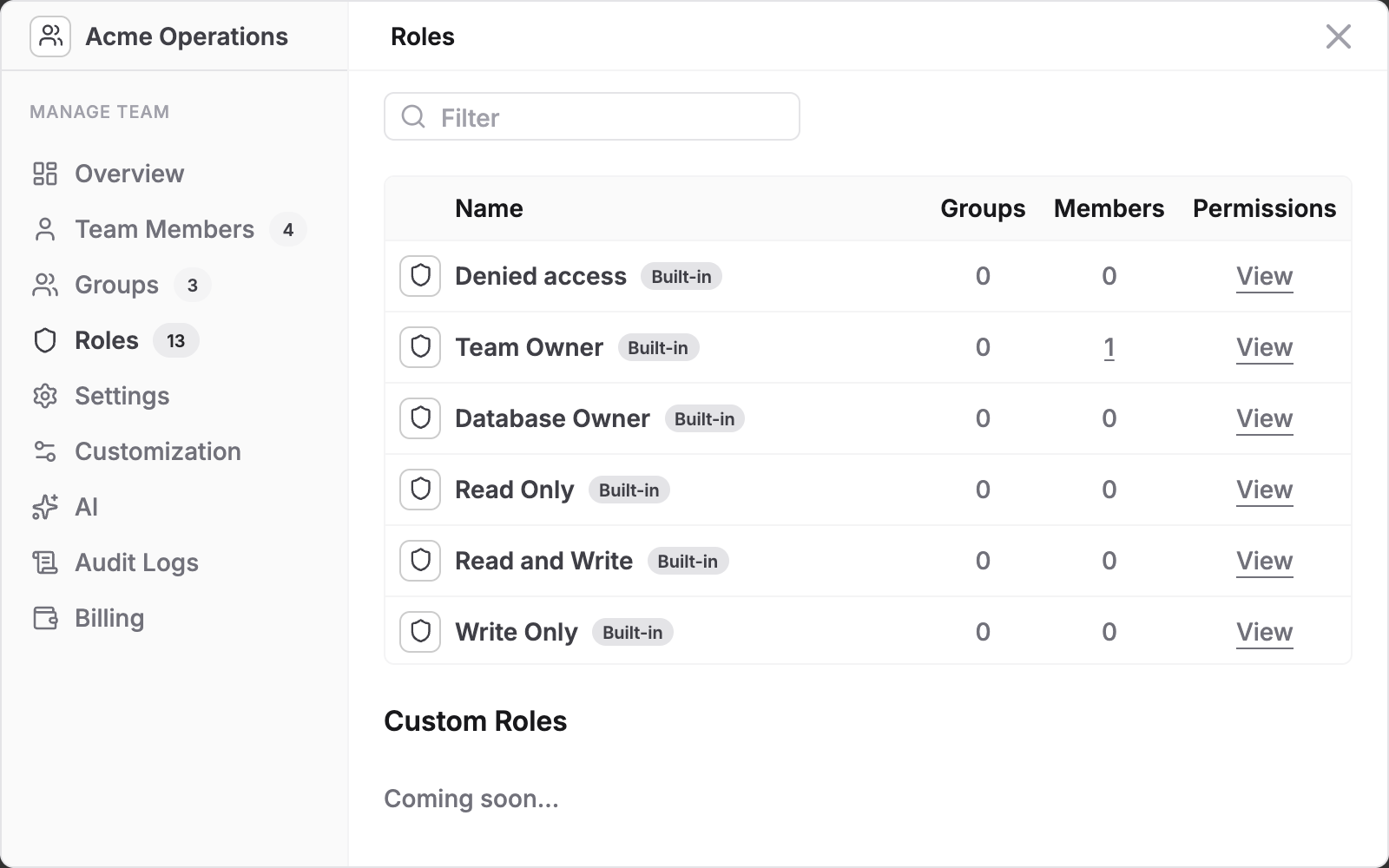
| Role | Purpose |
|---|---|
| Team Owner | Full control of the team, its workspaces and records. |
| Database Owner | Full control of one workspace and its records. Can only read the team. |
| Database Member | Works with every record in one workspace. Cannot administer or share the workspace. |
| Team Member | Can see the team, members and groups. Denied on workspaces and records until granted lower down. |
| Read Only | View only. |
| Read and Write | View and edit. Create works on records but delete is denied. |
| Write Only | Edit without viewing. |
| Record Viewer | View a shared record (used for guests). |
| Record Editor | View and edit a shared record, but cannot delete it. |
| Record Editor (no new records) | Edit existing records in a shared view but not create new ones. |
| Denied access | Blocks everything. |
| User Owner, Group Owner | Full control of one user profile or one group. |
What each role allows
Legend: C create, R read, U update, D delete, All every level, Deny every level explicitly denied, – nothing said.
Team areas
| Role | Self | Admin | Attached | Users | Share |
|---|---|---|---|---|---|
| Denied access | Deny | Deny | Deny | Deny | Deny |
| Team Owner | All | All | All | All | All |
| Database Owner | R | Deny | R | R | R |
| Read Only | R | Deny | R | R | R |
| Read and Write | R | Deny | RU | RU | RU |
| Write Only | U (not R) | All | U (not R) | U (not R) | U (not R) |
| Team Member | R | Deny | R | R | R |
| Database Member | R | Deny | R | R | R |
| User Owner | Deny | Deny | Deny | Deny | Deny |
| Group Owner | Deny | Deny | Deny | Deny | Deny |
| Record Viewer | Deny | Deny | Deny | Deny | Deny |
| Record Editor | Deny | Deny | Deny | Deny | Deny |
| Record Editor (no new records) | Deny | Deny | Deny | Deny | Deny |
Database (workspace) areas
| Role | Self | Admin | Attached | Share |
|---|---|---|---|---|
| Denied access | Deny | Deny | Deny | Deny |
| Team Owner | All | All | All | All |
| Database Owner | All | All | All | All |
| Read Only | R | Deny | R | R |
| Read and Write | RU | Deny | RU | RU |
| Write Only | U (not R) | All | U (not R) | U (not R) |
| Team Member | Deny | Deny | Deny | Deny |
| Database Member | R | Deny | CRUD | Deny |
| User Owner | Deny | Deny | Deny | Deny |
| Group Owner | Deny | Deny | Deny | Deny |
| Record Viewer | Deny | Deny | Deny | Deny |
| Record Editor | Deny | Deny | Deny | Deny |
| Record Editor (no new records) | Deny | Deny | Deny | Deny |
Record areas
| Role | Self | Attached | Share |
|---|---|---|---|
| Denied access | Deny | Deny | Deny |
| Team Owner | All | All | All |
| Database Owner | All | All | All |
| Read Only | R | R | R |
| Read and Write | CRU (not D) | CRU (not D) | CRU (not D) |
| Write Only | CU (not R) | CU (not R) | Deny |
| Team Member | Deny | Deny | Deny |
| Database Member | All | All | All |
| User Owner | Deny | Deny | Deny |
| Group Owner | Deny | Deny | Deny |
| Record Viewer | R | R | R |
| Record Editor | CRU (not D) | CRU (not D) | CRU (not D) |
| Record Editor (no new records) | RU (not CD) | CRU (not D) | R |
Group and user areas
| Role | Self (group) | Admin (group) | Self (user) | Admin (user) |
|---|---|---|---|---|
| Denied access | Deny | Deny | Deny | Deny |
| Team Owner | Deny | Deny | Deny | Deny |
| Database Owner | Deny | Deny | Deny | Deny |
| Read Only | Deny | Deny | Deny | Deny |
| Read and Write | RU | Deny | RU | Deny |
| Write Only | U (not R) | All | U (not R) | All |
| Team Member | R | Deny | R | Deny |
| Database Member | Deny | Deny | Deny | Deny |
| User Owner | Deny | Deny | All | All |
| Group Owner | All | All | Deny | Deny |
| Record Viewer | Deny | Deny | Deny | Deny |
| Record Editor | Deny | Deny | Deny | Deny |
| Record Editor (no new records) | Deny | Deny | Deny | Deny |
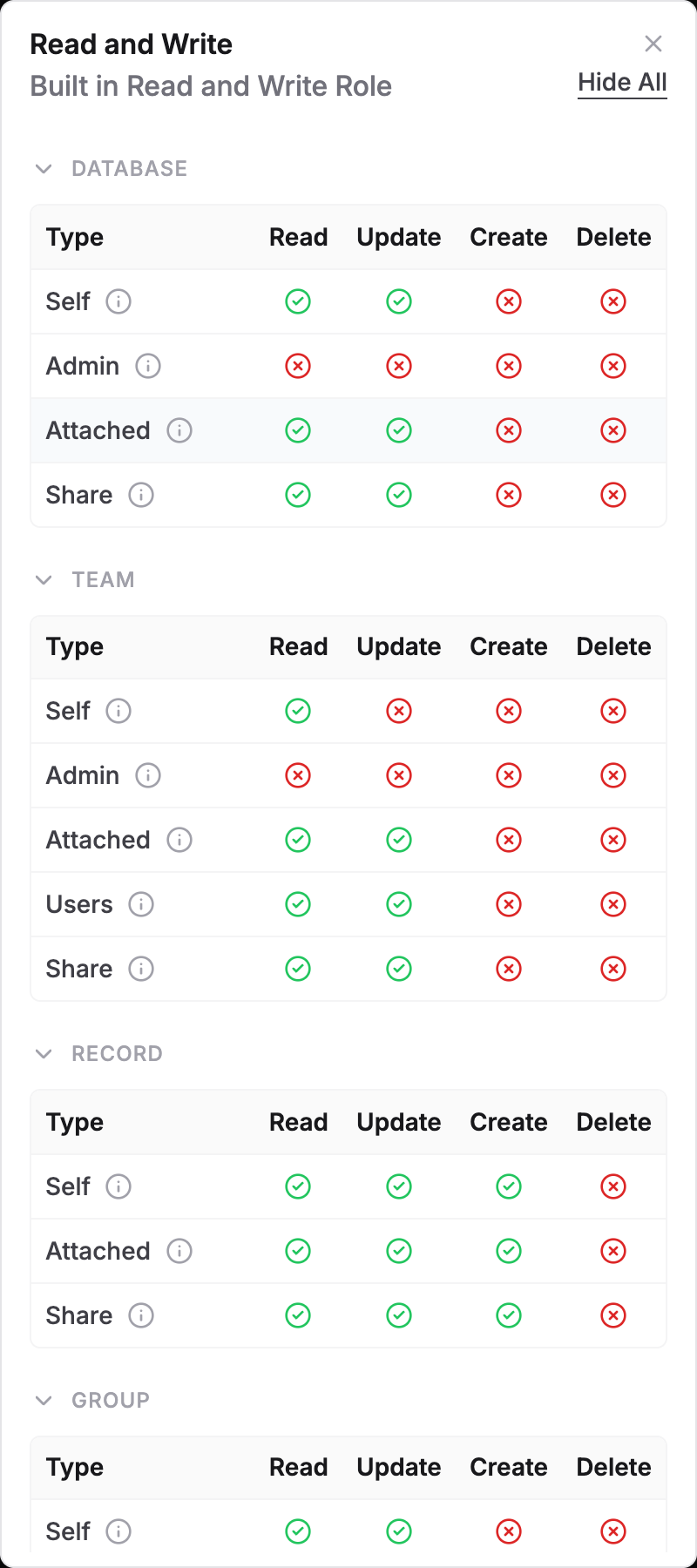
Notes on the tables
- Team Member is Deny on every workspace and record area. This is deliberate: being on a team gives no access to the data. Access comes from a role on a workspace or record.
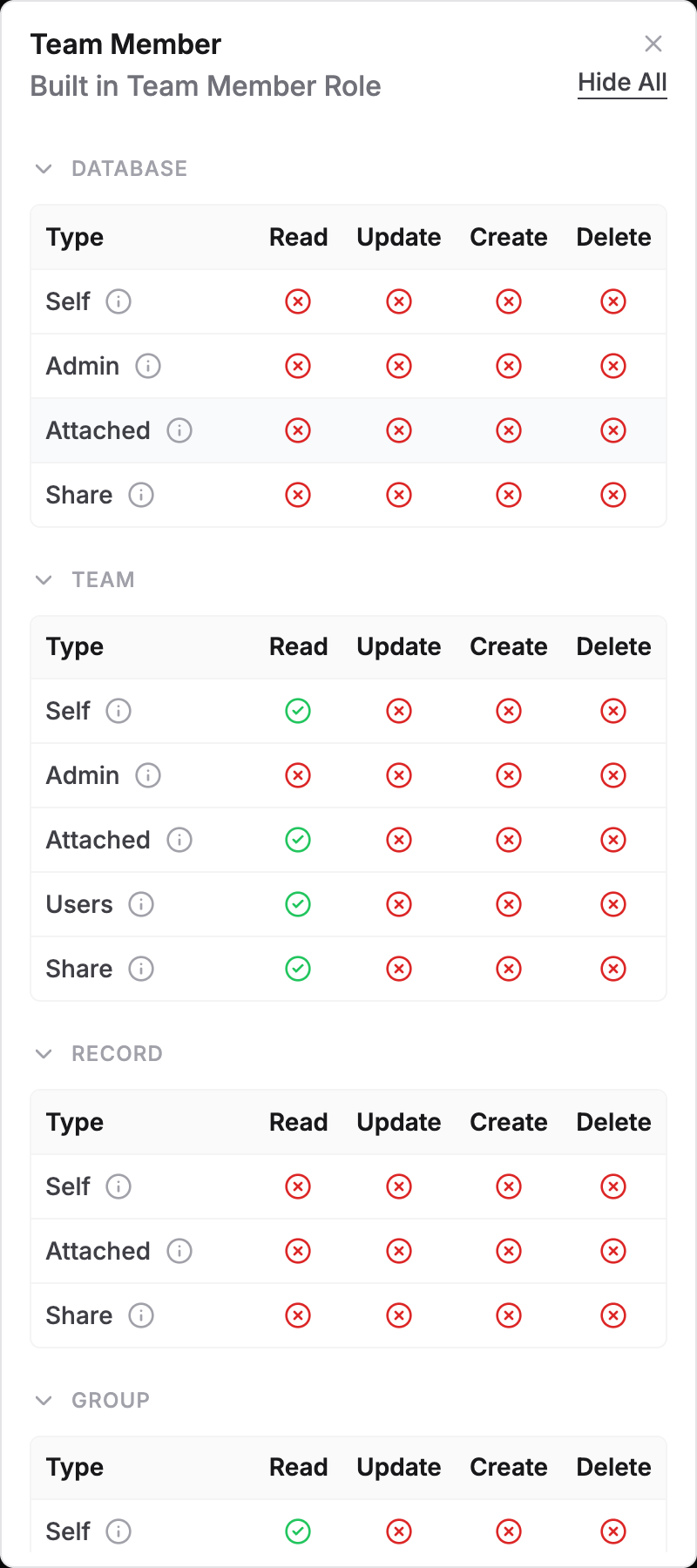
- Read and Write allows Create and Update but explicitly denies Delete on records, so it can never delete even when combined with another role in the same entry.
- Database Member gets full access to the records of its workspace but is Deny on workspace administration and sharing.
- Database Owner is read-only on the team areas and Deny on team administration.
- Record Editor (no new records) may update the record itself but cannot create new ones directly on it. It still has Create on Attached, so the person can add child records under a record.
The Write Only role allows Admin on teams, workspaces, groups and users (the All in the Admin columns above) while it denies Read. Every other role below Owner denies Admin. Do not give Write Only to anyone who should not administer the team or workspace.
Group and user profiles are controlled through their own owner roles, User Owner and Group Owner. Team Owner is Deny on the group and user areas in the table above.
How permissions combine
- A person can hold several roles in one place. They are combined.
- If any of those roles says Deny for an area and level, the answer is no, even if another role in the same entry allows it.
- Roles given to different entries (for example your own entry and a group entry) combine differently. See Deny.
- The closest entry to the record is consulted first. See searching up the chain.