Audit Logs
Audit Logs provide visibility into all key actions performed within your AnyDB team. They help administrators monitor system usage, track activity, and maintain compliance.
AnyDB audit logs are only available in Business Edition and above.
Accessing Audit Logs
You can find Audit Logs under the Admin → Audit Logs section of the left sidebar.
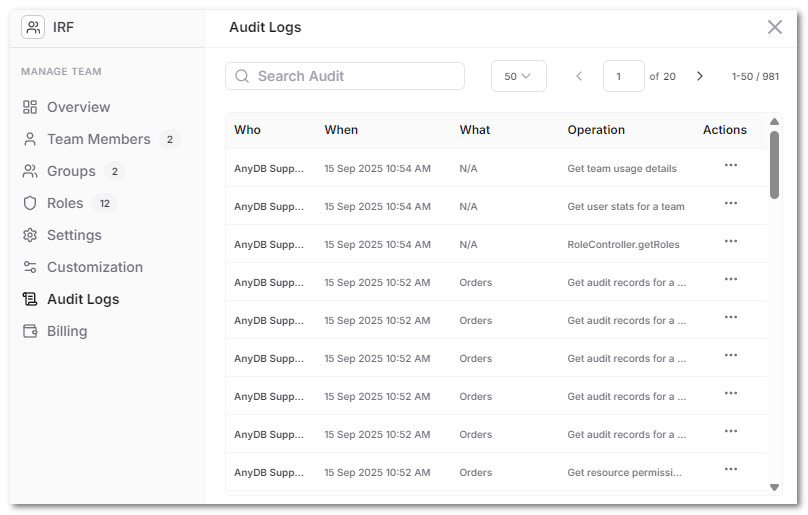
The log table provides:
- Who: The user or system account that performed the action.
- When: Timestamp of the action.
- What: The resource or object affected (e.g.,
Orders,Roles). - Operation: The type of action performed (e.g., Get audit records, Get team usage details).
- Actions: A button to view detailed information for each entry.
You can search logs using the Search Audit bar and adjust the number of results per page.
Audit Log Details
Clicking on an entry opens the Audit Log Details panel. This provides a full record of the event.
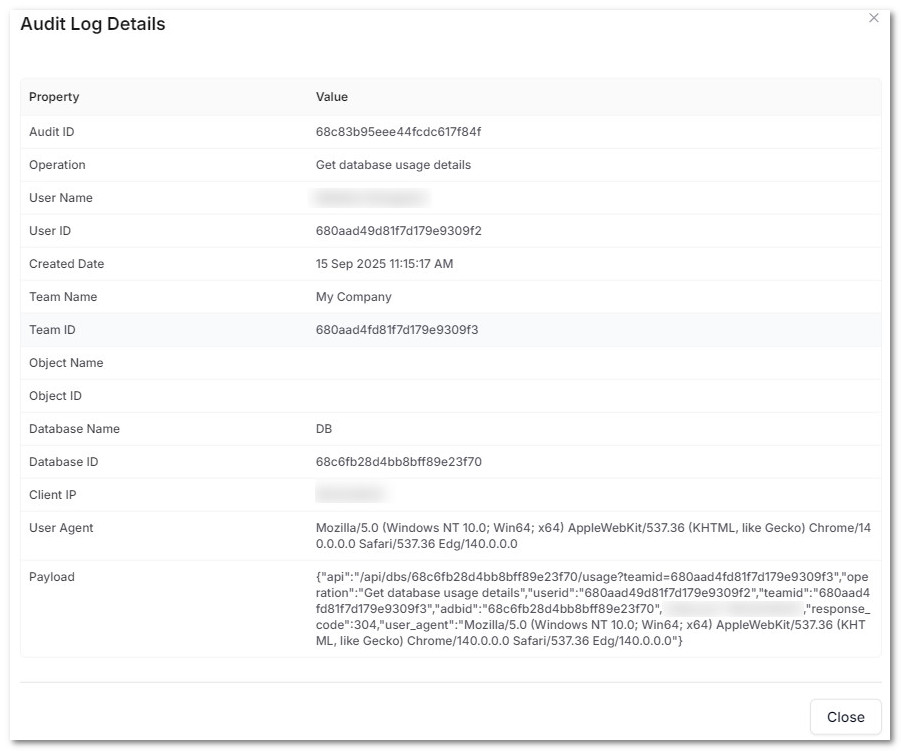
Each log entry contains:
- Audit ID: Unique identifier for the log entry.
- Operation: The action performed (e.g., List all databases for a team).
- User Name and User ID: The account that triggered the action.
- Created Date: Timestamp of when the action occurred.
- Team Name and Team ID: The team context for the action.
- Object Name and Object ID: The specific object affected (if applicable).
- Database Name and Database ID: Database targeted (if applicable).
- Client IP: The IP address of the user or system making the request.
- User Agent: Browser or client used to perform the action.
- Payload: Raw request metadata (API endpoint, parameters, response codes, etc.).
This detailed view is useful for auditing user actions, troubleshooting errors, and verifying API requests.
Security events
AnyDB also records security events for every team, on every plan:
- sign-ins and failed sign-ins, with the address that was tried;
- refused requests;
- exports and downloads, with how many rows left.
Each event records the IP address and, where your network supplies it, the country. To keep the audit log readable, these events are not listed here. Team admins, and AI Teammates they allow, search and group them through AnyDB's security tools and compliance checks.
Passwords, tokens, API keys and other credential fields are redacted before anything is written to the audit log.
Use Cases
- Security & Compliance: Ensure only authorized users are performing actions.
- Troubleshooting: Investigate why certain changes occurred or why data is missing.
- Usage Monitoring: Track system usage patterns over time.
By default, audit logs are retained for all actions taken by users and system processes inside your team. Administrators can review them anytime to maintain transparency and control.