The Teammates dashboard
Open Teammates to see the dashboard. In a workspace, it covers the Teammates that work there. In AI Teammates in the left navigation, team admins see every Teammate. Choose a date range (Today, Last 7 days, Last 30 days) and one Teammate or All Teammates. Refresh reloads it.
Overview
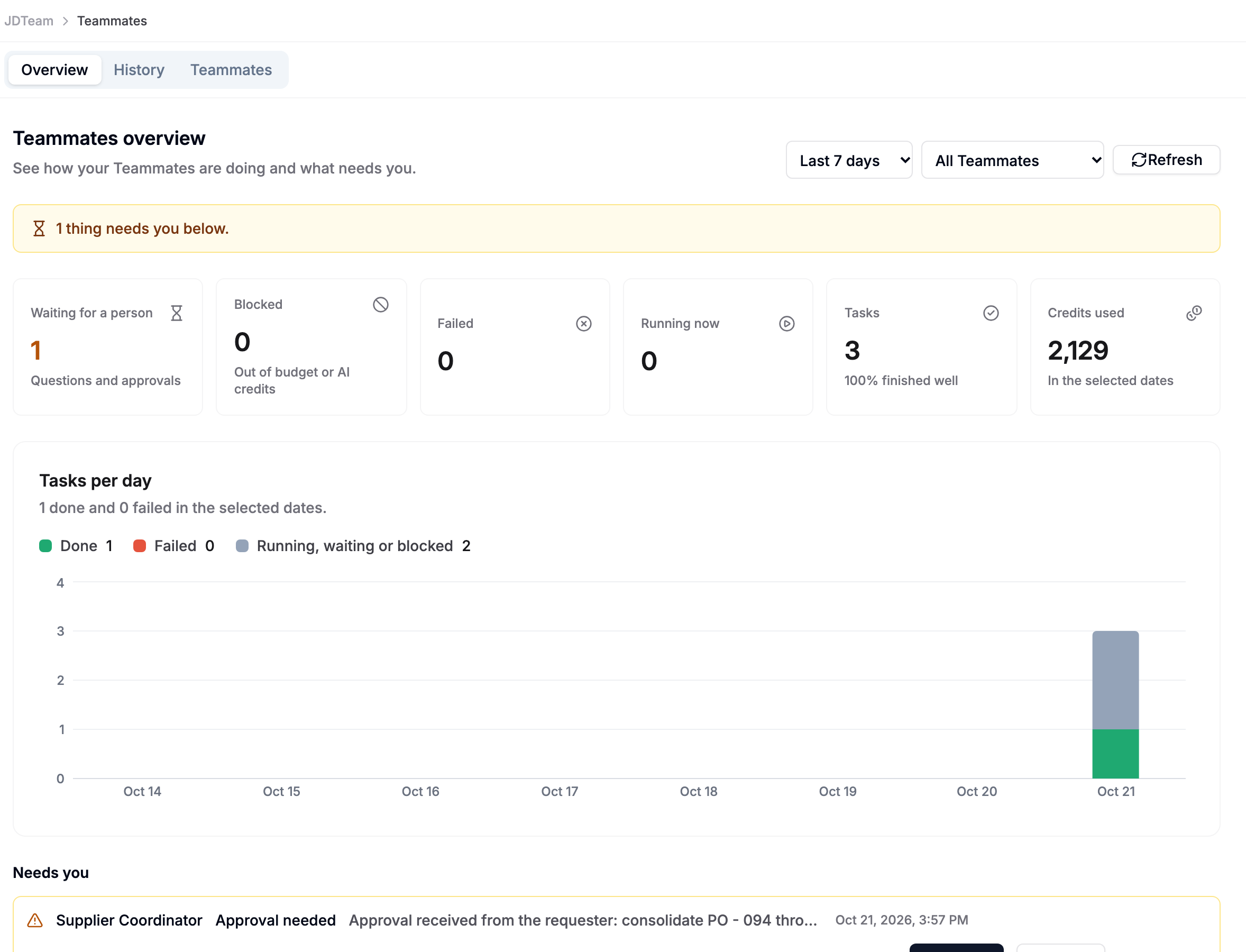
Needs you
When something needs you, a banner says how many things, and Needs you lists them. It shows only what you can act on now:
| Item | What you can do |
|---|---|
| An approval | Approve or Decline the action it holds. |
| A question | Answer it, or Dismiss it if it is no longer relevant. |
| Blocked work (admins) | It is out of budget, out of AI credits, or the plan's monthly runs are used up. Raise budget, or upgrade. |
| Failures (admins) | A Teammate's latest task failed. Open it to see why; Acknowledge clears it from the list. |
| Near its budget (admins) | It has used most of its monthly budget. |
| Paused (admins) | Resume it. |
When nothing needs you, there is no banner.
Tiles and chart
The tiles show tasks Waiting for a person, Blocked, Failed, Running now, all Tasks (with how many finished well), and Credits used in the range. Choose a tile to jump to those tasks on the History tab.
Tasks per day charts tasks done, failed, and still running or waiting, for each day in the range.
How each Teammate is doing
One row per Teammate:
| Column | Meaning |
|---|---|
| Health | Blocked, Last task failed (until an admin acknowledges it), Needs a person, Going well, or No tasks in the range. |
| Model | The model it uses, or Team's model. |
| Tasks, Done, Failed, Waiting, Blocked | Counts for the range. |
| Avg time | Average time a task took. |
| AI use | Credits used this month, out of its budget. |
| Next run | When its next check-in runs. |
| Last task | Its newest task and outcome. |
History
Every task in the range, newest first, with its source, start time, outcome, duration, tool calls and credits. Failed tool calls show the reason the tool gave. Filter by outcome, and open a task to see its full activity.
Teammates
The list of Teammates, with New Teammate, the Library, and the shared count: N of M workflows and Teammates · X of Y runs this month (see Limits, budgets and credits).