Create a Teammate
Only team admins can create Teammates.
-
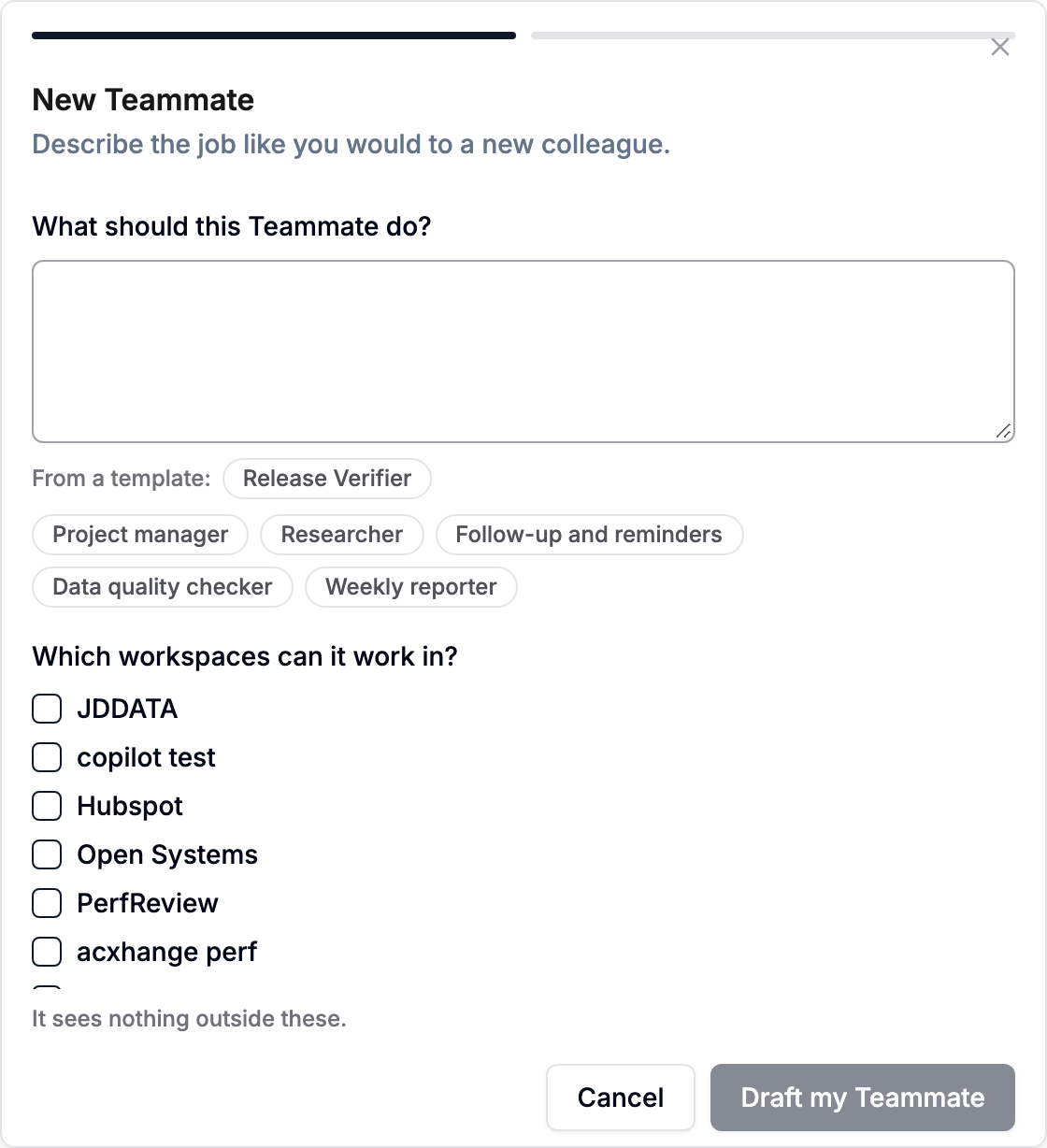
Open Teammates and choose New Teammate.
-
Under What should this Teammate do?, describe the job like you would to a new colleague. Or pick one of the starting points under From a template:
- Project manager: follow up on open work, keep priorities current, and remind owners when something has not moved.
- Researcher: collect the background each new record needs and add a short summary of what you found.
- Follow-up and reminders: make sure nothing is dropped, find records waiting on someone and remind them.
- Data quality checker: look for missing or inconsistent values and flag them for the record's owner.
- Weekly reporter: summarise what changed this week and share it with the team.
- Any template your team saved from an existing Teammate (see below).
-
Under Which workspaces can it work in?, choose the workspaces. A Teammate sees nothing outside them.
-
Choose Draft my Teammate. AnyBot drafts the Teammate from your description: its Name, Role, Goal, when it works, what it will ask you about first, and anything It will need (for example, an email address it may write to).
-
Check the draft. To change something, type it under Ask AnyBot to change something and choose Refine.
-
Choose Create Teammate.
The draft never grants anything on its own. Connections, email addresses and skills listed under It will need are added by an admin on the Teammate's profile afterwards. Skills, memory and connections are not needed to get started.
The Teammate's profile
Open a Teammate from the Teammates tab to see its profile. The tabs are:
| Tab | What it holds |
|---|---|
| Overview | Status, what needs you, open tasks, credits this month, next check-in, current tasks, workspaces, model. |
| Chat | A conversation with the Teammate. See Give a Teammate work. |
| Job | Name, Role, Goal and Standing instructions. See Job and access. |
| Skills | Team skills this Teammate may use. See Skills and memory. |
| Connections | Outside services it may call, Google Chat, and publishing it as an agent. See Connections. |
| Schedule & budget | AI model, Monthly budget (credits), Check in every (hours) and what to do On each check-in. |
| Access | Workspaces, What it may do on its own, Who it may email, and every tool it can use. |
| Memory | Notes it saved for future tasks (admins only). |
| Activity | Every task, with its messages, tool calls, approvals and credits. |
From the profile you can also Assign a task, Pause or Resume the Teammate, Save as template, or Remove it. Removing a Teammate takes it out of the team and every workspace it was in.
Templates
Save as template on a profile saves the Teammate's job, policy, skills and catalog connections to the team Library, under Teammate templates. Custom connections are not included, and workspaces are always chosen again when you start a new Teammate from a template.