Exporting and Importing AnyDB Types
Exporting a specific Type
Types can be exported for backup, sharing, or transferring to other workspaces or teams.
To export:
- Open any record created from the desired type.
- Click Export and select Type.
- Select the format as AnyDB JSON/Zip
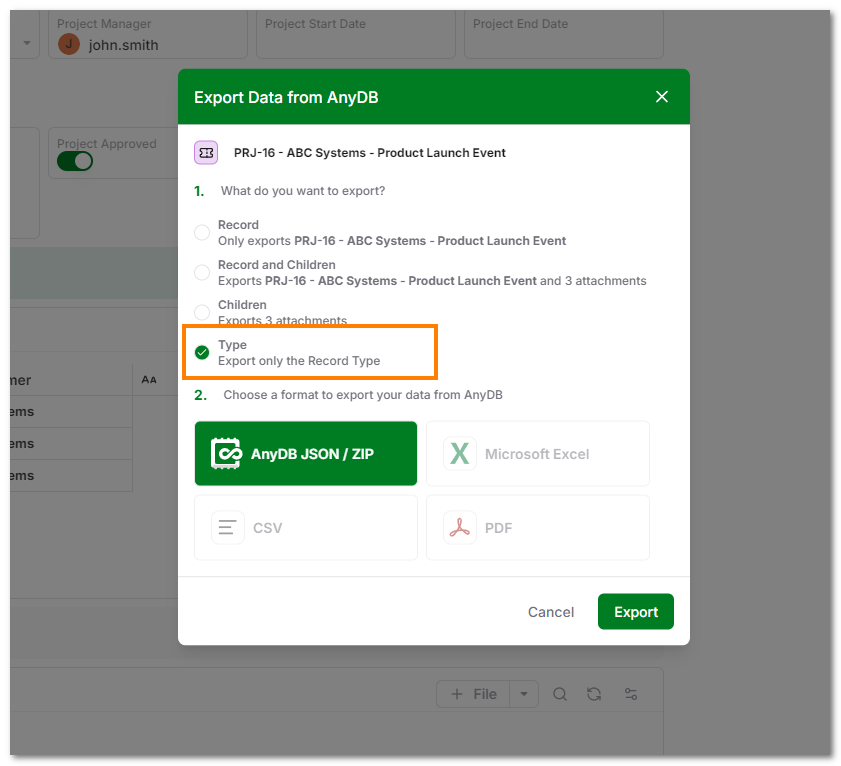
A JSON file containing the type structure will be downloaded.
You can also export a Type from the Manage Types dialog. See Managing Types for details. Select the Type and the specific version and click on 'Export' link next to the version. A JSON file containing the type structure will be downloaded.
Exporting all Types
All the Record Types in a workspace can be exported for backup, sharing, or transferring to other workspaces or teams.
To export all types
- Navigate to the target workspace.
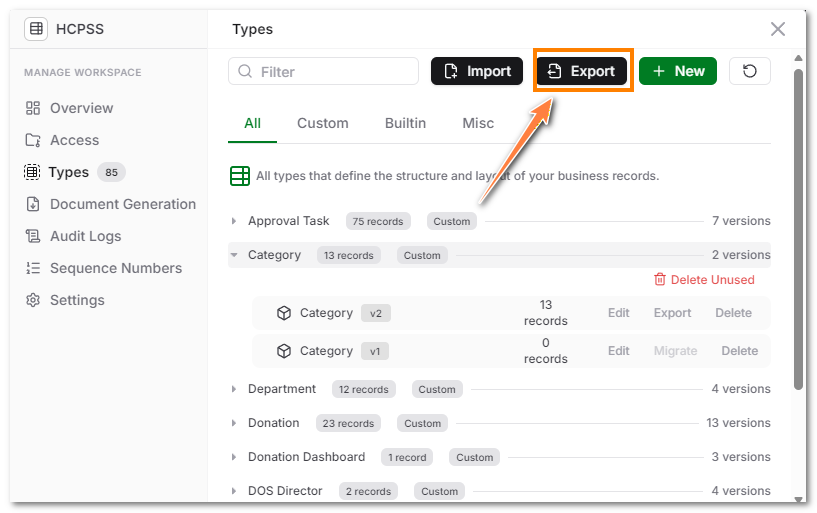
- Open Manage Types Dialog (See Managing Types for details).
- Click Export button
- A JSON file containing the type structure will be downloaded.
Importing Types
To import a Type or multiple Types into another workspace:
- Navigate to the target workspace.
- Open Manage Types Dialog (See Managing Types for details).
- Click Import Type.
- Select the previously exported JSON.
Once imported, the Type(s) will be available to all team members in that workspace.
Importing a type transfers the layout, field types, and styles only. No data is included.