Rules Reference
Every profile is built from the rules below. Each rule checks one thing AnyDB can see and has fixed values you set, so the same profile always gives the same answer.
Sharing
| Rule | What it checks | Values |
|---|---|---|
| No public shares | No record or form is shared by public link. | Optionally allow public shares that expose no personal data. |
| Public shares need a password | Every record or form shared by public link has a password. A public share with no password fails; one with a password does not. | |
| Public sharing turned off | The team does not allow public sharing at all. | |
| Personal data is not shared | No share, public or to people, exposes personal data. | |
| Shares expire | Every share has an expiry no further away than this. A share with no expiry fails. | Days (1 to 3650) |
A finding about a public share says whether the share has a password. A public link with no password is open to anyone who has the link, so use No public shares together with Public shares need a password: a protected public share then fails one rule, and an open one fails both.
| Embedding limited | AnyDB may only be embedded in these sites. | Origins, e.g. https://intranet.example.com |
Members and sign-in
| Rule | What it checks | Values |
|---|---|---|
| Members from allowed domains | Every member's email is in one of these domains. AI Teammates are not counted. | Domains, e.g. example.com |
| Guests from allowed domains | Every guest's email is in one of these domains. | Domains |
| Single sign-on | Team single sign-on is set up and on. | Optionally require SSO to be limited to allowed email domains. |
| Multi-factor sign-in | Always Cannot check: AnyDB has no multi-factor sign-in of its own. Enforce it in the identity provider behind team SSO. | |
| Sign-ins from allowed countries | Every sign-in in the period came from one of these countries. | Two-letter country codes, e.g. US; days to look back |
| Few failed sign-ins | No address has more failed sign-ins than this in the period. | Count; days to look back |
| Admins are active | Every owner and admin was active within this many days. | Days (1 to 90) |
Credentials and apps
| Rule | What it checks | Values |
|---|---|---|
| Unused API keys | No API key goes unused for longer than this. | Days (1 to 365) |
| Only verified apps | Every connected app (an AI assistant or other OAuth app) is verified. | |
| App scopes limited | Connected apps hold only these permissions. | Scopes, e.g. mcp:read |
Data handling
| Rule | What it checks | Values |
|---|---|---|
| No large exports | No export, download or large listing took more rows than this in the period. | Rows; days to look back |
| Retention periods set | Always Cannot check: AnyDB has no per-team retention period yet. | |
| AI processing controlled | Always Cannot check: AnyDB has no per-team control over AI providers yet. | |
| Data kept in allowed regions | Always Cannot check: AnyDB stores and processes all data in the United States (AWS us-east-1). | Regions, e.g. EU |
Rules that look back over a period use sign-in and export records, which are kept for 90 days. A period can be at most 90 days.
Domains, countries and other text values are compared ignoring case.
Severity
Every rule has a severity: high, medium or low. The default comes from the rule, for example high for No public shares and medium for Shares expire. Severity is shown on every result and in the CSV, so you can work through what must be fixed now before what to review.
To change a rule's severity, save the profile from an AI assistant with severity set on the rule (see AI Teammates and MCP). Editing the profile in Manage Team keeps each rule's severity.
What counts as personal data
The sharing rules count a share as exposing personal data when the type of the shared record has:
- a cell marked Personal Data, or
- a person cell (user or users), or a signature cell.
AnyDB does not read the content of text cells to guess. A type's Email or Phone cell is counted only once you mark it.
Marking a cell as personal data
- Open a record of the type, and select Edit Type.
- Select the cell, for example Email.
- In the cell panel, open Privacy and turn on Personal Data.
- Select Save Record Layout, then save the type.
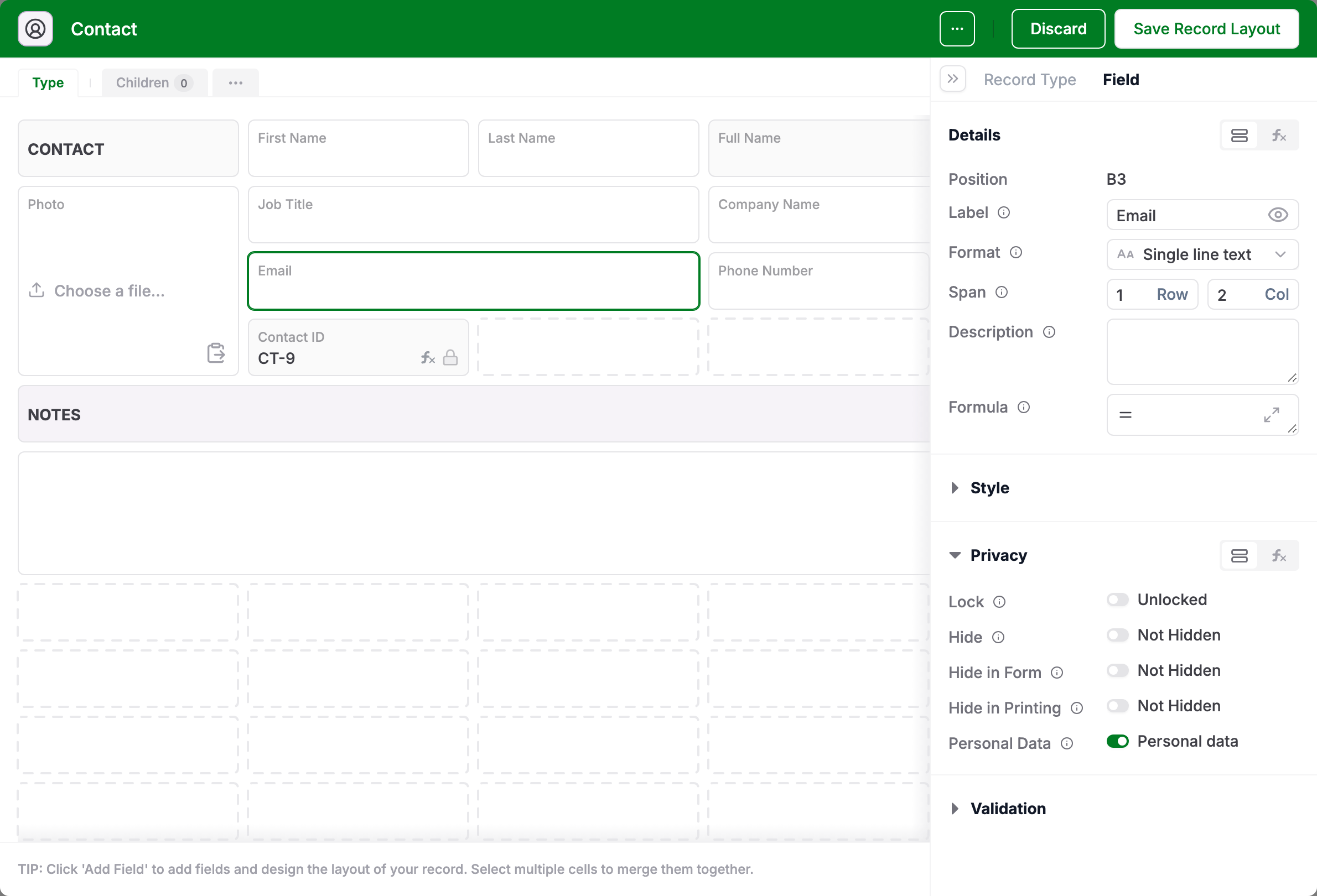
From then on, every share of a record of that type is checked as exposing personal data, and the results name the cells, for example sensitiveCells: Email. See also Cell privacy and locking.