Happy December 
We are happy to announce the immediate availability of Shared Views in AnyDB.
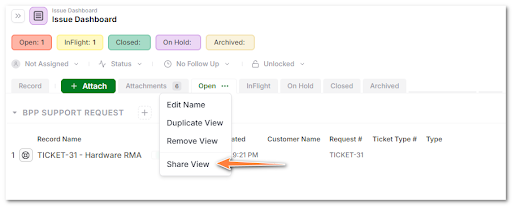
We just shipped one of the most requested collaboration features.
You can now share any saved view in AnyDB with team members or guests via the portal. This turns your filtered or grouped views into focused portals that show exactly what you want them to see and nothing else.
What this means
You can now create:
- Team Views for internal users
- Guest Portals for clients, contractors or partners
Views automatically respect filters, sorting, grouping and column visibility.
Guests and public users only see the records exposed by that view. The data is dynamic, as new records are added or removed that fit the share criteria they will be available to the user.
Why it matters
This is the fastest way to expose operational data without giving access to the full database.
Use it for things like:
- Customer project dashboards
- Vendor task lists
- Shared work order boards
- Status views for inspectors or field crews
- Lead pipelines for reps
- Any custom portal experience you want to share
No need to clone data or build separate structures. Just create a view and share it.
How it works
- Create or open any Saved View
- Open the View Options menu
- Click Share View
- Choose:
- Share with team members
- Invite guests
You can adjust or revoke access from the same menu.
Available now
This update is live for all users on all plans.
If you build portals, dashboards or controlled views for external collaborators, this unlocks a lot of possibilities.
Full documentation is available at Sharing | AnyDB