AnyDB Reference Cell
Reference Cell Type
Reference cells in AnyDB are used to store a link or a reference to another record in the same database. This is useful for creating relationships between different records, allowing you to reference and jump to a related document easily.

Setting a Reference Cell
- When a cell is set to be a reference cell, it will be empty by default.

-
To set a reference cell, double click on the cell, and a dialog will appear, allowing you to select the document you want to reference.
-
You can search for the document by its name and select it from the list.
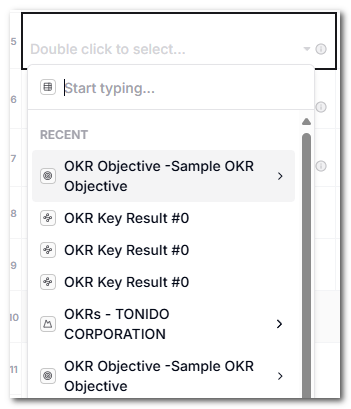
-
Once you select a document, the reference cell will display the name of the referenced document.
Filtering Referenced Records
You can filter the list of records shown in a reference cell so users only see a subset of records for the selected type. This is useful when the available referenced records should depend on other values in the current record.
To set a dynamic filter:
- Open the cell configuration for the reference cell.
- Click the computed properties tab, marked with the
fxicon. - Add a computed property named
Filter. - Set the value to a JSON filter expression.
For example:
[
  {
    "field": "{{Location}}",
    "value": {{Location Name}},
    "op": "eq",
    "type": "cell"
  }
]
In this example, {{Location Name}} is read from the current record and used to filter the returned records. Only records where the Location field is equal to the current record's Location Name value will be shown in the reference picker.
Note: The name of the referenced document will be displayed in the reference cell. If you change the name of the referenced document, the reference cell will automatically update to reflect the new name.
Note: You can only reference documents that are in the same database.
Note: Regardless of whether the document is referenced or not, a user cannot access the document unless they have the appropriate permissions to view it. If a user does not have permission to view the referenced document, they will see an error message when they try to access it.