AnyDB Lookup Cell
The Lookup cell type allows you to display data from a linked record inside the current record.
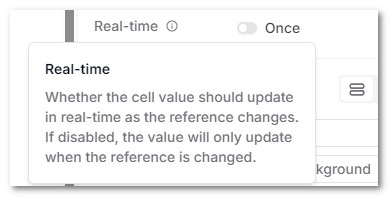
Instead of duplicating information, a Lookup cell reads a value from a related record. By default, it gets the value once when the reference is selected or changed. Enable Real-time if the Lookup should also update when that value changes in the linked record.
Lookup cells are commonly used in:
- CRM systems (show Company Name inside a Deal)
- Order management (show Customer Address inside an Order)
- Asset tracking (show Location Name from a linked Location record)
- Vendor management (show Vendor Risk Score inside Contracts)
How Lookup Works
A Lookup cell:
- Selects an existing Linked Record cell
- Chooses a specific field from the linked record
- Displays that field inside the current record
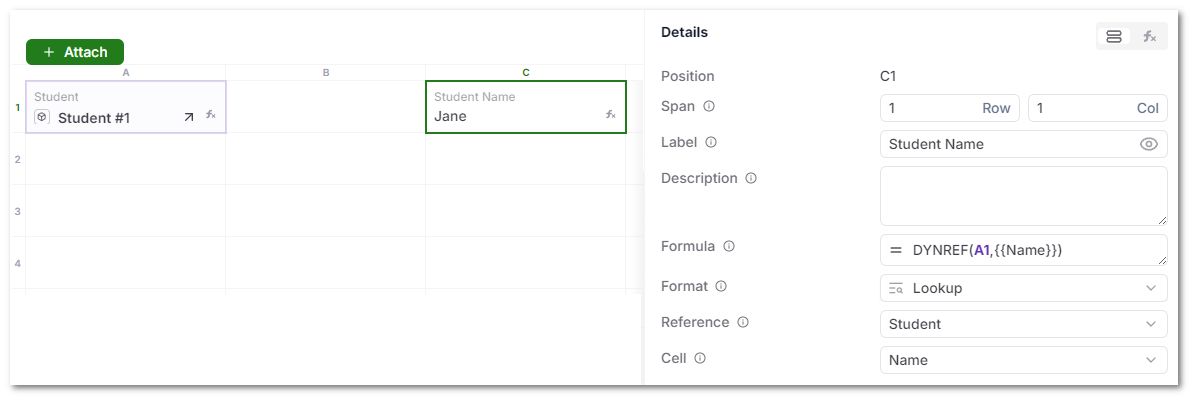
Under the hood, the Lookup cell uses a DYNREF() formula to dynamically reference the related record.
Example internal formulas:
DYNREF(A1, {{Name}}, "GO") // Once (default)
DYNREF(A1, {{Name}})       // Real-time
However, users do not need to write formulas manually. The Lookup configuration handles this automatically.
Configuration Options
When configuring a Lookup cell, you will specify:
- Reference – The Linked Record cell to use
- Cell – The field from the linked record to display
The Lookup also has a Real-time setting, which controls whether it stays synchronized with the linked record.
Real-time is disabled by default, so the mode is shown as Once. In Once mode, the Lookup refreshes when you select a different record in the Reference cell, but later edits to the selected record do not change the stored Lookup value.
Once vs Real-time
Choose the mode based on whether the current record needs a snapshot or a synchronized value:
| Mode | Behavior |
|---|---|
| Once (default) | Gets the source value when the Reference cell is selected or changed. Later changes to that value in the linked record do not update the Lookup. |
| Real-time | Updates the Lookup when the selected value changes in the linked record. |
To keep a Lookup synchronized, edit the Lookup cell's properties and enable Real-time. The mode label changes from Once to Real-time.
Use Once for values that should preserve what was selected at that time, such as a quoted price or address. Use Real-time for values that should always show the latest source data, such as a current status or risk level.
Why Use Lookup Instead of Copying Data?
Copying values between records creates:
- Data duplication
- Sync issues
- Manual maintenance
- Inconsistent reporting
Lookup keeps data connected.
You store information once and display it wherever needed.
Practical Example
Scenario: Deal linked to Company
- A Deal record links to a Company record
- The Company record contains:
- Name
- Industry
- Risk Level
Inside the Deal, you can add Lookup cells to display:
- Company Name
- Industry
- Risk Level
By default, each Deal keeps the Risk Level it retrieved when its Company reference was selected. Enable Real-time on the Risk Level Lookup if all related Deals should reflect later changes automatically.
Best Practices
- Use Lookup for display-only related data
- Use Linked Record cells to define relationships
- Leave the default Once mode on when historical values should not change
- Enable Real-time only when the current value must stay synchronized
- Avoid duplicating important data across records
- Combine Lookup with Automation to trigger workflows based on related values