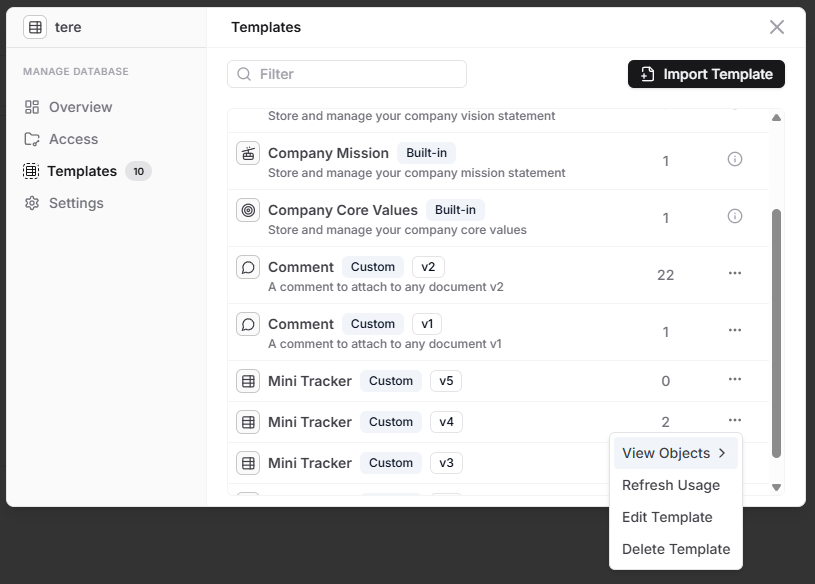
We have made some fixes in the template management section. From what you explained in your bug report, it seems that there was a usage tracking mismatch. With the new updates, you should be able to get unblocked.
Now the template management section will have better tracking, ability to refresh the usage count forcefully in case of template deletion issues and ability to delete template + associated objects in a single request.
Thanks for the update. Deleting templates works much better now. Also the popup shows more information and more templates (versions) then I thought I had in my database..
So edited versions of a customer template are also counted as a separate template?
Then you reach the limit of 25 very fast. I am testing all the features in cell of a custom template one-by-one. But each time i Save mij edit, it subtracts that version of the 25-limit.
So to proceed testing beyond the 25-limit I need to manually delete one by one all the old versions of the template I am experimenting with. My suggestion: don’t count the versions (V1 V2 etc) of the same custom template as a customer template on its own. Or have a menu-option to delete all older versions of a custom template.
Thank you for your suggestion! We agree that it makes sense to track only unique templates rather than their versions. We’ll be updating our logic to reflect this change and will keep you informed of our progress.
In the meantime, please delete the older template versions manually.