Weekly AnyDB tip 
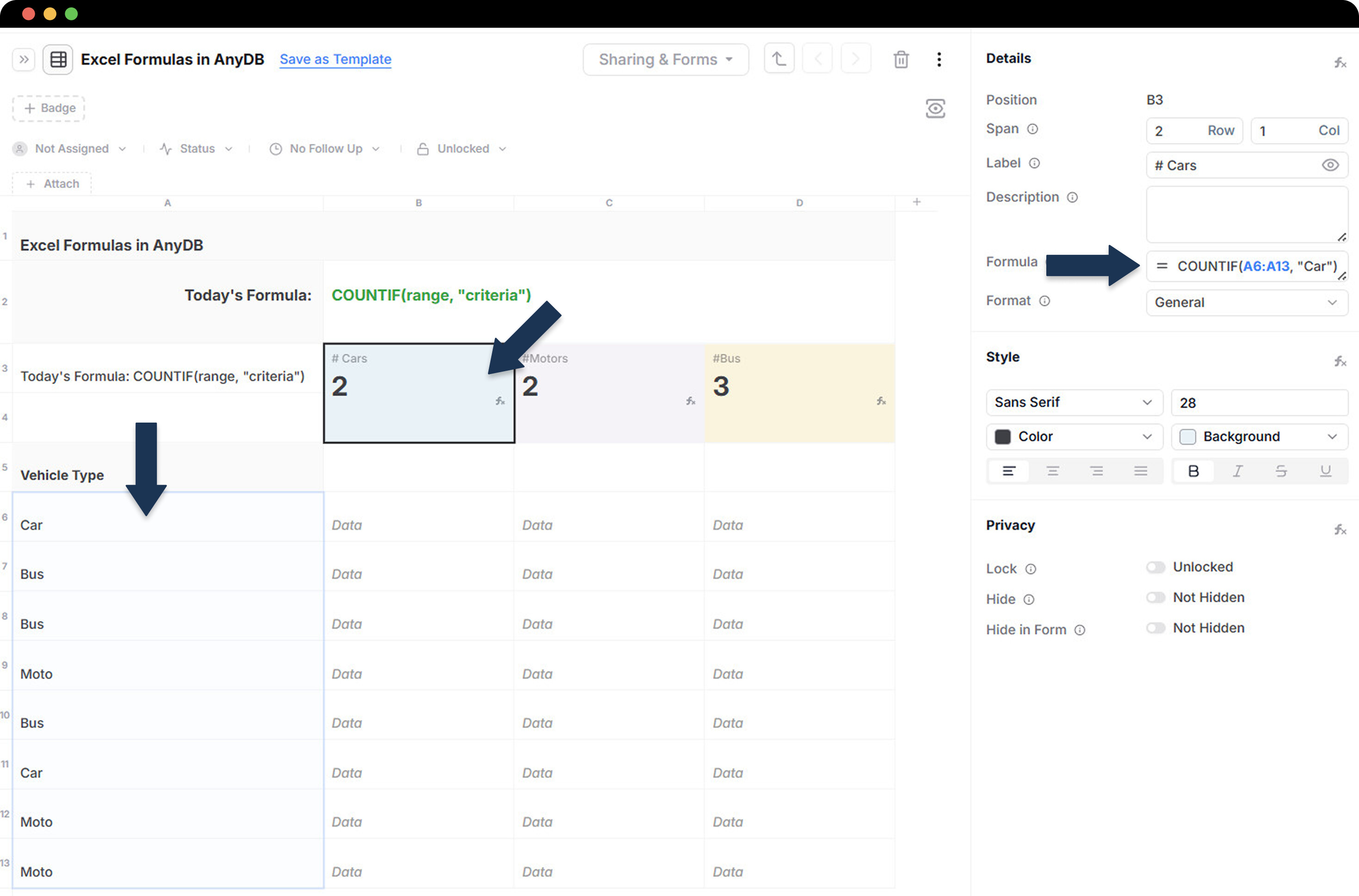
You can use Excel formulas in AnyDB to automate tasks. As an example, let’s take the =COUNTIF(range, “criteria”) formula to count the number of cells that meet a specified condition:
-
Select the cell where you want the result to appear
-
Go to the formula field on the right side
-
Add the formula: COUNTIF(range, “criteria”). Example:
-
Range = cells with data (A6:A13)
-
“Criteria“ = feature you want to count (cells with the word “Car”).
-
You can also use other useful Excel formulas in AnyDB, such as:
-
SUMIF(range, criteria): adds the number of cells that meet a specified condition.
-
VLOOKUP(lookup_value, table_array, col_index_num, approximate_match): searches for a value in the first column of a table and returns a value in the same row from a specified column.
-
DAYS(end_date, start_date): returns the number of days between two dates.
See all the formulas and how to use them by accessing: