UI Update Now Live: Object-Based View
We have released a foundational UI update to AnyDB in Production.
What changed
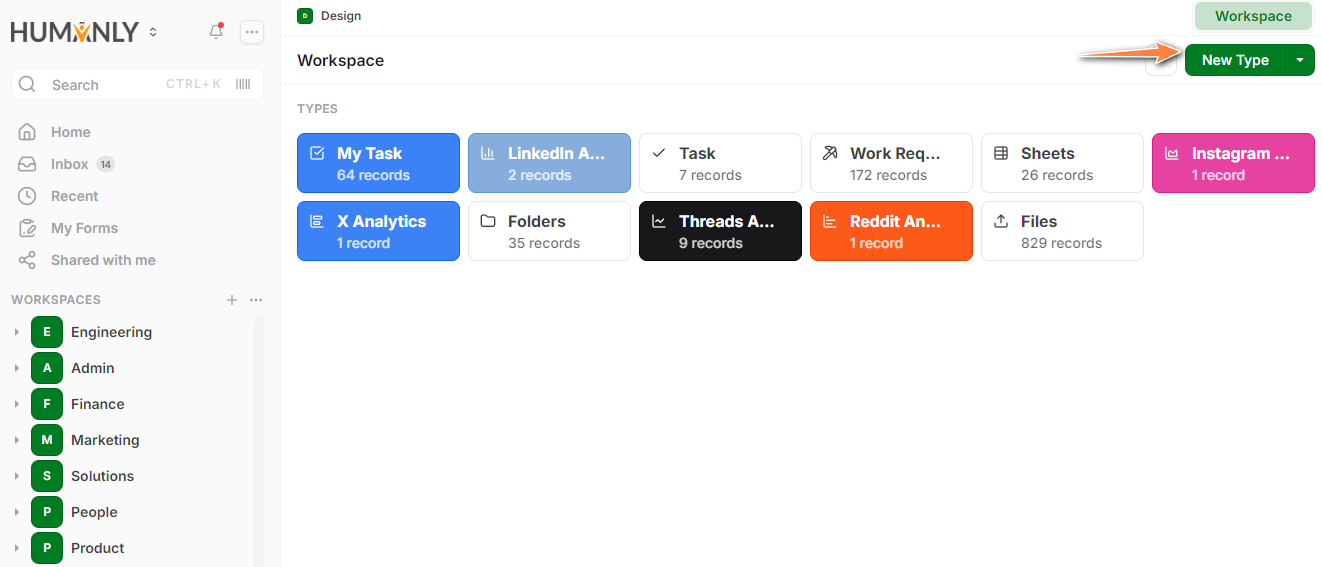
You work in AnyDB in an Object-Based View by default inside each Workspace (previously called Databases)
-
Templates are now called Types
Types define object structure. Records are instances of those Types. -
The Object-Based View shows all Types upfront
You can create new Types here and hide Types you do not want visible. -
Records are created only after a Type exists
This makes the object model clear.
Still available: Structure View
The previous tree structure view is still available.
- Click the […] menu next to the workspace
- Select View Structure
This shows records laid out as a hierarchy, similar to the earlier experience.
Why we made this change
This update is based on repeated feedback from customers who found the previous flow unclear as systems grew.
The Object-Based View:
- Scales better for real operational systems
- Makes structure explicit
- Reduces confusion on how best to organize records
This is a foundational change to how AnyDB is understood and used.
Known items
There are still several open issues reported by customers. Now that this update is live, we are continuing work on those items and improving your experience.
Feedback
If something feels unclear or harder than before, please post feedback in the forum or reach out directly. This update is intended to simplify how AnyDB works at scale, and we will continue refining it based on real usage.